Web Development · Frameworks
Angular 20 End of Life: Upgrade to 22, Not Just 21
Angular 20 loses support on November 28, 2026. Go to Angular 22, supported until June 2028. The two ng update hops, what breaks in each, and what to test.

Abhishek Gupta
10 min read

Sponsored
Angular 20 end of life is November 28, 2026, the day it drops out of long-term support. That’s tomorrow, if you’re reading this on the day it went up. The last 20.x patch, 20.3.35, shipped on November 2, and the framework team won’t cut another. If you maintain an Angular 20 app, upgrade it to Angular 22. Going only as far as 21 buys you seven months.
Angular 21 is already in its LTS phase, which ends in June 2027. Angular 22 has active support until June 2027 and LTS until June 2028, per the Angular releases page. Since you have to pass through 21 anyway (more on that below), stopping there means paying for most of the work and getting the shorter runway.
Everything here comes from the official compatibility table, the support policy and the breaking-changes sections of the framework and CLI changelogs for 21.0.0 and 22.0.0.
Angular 20 end of life: what stops on November 28
Your app keeps running. Builds keep working. What stops is upstream maintenance: any vulnerability found in @angular/core, the router or the SSR packages after the 28th gets a fix in 21 and 22, and 20 keeps it. For an app that renders on the server or handles user-supplied HTML, that’s the part that matters.
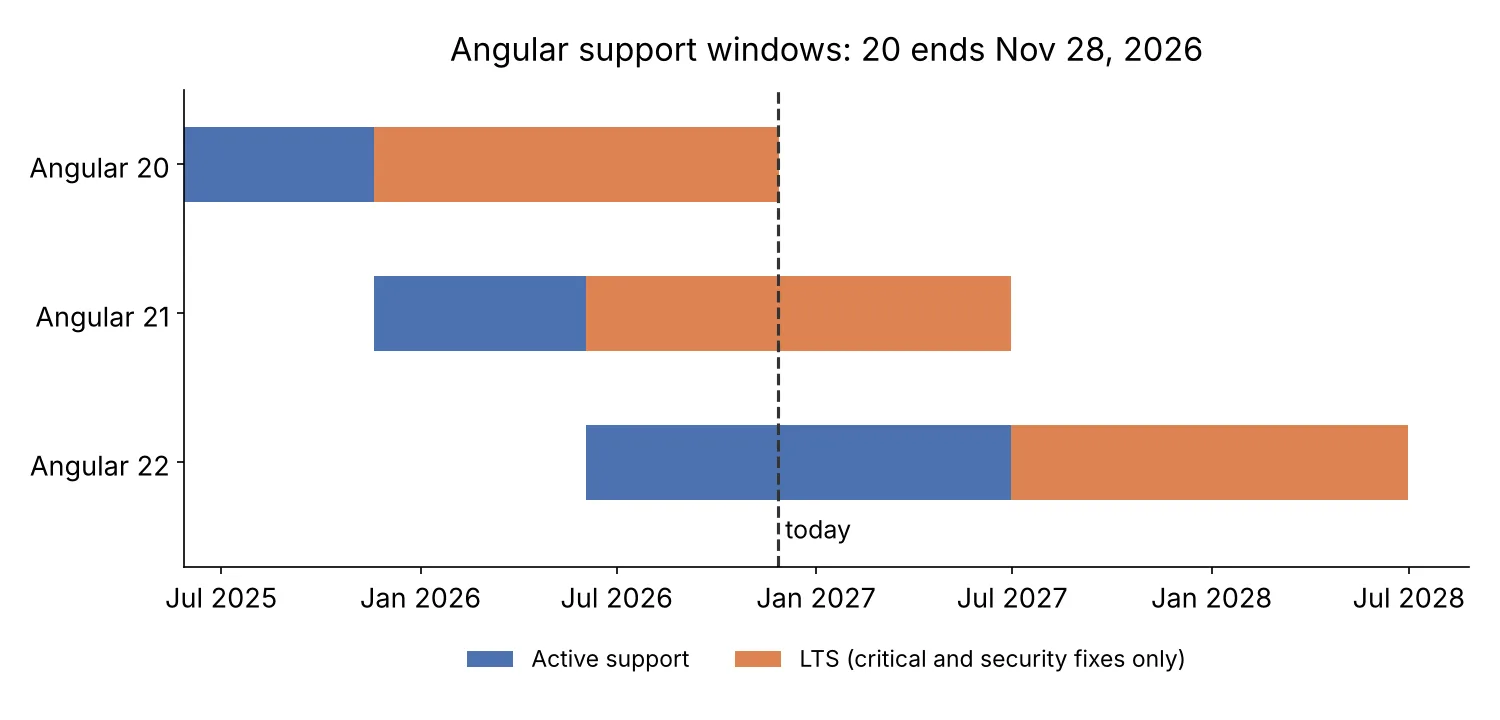
The chart also shows a change in rhythm. Until v22, Angular shipped a major every six months. The releases page now says “a major release every 12 months,” with four to six minors per major and roughly 24 months of support each. So 22 is the version you’ll sit on for a while, which is one more reason to land there rather than on 21.
Upgrade Angular 20 to 21 or 22?
| Angular 21 | Angular 22 | |
|---|---|---|
| Released | November 19, 2025 | June 3, 2026 |
| Status today | LTS (critical and security fixes only) | Active (regular patches and minors) |
| Support ends | June 2027 | June 2028 |
| TypeScript | 5.9.x | 6.0.x |
| Node.js | ^20.19, ^22.12 or ^24 | ^22.22.3, ^24.15 or ^26 |
| Current release | 21.2.26 (Nov 2, 2026) | 22.3.0 (Nov 18, 2026) |
Pick 21 only if something outside Angular pins you: a component library that hasn’t published a v22-compatible release, or a build server you can’t move off Node 20 this quarter. In that case go to 21 now, put the 22 hop on the calendar for spring, and don’t let it slip past June.
A note on TypeScript, because it trips people up: TypeScript 7.0 is out, but the compatibility table for Angular 22 says >=6.0.0 <6.1.0. Angular 22 apps stay on TypeScript 6.0 for now. If your monorepo shares one typescript version across packages, the Angular app sets the ceiling.
How to upgrade from Angular 20 to 22, step by step
ng update moves one major at a time. You can’t go straight from 20 to 22, and you shouldn’t want to: each hop has its own migrations, and they assume the code they run on is one version back.
- Get on the latest 20.x first. Run
ng update @angular/core@20 @angular/cli@20and fix any deprecation warnings the build prints. Those warnings are the v21 removals announcing themselves. - Move Node before Angular. Angular 21 still accepts Node 20.19, but Angular 22 doesn’t. Node 20 itself reached end of life in April 2026, so go to Node 24 now and you won’t touch the CI image twice. The Node 24 to 26 checklist covers the next step if you want to go further.
- Hop to 21 and commit.
ng update @angular/core@21 @angular/cli@21
# also update anything else ng update lists, e.g.
ng update @angular/material@21
npx tsc -p tsconfig.app.json --noEmit
ng test --watch=false
git commit -am "chore: angular 21"- Hop to 22 and commit. Same commands with
@22. This hop has the behavior changes, so the review is where you spend your time (next sections). - Read every diff the migrations produced. They’re correct as code, but several of them are flags meaning “this component relies on old behavior.” Treat those as a to-do list.
Keep the two hops as separate commits or separate PRs. When a test fails after the 22 hop, you want git bisect to land on one framework version, not on a combined diff of four hundred files.
What breaks between Angular 20 and 21
Most of the 21.0.0 breaking changes are removals of APIs that were deprecated for a long time. The migrations handle the common ones. These are the ones that still need a human.
Host bindings are type-checked now
The compiler enables typeCheckHostBindings by default, so expressions in host: {} metadata and @HostBinding get the same checking as templates. Expect a burst of type errors in older directives. Fix them, or set "typeCheckHostBindings": false in angularCompilerOptions as a temporary escape hatch with a ticket attached.
Zone apps need an explicit provider
Angular 21 stopped providing a zone-based change detection scheduler by default. The update migration adds provideZoneChangeDetection() for you. If you bootstrap in an unusual way (a custom main.ts, micro-frontend shells), check it landed:
// main.ts after the v21 migration
bootstrapApplication(AppComponent, {
  providers: [
    provideZoneChangeDetection(),
    provideRouter(routes),
    provideHttpClient(),
  ],
});
If you want to drop zone.js entirely while you’re in here, that’s a separate project. The signals and zoneless migration guide walks through it. Don’t bundle it into the version bump.
Tests may start failing on purpose
TestBed now rethrows application errors even when provideZoneChangeDetection is in the test providers, and it ships a fake PlatformLocation that supports the Navigation API. Router navigations can also take a few more microtasks to finish. The changelog says the usual fix is to wait for navigation to complete before asserting, so look for tests that assert right after router.navigate() without awaiting it.
Smaller removals, each worth one grep
moduleIdand theinterpolationoption are gone from@Componentmetadata.NgModuleFactoryis removed. Use the NgModule class.- Import
ApplicationConfigfrom@angular/core, not@angular/platform-browser. Router.lastSuccessfulNavigationis a signal, so call it:router.lastSuccessfulNavigation().UpgradeAdapteris removed. Hybrid AngularJS apps must already use@angular/upgrade/static.- The CLI no longer auto-detects
cnpm, and Less’sjavascriptEnabledoption is no longer supported. - TypeScript below 5.9 is rejected.
What breaks between Angular 21 and 22
This is the hop that changes how a running app behaves. Three changes deserve a full regression pass in staging.
Components default to OnPush
Any component that doesn’t set changeDetection is now OnPush. A component that mutates an object in place and expects the view to refresh will stop refreshing, with no error. The v22 migration adds ChangeDetectionStrategy.Eager to components it thinks need the old behavior:
@Component({
  selector: 'app-order-table',
  templateUrl: './order-table.html',
  changeDetection: ChangeDetectionStrategy.Eager, // added by ng update
})
export class OrderTableComponent { /* ... */ }
Count those annotations after the hop. Each one is a component that depends on default change detection. Leaving Eager in place is safe for the upgrade. Removing it later, one component at a time, by moving the state to signals or immutable updates, is where the performance gain comes from.
HttpClient uses fetch by default
FetchBackend replaced HttpXhrBackend as the default, and withFetch() is deprecated because it no longer does anything. The catch is upload progress: fetch can’t report it. If you show a progress bar on file uploads, keep XHR:
provideHttpClient(withXhr())There’s a migration schematic for this, but it can’t know which apps show upload progress, so check. The withXhr reference also warns not to use it in server-side rendering, so on an SSR app, scope it to the browser config. The reportProgress request option is deprecated in favor of reportUploadProgress and reportDownloadProgress.
Child routes inherit every parent param
paramsInheritanceStrategy now defaults to 'always' instead of 'emptyOnly'. A child route that reads route.params will now see its parents’ params too, and a parent and child that both use :id will collide. If you’d rather keep the old behavior while you audit:
provideRouter(routes, withRouterConfig({ paramsInheritanceStrategy: 'emptyOnly' }))The rest of the v22 list
ComponentFactoryResolverandComponentFactoryare removed. Pass the component class toViewContainerRef.createComponent()directly. Old dynamic-dialog and portal code is where these still live.ChangeDetectorRef.checkNoChangesandcreateNgModuleRefare removed. Usefixture.detectChanges()in tests andcreateNgModuleinstead.provideRoutes()is removed. UseprovideRouter().- Class-based
CanMatchguards must declare the thirdcurrentSnapshotparameter. A migration adds it. - Reactive forms
minandmaxvalidators no longer accept strings.Validators.min('5')has to becomeValidators.min(5). - Hammer.js integration is removed. Gesture handling needs its own implementation now.
data-prefixed attributes no longer bind inputs or outputs, and binding two inputs or outputs to the same name now throws at compile time.- New compiler diagnostics flag
??and?.on values that can’t be null. The changelog suggests disablingnullishCoalescingNotNullableandoptionalChainNotNullabletemporarily if the noise blocks the build. - SSR host validation returns 400 for requests whose
Hostheader isn’t inallowedHosts, where it used to fall back to client rendering. Add every real hostname, including preview and staging domains, or those environments will start failing after deploy. ng servehonors thePORTenvironment variable overangular.jsonand--port. That surprises people whose shell or dev container setsPORTfor another service.- The experimental Jest and Web Test Runner builders in
@angular-devkit/build-angularare gone. If you use one, plan a move to Vitest or Karma before the 22 hop.
Roll it out in this order
Node and CI image first, in their own PR. Then the 21 hop, merged and deployed, and left alone for a few days. Then the 22 hop, with an hour spent on three specific checks in staging: screens that update after a background event (OnPush), file uploads with progress bars (fetch), and nested routes that share param names (inheritance). Those three cover the behavior changes. Removals break the build, so you’ll see them. Behavior changes compile fine and ship.
On a large app with a small team, plan around the 22 hop. The 21 hop is mostly removals the compiler points at; the 22 hop is where the behavior review lives. And if you’re weighing whether to staff the upgrade in-house or bring in help, the Angular developer hiring guide covers what to screen for, including the signals and change detection knowledge this upgrade leans on.
The date that matters next is June 2027, when Angular 21 leaves support and 22 moves to LTS. Upgrade to 22 now and that date passes without you having to do anything.
Sources
Sponsored
More from this category
More from Web Development



Sponsored
Discussion
Join the conversation.
Comments are powered by GitHub Discussions. Sign in with your GitHub account to leave a comment.
Sponsored