Web Development · Languages
TypeScript 7.0 Is GA: Who Should Upgrade Now
TypeScript 7.0 hit GA on July 8, three weeks after the RC. The real GA benchmark, what strict mode locks in, and why Astro and Vue projects should wait.

Abhishek Gupta
5 min read
Sponsored
TypeScript 7.0 is no longer a preview build with an asterisk next to it. It went generally available on July 8, 2026, three weeks after the release candidate we covered when it shipped in June. If your team held off upgrading until there was a stable release to point at in a changelog, that release exists now. Here’s what’s actually different at GA, and the one category of project that still shouldn’t touch it yet.
The number that matters, again, with a caveat
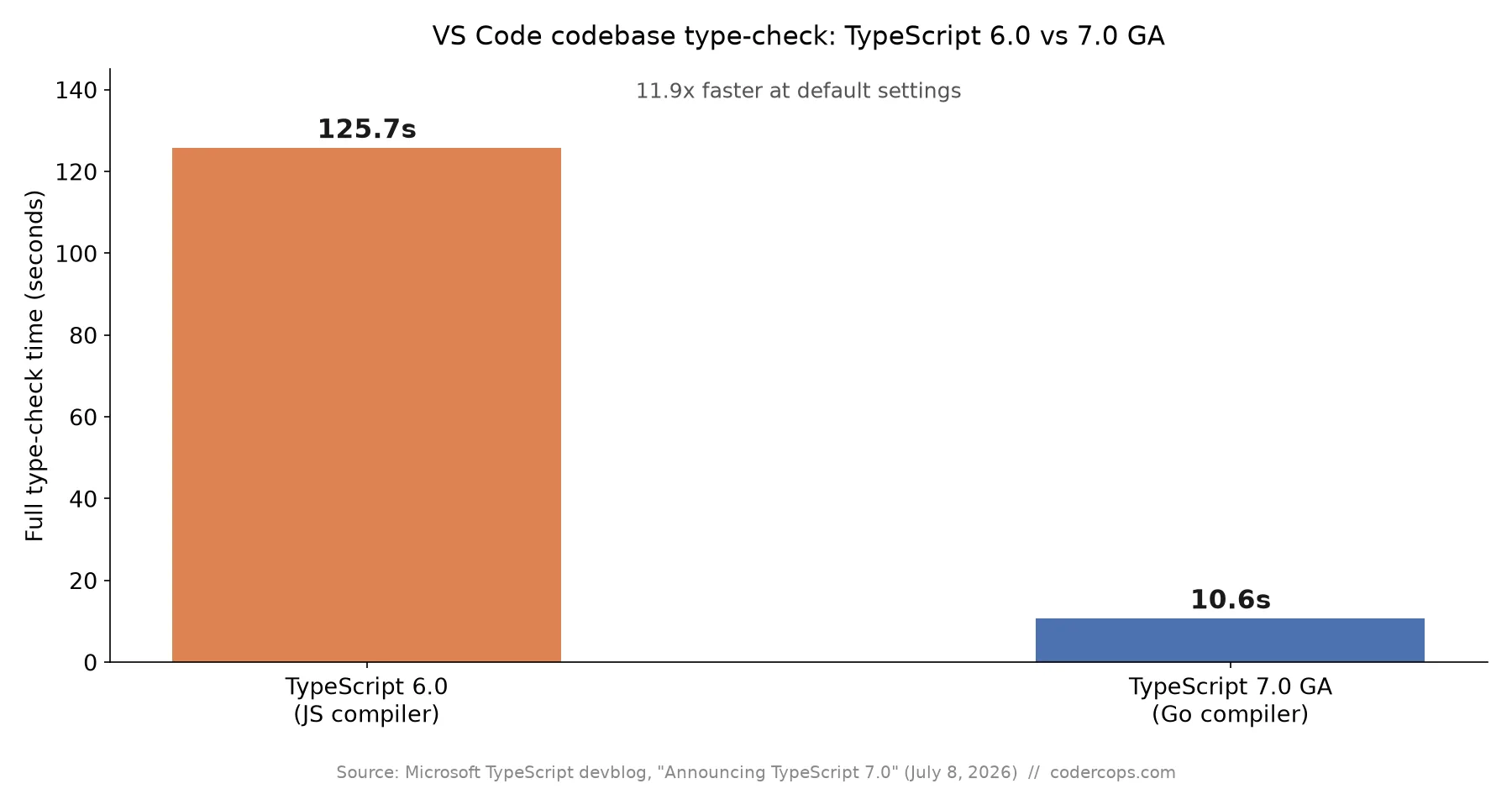
Microsoft’s official GA benchmark measures the same yardstick the team has used since the project was announced: type-checking VS Code’s own codebase, roughly 1.5 million lines of TypeScript. At GA, that full type-check dropped from 125.7 seconds on TypeScript 6’s JavaScript-based compiler to 10.6 seconds on TypeScript 7’s Go-based one, an 11.9x speedup at default settings.
That’s a different pair of numbers than the RC’s headline figure, which was 77 seconds down to 7.5 seconds, about 10x. Both are real, both come from Microsoft, and both land in the same 8x-to-12x range the team has quoted consistently since the rewrite was first announced. The discrepancy is most likely down to measurement conditions rather than a regression between RC and GA. Don’t treat the exact decimal as gospel. Do treat “roughly an order of magnitude, on a full build, on a genuinely large codebase” as the trustworthy takeaway.
What GA locks in that the RC left open
The RC was a preview of the Go engine running against your existing tsconfig. GA ships with a handful of defaults finalized:
- Strict mode is now a hard default. New projects get it on with no opt-out flag to turn it off at the tsconfig level the old way.
- The es5 compile target is removed. ES2015 is the floor now. If a legacy build pipeline is still targeting es5 for old browser support, that config option no longer resolves.
- AMD, UMD, and SystemJS module formats are gone. If your build still emits any of these, either your bundler is doing the conversion already (likely, for most modern setups) or you have a real migration to do before you can move.
- moduleResolution: node10 is removed. This was already deprecated in 6.0; GA is where it stops working entirely.
For a typical modern app on moduleResolution: bundler or node16/nodenext, targeting ES2020 or later, none of this touches you. For anything still carrying legacy tsconfig settings forward out of habit, GA is the forcing function to clean them up.
# Upgrading a straightforward app or library
npm install -D typescript@latest
npx tsc --noEmit    # confirm your project still type-checks clean
The category that should still wait
TypeScript 7.0 does not ship a stable programmatic compiler API. That matters more than it sounds like, because a chunk of the frontend ecosystem is built on tools that embed the TypeScript compiler inside their own language service to power in-editor type checking:
| Tool | What it embeds TypeScript for | Status on TS 7.0 |
|---|---|---|
| Vue (Volar) | Single-file component type checking | Pinned to 6.0 |
| Svelte language tools | .svelte file type checking | Pinned to 6.0 |
Astro type checker (astro check) | .astro file type checking | Pinned to 6.0 |
| Angular template type-checking | Template type inference | Pinned to 6.0 |
Plain .ts/.tsx application code | Direct compiler use | Works on 7.0 today |
If your stack includes any framework in that first group, upgrading the compiler now breaks the editor tooling that developers rely on for red squiggles under real type errors, not the build itself necessarily, but the day-to-day feedback loop that makes TypeScript worth using. We hit exactly this with an Astro 7 project recently: the app type-checked fine on the command line with TypeScript 7 installed, but astro check started throwing an opaque internal error because it still expects the TypeScript 6 API shape. The team expects a new, different compiler API in 7.1, targeted for roughly October 2026. Until then, pin typescript@6 in any project that leans on one of these framework-level checkers, even if application code elsewhere in the monorepo is ready to move.
A practical upgrade order
- Plain application repos, no framework-level type checker involved: upgrade now. Run
npx tsc --noEmit, fix the small number of legacy tsconfig options GA removed, and take the build-time win in CI. - Monorepos mixing app code and a Vue/Svelte/Astro/Angular package: upgrade the parts that don’t touch framework tooling, hold the rest at 6.0, and revisit at 7.1.
- Anything depending on the compiler API directly (custom transformers, codegen, lint integrations that walk the AST programmatically): stay on 6.0 until the new API ships. There’s nothing to migrate to yet.
The eleven-x speedup is real and it compounds every time CI runs a type-check step, which for most teams is every commit. It’s just not a universal green light. Check which category your project falls into before you touch the lockfile.
Frequently asked questions
- Is TypeScript 7.0 actually faster than the RC, or is 11.9x just a rounding of the RC's 10x claim?
- It's a separate measurement. The RC's published number was 77 seconds down to 7.5 seconds on the same VS Code codebase, roughly 10x. The GA announcement cites 125.7 seconds down to 10.6 seconds, 11.9x, explicitly measured at default settings. The two runs aren't using identical configurations, so treat both as real, both as the same order of magnitude, and don't over-index on the decimal.
- Can I upgrade my Astro, Vue, or Svelte project to TypeScript 7.0 today?
- Not without breaking your editor tooling. TypeScript 7.0 ships without a stable programmatic compiler API, and tools like Vue's Volar, Svelte's language tools, and Astro's type checker embed that API to power in-editor type checking. They're pinned to TypeScript 6.0 until 7.1 ships with a new API, expected around October 2026. Upgrading the compiler in those projects now gets you a broken IDE, not a faster build.
- Does upgrading to TypeScript 7.0 require changing my code?
- For most application code, no. The language itself didn't change, only the compiler's implementation language, from TypeScript-on-JavaScript to Go. Your .ts files and tsconfig.json options work as before. The exceptions are edge cases newly excluded by GA: es5 as a compile target, the AMD, UMD, and SystemJS module formats, and moduleResolution: node10 are all removed, so projects still targeting any of those need to update tsconfig first.
- What happened to the TypeScript compiler API in 7.0?
- It's gone for now. TypeScript 7.0 doesn't expose a stable API for tools that programmatically drive the compiler, such as custom transformers or codegen. The team has prioritized letting TypeScript 7 run side by side with a TypeScript 6.0 install for utilities that still need that access, and says a new, different API is coming in 7.1.
- Should I upgrade a plain Node or React app to TypeScript 7.0 now?
- Yes, if you don't depend on a framework's embedded type checker. Application-only usage, no Vue SFC tooling, no Svelte or Astro type-aware editor plugins, is the safe case: run npm install -D typescript, confirm your CI type-check step passes, and take the build-time win. If your team relies on any of the frameworks above for in-editor type errors, stay on 6.0 until 7.1.
Sources
Sponsored
More from this category
More from Web Development



Sponsored
Discussion
Join the conversation.
Comments are powered by GitHub Discussions. Sign in with your GitHub account to leave a comment.
Sponsored