Web Development · Backend
.NET 8 End of Support: Upgrade to .NET 10, Not 11
.NET 8 and 9 lost support on November 10, 2026. Move to .NET 10 LTS: it's supported as long as .NET 11. Here's what breaks between 8 and 10, and how to fix it.

Abhishek Gupta
10 min read

Sponsored
.NET 8 went out of support yesterday, November 10, 2026, and so did .NET 9. The version to move to is .NET 10, the current LTS release. On the same day, Microsoft shipped .NET 11, which looks like the obvious “latest and greatest” target. It isn’t the better choice for a production upgrade, and the reason is a support-policy change most teams missed.
Everything below comes from Microsoft’s support policy page and the official breaking-change lists for .NET 9, .NET 10, ASP.NET Core 10, EF Core 9 and EF Core 10, linked at the end.
Should you upgrade .NET 8 to .NET 10 or .NET 11?
Upgrade .NET 8 to .NET 10. Microsoft’s support policy lists .NET 10 (LTS) and .NET 11 (STS) with the same end-of-support date, November 14, 2028. Moving to 11 gives you no extra time, a younger runtime, and a thinner ecosystem of tested packages. Plan the next hop for .NET 12 instead.
| Version | Type | Released | End of support |
|---|---|---|---|
| .NET 8 | LTS | November 14, 2023 | November 10, 2026 (ended) |
| .NET 9 | STS | November 12, 2024 | November 10, 2026 (ended) |
| .NET 10 | LTS | November 11, 2025 | November 14, 2028 |
| .NET 11 | STS | November 10, 2026 | November 14, 2028 |
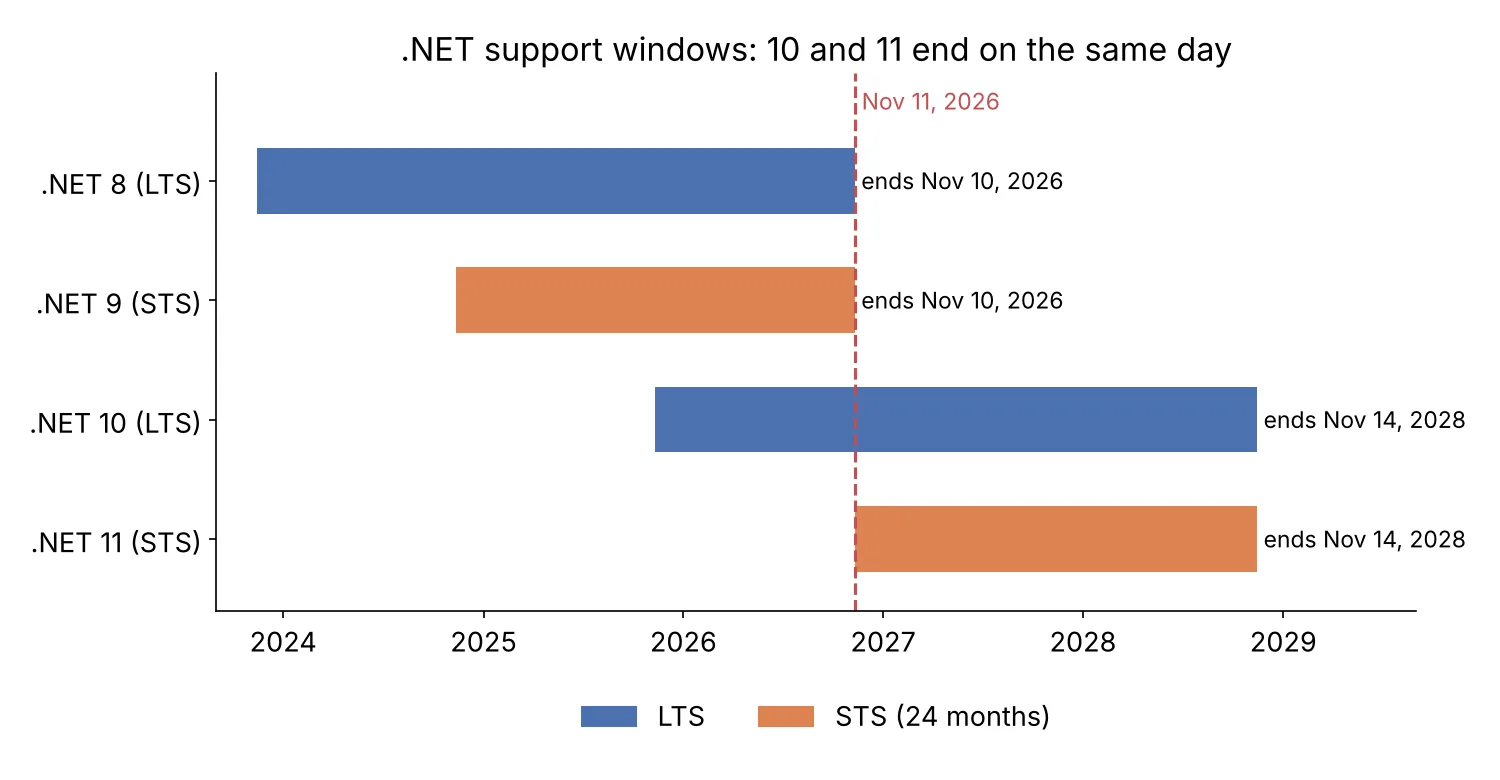
Why do 10 and 11 end together? In September 2025 Microsoft extended STS releases from 18 to 24 months. The stated reason was dependency drift: out-of-band libraries such as .NET Aspire and Microsoft.Extensions.AI could pull an LTS app onto STS packages, and the short STS window left those apps exposed. A side effect is that an STS release now ends roughly when the LTS before it does. That is also why .NET 9’s end date moved from May 2026 to November 10, 2026, the same day as .NET 8.
So the old advice (“STS if you want features, LTS if you want stability”) still holds, but the stability side now costs you nothing in runway. .NET 10 has a year of patches behind it (10.0.15 at the time of writing). Every library you depend on has had a year to certify against it. .NET 11 is one day old.
There’s a case for 11: you need a specific feature that only ships in 11, and you’re comfortable doing another upgrade within two years anyway. If that’s you, the steps below still apply, because 11 contains everything that changed in 9 and 10.
What “end of support” means for a .NET 8 app
Nothing stops working today. The support policy says Microsoft “no longer provides fixes, updates, or online technical assistance” for 8.0, and that running out-of-support versions “may put your applications, application data, and computing environment at risk.” The last .NET 8 patch is 8.0.34. The next ASP.NET Core or runtime CVE that lands in a Patch Tuesday won’t have an 8.0 build.
That matters for a web stack in particular, because Kestrel often faces the internet directly, so a bug in the server or the runtime under it is reachable by anyone who can send a request. Security scanners will start flagging the 8.0 runtime in your images, and if you sell to companies with vendor security reviews, someone will ask about it before you ask yourself.
Teams in the same spot on other stacks this autumn: the Next.js 15 end-of-life checklist and the PostgreSQL 14 end-of-life guide follow the same shape. Pick the LTS, rehearse, then ship.
How to upgrade from .NET 8 to .NET 10, step by step
- Install the .NET 10 SDK on dev machines and CI runners, and pin it in
global.json. - Change
TargetFrameworkfromnet8.0tonet10.0in every project. - Update every
Microsoft.*,Microsoft.EntityFrameworkCore.*andMicrosoft.AspNetCore.*package to a 10.x version. - Build with warnings visible and fix the obsoletions before changing anything else.
- Run the test suite, then work through the behavior changes below.
- Update Dockerfiles, base images and hosting runtimes.
- Deploy to staging and watch auth flows, migrations and logs for a full day.
The project-file change is the smallest part:
<Project Sdk="Microsoft.NET.Sdk.Web">
  <PropertyGroup>
    <TargetFramework>net10.0</TargetFramework>
    <Nullable>enable</Nullable>
    <ImplicitUsings>enable</ImplicitUsings>
  </PropertyGroup>
</Project>
{
"sdk": {
"version": "10.0.100",
"rollForward": "latestFeature"
}
}latestFeature lets the build pick up any newer 10.0 SDK band on the machine without jumping to 11. If you keep package versions in Directory.Packages.props, bump them there in one commit so the diff is easy to review.
What breaks between .NET 8 and .NET 10
You’re crossing two releases, so the .NET 9 and .NET 10 lists both apply. Microsoft’s lists run to well over a hundred items, most of them in Windows Forms, WPF or cryptography corners a web API never touches. These are the ones likely to hit an ASP.NET Core service with EF Core behind it.
EF Core 9 throws on pending model changes
This is the one that breaks deploys. Starting with EF Core 9, Migrate(), MigrateAsync() and dotnet ef database update throw if the model has changes that no migration captures:
The model for context 'AppDbContext' has pending changes. Add a new migration
before updating the database.
Before, those changes were silently not applied. The usual causes, per the EF Core 9 notes: you never added a migration after a model tweak; a migration was hand-written without updating the snapshot; or HasData seeds use DateTime.Now or Guid.NewGuid(), so the model differs on every build. The fix for the last one is a hardcoded value, not a suppression. Run dotnet ef migrations add CheckDrift on the upgrade branch. If the generated migration isn’t empty, you’ve found your problem before production does.
A related EF Core 9 change: wrapping MigrateAsync in your own transaction now throws MigrationsUserTransactionWarning, because EF takes a migration lock itself. Delete the wrapper:
// Before (.NET 8): explicit transaction around migrations
await using var tx = await db.Database.BeginTransactionAsync(ct);
await db.Database.MigrateAsync(ct);
await tx.CommitAsync(ct);

// After (.NET 10): EF manages the transaction and the lock
await db.Database.MigrateAsync(ct);
If you run migrations from app startup across several instances, that built-in lock is good news. Our zero-downtime migrations guide covers the expand-and-contract pattern that keeps a schema change from blocking a rolling deploy.
EF Core 10 adds smaller changes. Contains() over a parameter list now translates to multiple scalar parameters instead of a JSON array, which usually gives better plans but can change performance for very large lists. Generated SQL parameter names drop the @__name_0 style for @name, which breaks snapshot tests that compare SQL text. And dotnet ef now needs --framework on multi-targeted projects.
BinaryFormatter always throws (.NET 9)
The in-box BinaryFormatter now throws on every call, and the switches that used to re-enable it are gone. If an old caching layer, session store or message queue still serializes with it, this shows up as a runtime exception, not a build error. Search for it before you upgrade:
grep -rn "BinaryFormatter" --include=*.cs .Move to System.Text.Json or another format. Microsoft publishes an unsupported compatibility package for teams that truly can’t, but data already written with BinaryFormatter is exactly the kind of payload that caused the security bugs it was removed for.
NuGet audits transitive packages (.NET 10 SDK)
For projects targeting net10.0, NuGetAuditMode defaults to all. Restore now warns (NU1901 to NU1904) about vulnerable packages you don’t reference directly. With TreatWarningsAsErrors, that fails the build on the first CI run after the upgrade. That’s mostly a good thing. Use dotnet nuget why <package> to find which top-level reference drags the vulnerable one in, and upgrade that. If you need the build green today while you sort it out, keep the warnings as warnings:
<PropertyGroup>
  <WarningsNotAsErrors>NU1901;NU1902;NU1903;NU1904;$(WarningsNotAsErrors)</WarningsNotAsErrors>
</PropertyGroup>
Don’t leave that in for long. Those warnings are the reason you’re upgrading.
Cookie auth returns 401 for API endpoints (ASP.NET Core 10)
Apps that use cookie authentication for both pages and APIs get a behavior change. Unauthenticated requests to “known API endpoints” ([ApiController] actions, minimal APIs that read or write JSON, TypedResults endpoints, SignalR hubs) now get a 401 or 403 instead of a 302 to the login page. That’s what an SPA wants, and it fixes a long-standing annoyance. It also breaks any front-end code that followed the redirect to detect a logged-out user. To restore redirects on a single endpoint:
app.MapGet("/reports/summary", () => new { Total = 1000 })
   .RequireAuthorization()
   .AllowCookieRedirect();
There’s also an app-wide switch (Microsoft.AspNetCore.Authentication.Cookies.IgnoreRedirectMetadata), but fixing the client to handle 401 is the better long-term move.
Obsoletions that become warnings
These compile, but they warn, and a TreatWarningsAsErrors build will stop on them:
WithOpenApi()on minimal API endpoints is deprecated (ASPDEPR002). Replace it withAddOpenApiOperationTransformer, or with the equivalent hook in Swashbuckle or NSwag.WebHostBuilder,IWebHostandWebHostare obsolete. Projects that never moved toWebApplication.CreateBuilderhave to move now.IActionContextAccessor, Razor runtime compilation andForwardedHeadersOptions.KnownNetworksare obsolete too.System.Linq.Asynccollides with the new built-inSystem.Linq.AsyncEnumerable. Remove the package or upgrade it to 7.0, and renameSelectAwaitcalls toSelect.
Containers: Ubuntu by default, no Debian
The mcr.microsoft.com/dotnet/aspnet:10.0 tag now points at Ubuntu 24.04, and Microsoft doesn’t ship Debian images for .NET 10 at all. If your Dockerfile installs packages with apt-get against Debian package names, or pins a -bookworm tag, it needs a look. .NET 9 also stopped installing zlib in the images, which matters if a native dependency expected it.
FROM mcr.microsoft.com/dotnet/sdk:10.0 AS build
WORKDIR /src
COPY . .
RUN dotnet publish -c Release -o /app

FROM mcr.microsoft.com/dotnet/aspnet:10.0-noble
WORKDIR /app
COPY --from=build /app .
ENTRYPOINT ["dotnet", "Api.dll"]
Pinning -noble explicitly makes the OS choice visible in code review instead of implied by a default.
Quieter runtime changes
A few behavior changes won’t fail anything, but they change what you see. HttpClientFactory logging redacts header values by default (since .NET 9). The default trace context propagator is now W3C, which matters if a downstream service still expects another format. BackgroundService.ExecuteAsync now runs entirely as a task, so synchronous work at the top of it no longer blocks startup. Configuration now preserves explicit null values instead of dropping them. And environment variables take precedence over runtimeconfig.json settings. None of these need code on day one. All of them are worth knowing when a dashboard looks different on Monday.
A rollout plan that fits in a sprint
Do the work on a branch, in this order: SDK and target framework, package bumps, warnings, tests. Run your migration drift check early, because it’s the change most likely to surprise a deploy. Rehearse the deployment on staging with a copy of production data, watching the first startup closely if migrations run on boot.
Inherited a .NET 8 service from another vendor and not sure what’s in it? The codebase inheritance checklist is the audit to run first. And if the upgrade is bigger than your team has hours for, the guide to hiring a .NET developer covers what to screen for.
The takeaway: .NET 8 is unpatched as of yesterday. Target .NET 10, run the EF migration drift check first, and leave .NET 11 for teams that need a specific feature. Your next planned upgrade is .NET 12. If Microsoft keeps its November cadence, that’s November 2027, a year before .NET 10’s support runs out.
Frequently asked questions
- What happens to my app now that .NET 8 is out of support?
- It keeps running. Microsoft stops shipping servicing updates, security fixes and technical support, so any vulnerability found after November 10, 2026 stays unpatched in the .NET 8 runtime. Microsoft's support policy recommends uninstalling out-of-support versions and moving to a supported one.
- Should I upgrade from .NET 8 to .NET 10 or .NET 11?
- Choose .NET 10. Microsoft's support policy page lists both .NET 10 and .NET 11 with an end-of-support date of November 14, 2028, so the newer release doesn't extend your window. .NET 10 has a year of patches and third-party package support behind it, while .NET 11 shipped on November 10, 2026.
- Can I skip .NET 9 when upgrading from .NET 8?
- Yes. Change the target framework straight from net8.0 to net10.0. You still need to read the breaking-change lists for both .NET 9 and .NET 10 (and EF Core 9 and 10), because the changes from each release stack up.
Sources
- .NET and .NET Core official support policy
- .NET STS releases supported for 24 months (.NET Blog)
- Breaking changes in .NET 10
- Breaking changes in .NET 9
- Breaking changes in ASP.NET Core 10
- Breaking changes in EF Core 9
- Breaking changes in EF Core 10
- End of support looms for .NET 8 and .NET 9 (InfoWorld)
Sponsored
More from this category
More from Web Development



Sponsored
Discussion
Join the conversation.
Comments are powered by GitHub Discussions. Sign in with your GitHub account to leave a comment.
Sponsored