AI Integration · Data Science
NumPy 101: A Beginner's Guide to Data Science with Python
Learn NumPy essentials — arrays, shapes, reshaping, slicing, stacking, broadcasting, universal functions, and image processing with practical examples.

Anurag Verma
8 min read

Sponsored
This post is part of a hands-on Python data science series; the full course and exercise notebooks are on GitHub, alongside the 100-day roadmap it follows.
What is NumPy?
NumPy is Python’s core library for fast numerical computing. It stores data in homogeneous, fixed-size arrays and runs operations on them in compiled code instead of Python loops, which is why nearly every data science and machine learning library in Python, from pandas to scikit-learn, is built on top of it.
Python list vs NumPy arrays
NumPy arrays are similar to Python lists, but they are more efficient and can perform operations faster. NumPy arrays are homogenous, meaning they can only contain elements of the same data type, while Python lists can contain elements of different data types. NumPy arrays also have a fixed size, while Python lists do not.
Creating a NumPy Array
There are several ways to create a NumPy array:
- Basic ndarray: To create a basic NumPy array, we can use the numpy.array function. For example:
import numpy as np

a = np.array([1, 2, 3, 4])
print(a)
[1 2 3 4]
- Array of zeros: To create an array of zeros, we can use the numpy.zeros function. For example:
a = np.zeros(5)
print(a)
[0. 0. 0. 0. 0.]
- Array of ones: To create an array of ones, we can use the numpy.ones function. For example:
a = np.ones(5)
print(a)
[1. 1. 1. 1. 1.]
- Random numbers in ndarray: To create an array of random numbers, we can use the numpy.random.rand function. For example:
a = np.random.rand(5)
print(a)
[0.34150314 0.25977794 0.18726775 0.00209527 0.08221211]
- An array of your choice: To create an array with specific values, we can use the numpy.arange function. For example:
a = np.arange(1, 11)
print(a)
[ 1 2 3 4 5 6 7 8 9 10]
- Matrix in NumPy: To create a 2D array (matrix), we can use the numpy.matrix function. For example:
a = np.matrix([[1, 2, 3], [4, 5, 6]])
print(a)
[[1 2 3] [4 5 6]]
- Evenly spaced ndarray: To create an array with evenly spaced values, we can use the numpy.linspace function. For example:
a = np.linspace(1, 10, 5)
print(a)
[ 1. 3.25 5.5 7.75 10. ]
Shape and Reshaping of NumPy Array
- Dimensions of NumPy array: To get the dimensions of a NumPy array, we can use the ndarray.ndim attribute. For example:
a = np.array([[1, 2, 3], [4, 5, 6]])
print(a.ndim)
2
- Shape of NumPy array: To get the shape of a NumPy array, we can use the ndarray.shape attribute. For example:
print(a.shape)(2, 3)
- Size of NumPy array: To get the total number of elements in a NumPy array, we can use the ndarray.size attribute. For example:
print(a.size)6
- Reshaping a NumPy array: To reshape a NumPy array, we can use the ndarray.reshape function. For example:
a = np.array([1, 2, 3, 4, 5, 6])
b = a.reshape(2, 3)
print(b)
[[1 2 3] [4 5 6]]
- Flattening a NumPy array: To flatten a NumPy array, we can use the ndarray.flatten function. For example:
a = np.array([[1, 2, 3], [4, 5, 6]])
b = a.flatten()
print(b)
[1 2 3 4 5 6]
- Transpose of a NumPy array: To get the transpose of a NumPy array, we can use the ndarray.transpose function. For example:
a = np.array([[1, 2, 3], [4, 5, 6]])
b = a.transpose()
print(b)
[[1 4] [2 5] [3 6]]
Expanding and Squeezing a NumPy Array
- To expand a NumPy array, we can use the numpy.expand_dims function. For example:
a = np.array([1, 2, 3])
b = np.expand_dims(a, axis=1)
print(b)
[[1] [2] [3]]
- To squeeze a NumPy array, we can use the numpy.squeeze function. For example:
a = np.array([[1], [2], [3]])
b = np.squeeze(a)
print(b)
[1 2 3]
Indexing and Slicing of NumPy Array
- Slicing 1-D NumPy arrays: To slice a 1-D NumPy array, we can use the
ndarray[start:end:step]notation. For example:
a = np.array([1, 2, 3, 4, 5, 6])
b = a[1:4]
print(b)
[2 3 4]
- Slicing 2-D NumPy arrays: To slice a 2-D NumPy array, we can use the
ndarray[row_start:row_end:row_step, col_start:col_end:col_step]notation. For example:
a = np.array([[1, 2, 3], [4, 5, 6], [7, 8, 9]])
b = a[0:2, 1:3]
print(b)
[[2 3] [5 6]]
- Slicing 3-D NumPy arrays: To slice a 3-D NumPy array, we can use the
ndarray[dim1_start:dim1_end:dim1_step, dim2_start:dim2_end:dim2_step, dim3_start:dim3_end:dim3_step]notation. For example:
a = np.array([[[1, 2, 3], [4, 5, 6]], [[7, 8, 9], [10, 11, 12]]])
b = a[0:2, 0:2, 0:2]
print(b)
[[[ 1 2] [ 4 5]]
[[ 7 8] [10 11]]]
- Negative slicing of NumPy arrays: To slice a NumPy array with negative indices, we can use the
ndarray[-end:-start:-step]notation. For example:
a = np.array([1, 2, 3, 4, 5, 6])
b = a[-4:-1]
print(b)
[3 4 5]
Stacking and Concatenating Numpy Arrays
- Stacking ndarrays: To stack NumPy arrays vertically or horizontally, we can use the
numpy.vstackornumpy.hstackfunctions. For example:
a = np.array([1, 2, 3])
b = np.array([4, 5, 6])
c = np.vstack((a, b))
d = np.hstack((a, b))
print(c)
print(d)
[[1 2 3] [4 5 6]] [1 2 3 4 5 6]
- Concatenating ndarrays: To concatenate NumPy arrays along a specific axis, we can use the
numpy.concatenatefunction. For example:
a = np.array([[1, 2], [3, 4]])
b = np.array([[5, 6], [7, 8]])
c = np.concatenate((a, b), axis=1)
print(c)
[[1 2 5 6] [3 4 7 8]]
Broadcasting in Numpy Arrays
Broadcasting is a powerful feature in NumPy that allows us to perform arithmetic operations on arrays of different shapes. NumPy automatically broadcasts smaller arrays to match the shape of larger arrays to perform operations. If the underlying math here is unfamiliar, our linear algebra for data science primer covers the vector and matrix concepts NumPy is built around.
For example:
a = np.array([1, 2, 3])
b = np.array([4, 5, 6])
c = a + b
print(c)
[5 7 9]
NumPy Ufuncs
NumPy provides a wide range of universal functions (ufuncs) that can be applied to arrays to perform mathematical operations. Some common ufuncs include:
-
np.add: Adds two arrays element-wise
-
np.subtract: Subtracts two arrays element-wise
-
np.multiply: Multiplies two arrays element-wise
-
np.divide: Divides two arrays element-wise
-
np.abs: Calculates the absolute value of an array
-
np.sin: Calculates the sine of an array
-
np.cos: Calculates the cosine of an array
-
np.exp: Calculates the exponent of an array
a = np.array([1, 2, 3])
b = np.array([4, 5, 6])
c = np.add(a, b)
d = np.subtract(a, b)
e = np.multiply(a, b)
f = np.divide(a, b)
g = np.abs(a)
h = np.sin(a)
i = np.cos(a)
j = np.exp(a)
print(c)
print(d)
print(e)
print(f)
print(g)
print(h)
print(i)
print(j)
[5 7 9] [-3 -3 -3] [ 4 10 18] [0.25 0.4 0.5 ] [1 2 3] [0.84147098 0.90929743 0.14112001] [ 0.54030231 -0.41614684 -0.9899925 ] [ 2.71828183 7.3890561 20.08553692]
Maths with NumPy Arrays
NumPy provides many functions to perform mathematical operations on arrays. Some common functions include:
-
np.mean: Calculates the mean of an array
-
np.median: Calculates the median of an array
-
np.std: Calculates the standard deviation of an array
-
np.min: Calculates the minimum value of an array
-
np.max: Calculates the maximum value of an array
-
np.argmin: Calculates the index of the minimum value of an array
-
np.argmax: Calculates the index of the maximum value of an array
-
np.sort: Sorts an array in ascending order
a = np.array([1, 2, 3, 4, 5])
mean = np.mean(a)
median = np.median(a)
std = np.std(a)
min_val = np.min(a)
max_val = np.max(a)
min_index = np.argmin(a)
max_index = np.argmax(a)
sorted_a = np.sort(a)
print(mean)
print(median)
print(std)
print(min_val)
print(max_val)
print(min_index)
print(max_index)
print(sorted_a)
3.0 3.0 1.4142135623730951 1 5 0 4 [1 2 3 4 5]
NumPy Arrays and Images
NumPy arrays can be used to represent images. To read an image into a NumPy array, we can use the scipy.misc.imread function. To write a NumPy array as an image, we can use the scipy.misc.imsave function.
import numpy as np
import imageio

# Read image into NumPy array
img = imageio.imread('image.jpeg')

# Perform some operations on the image
img = img * 2

# Save the modified image
imageio.imsave('modified_image.jpeg', img)
To display the image using matplotlib, you can use the same code as before:
import numpy as np
import matplotlib.pyplot as plt

# Read image into NumPy array
img = imageio.imread('image.jpeg')

# Display image
plt.imshow(img)
plt.show()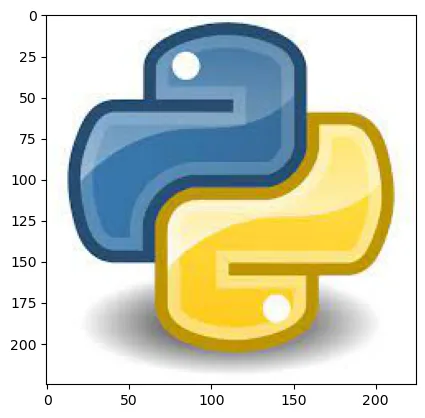
After Image
# Read image into NumPy array
img = imageio.imread('modified_image.jpeg')

# Display image
plt.imshow(img)
plt.show()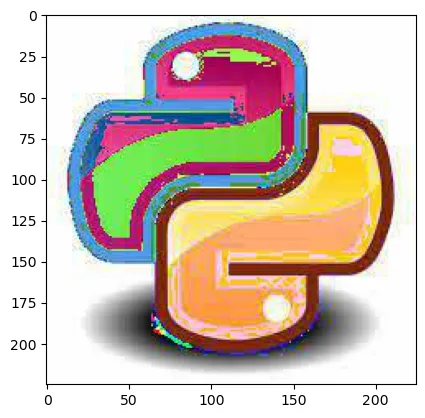
Exercise Question you will find in the exercise notebook of Day 4 on GitHub.
If you liked it then…
Frequently asked questions
- What's the difference between a Python list and a NumPy array?
- A Python list can hold mixed data types and grows dynamically, while a NumPy array is homogeneous (one data type) and fixed-size. That constraint is what lets NumPy store arrays compactly and run vectorized operations in compiled code, which is significantly faster than looping over a Python list.
- How do I reshape a NumPy array without changing its data?
- Use `ndarray.reshape(rows, cols)` to change an array's dimensions, as long as the total number of elements stays the same. `.flatten()` collapses any array back to 1-D, and `.transpose()` swaps its axes.
- What is broadcasting in NumPy?
- Broadcasting is NumPy's rule for applying arithmetic operations between arrays of different shapes by automatically expanding the smaller array to match the larger one's shape, so you can write `a + b` instead of a manual loop even when `a` and `b` aren't the same size.
- Can NumPy be used for image processing?
- Yes. An image loaded into memory is just a NumPy array of pixel values, so array operations like multiplication, slicing, and indexing double as basic image transforms. Libraries like `imageio` and `matplotlib` read and display images as NumPy arrays directly.
Sponsored
More from this category
More from AI Integration

Sponsored
Discussion
Join the conversation.
Comments are powered by GitHub Discussions. Sign in with your GitHub account to leave a comment.
Sponsored