AI Integration · Industry News
OpenAI's Agents API: The Codex Harness, One Call
OpenAI's Agents API public beta puts session orchestration, context compaction, and sandboxed execution behind one call. What it replaces and what it costs.

Anurag Verma
5 min read
Sponsored
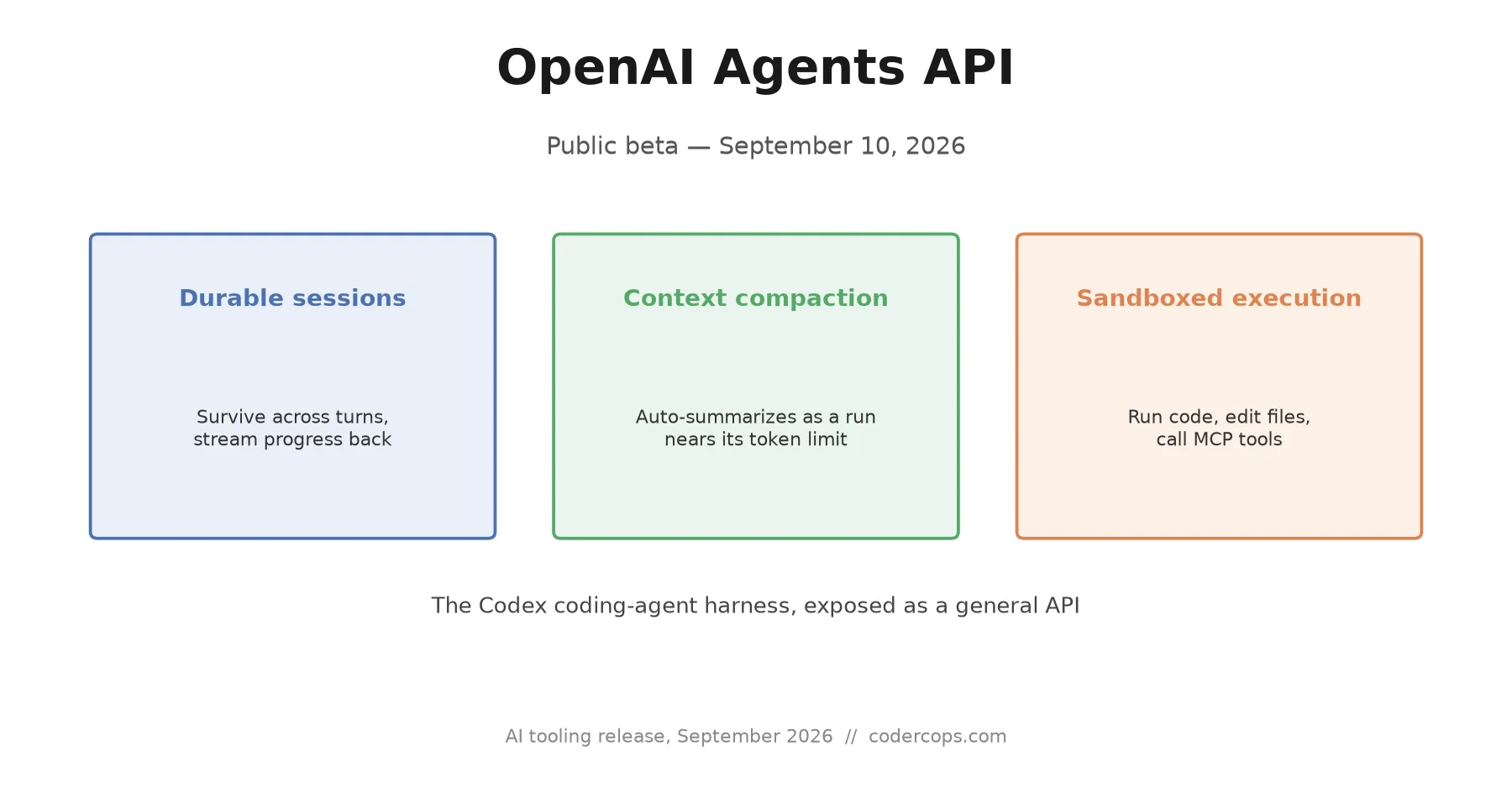
OpenAI’s Codex coding agent can work on a task for a long time: reading a codebase, editing files across a session, running into a context limit, and continuing anyway, without you managing any of that yourself. As of September 10, 2026, you can build the same thing. The Agents API, now in public beta, takes the same harness that makes Codex’s long-running sessions work and exposes it as a general-purpose API, for agents that reach into your own tools and data instead of just a code editor.
The problem this actually solves
Anyone who’s built an agent past the demo stage knows the parts that aren’t the interesting part. The model call is easy. What’s hard is everything around it: keeping a session alive across a task that outlasts one request, deciding what to summarize or drop as the conversation approaches the context window’s limit without losing information the agent still needs, recovering gracefully when a run gets interrupted, and giving the agent somewhere safe to actually execute code or edit files instead of just describing what it would do.
Most teams solve this with some combination of a framework (LangGraph, AutoGen, a hand-rolled state machine) and a fair amount of custom glue code specific to their own context-management strategy. It works, but it’s also the kind of infrastructure that every team building an agent ends up rebuilding a version of, because there hasn’t been a standard way to buy it instead.
The Agents API is OpenAI’s bet that most teams would rather not own that plumbing. It manages three things server-side: durable sessions that persist and stream progress back to your app as the agent works, automatic context compaction that kicks in as a session nears its token limit while preserving what the agent needs to keep going, and a sandbox, either OpenAI-hosted or connected from your own infrastructure, where an agent can run code, edit files, and produce real output rather than just text describing an action.
How tools and your own data get in
An agent that can only talk to itself isn’t useful for much beyond a chatbot. The Agents API connects to your systems two ways: custom function tools you define directly, the same pattern as function calling in the Chat Completions API, and Model Context Protocol servers, so an agent can reach internal databases, ticketing systems, or whatever else you’ve already exposed through MCP without rebuilding that integration a second time for this specific API.
That MCP support matters more than it might look at first glance. If your team has already built or connected MCP servers for another agent framework, or for Claude, those same servers plug into OpenAI’s Agents API without rewriting the tool-integration layer, since MCP’s entire point is being the part that doesn’t need to be rebuilt per vendor. It’s one of the clearer signs that MCP has settled into the connective layer of the agent ecosystem rather than staying tied to whichever company originated it.
Sandboxing follows the same “bring your own or use ours” pattern. Agents can run in a sandbox OpenAI hosts, or connect one from your own infrastructure or a supported partner provider, which matters for teams with compliance requirements around where code actually executes, or who already have sandboxing infrastructure they don’t want to duplicate.
What it costs, and what it doesn’t fix
There’s no separate line item for that orchestration layer during the public beta. You pay for three things: the model tokens an agent consumes across a session, any tool calls it makes, and sandbox minutes if it’s running code or editing files. That’s not a new pricing model so much as a recognition that those were always the real costs; the orchestration on top was previously either your engineering time or a framework’s overhead, not a line item OpenAI is now trying to charge separately for.
What it doesn’t fix is the underlying question every agent project still has to answer: whether the task actually benefits from an agent that runs autonomously across a long session, versus a simpler, shorter-lived call that gets the same job done with less to go wrong. A managed session layer makes the long-running case easier to build. It doesn’t make it the right architecture for every problem, any more than Claude’s own multi-agent orchestration tooling makes spinning up a team of coordinating agents the right call for a task one focused call would handle in a tenth of the time and cost.
Should you build on it now
For a new agent project, especially one you expect to run for more than a single context window’s worth of work, this is worth prototyping against instead of reaching straight for a custom LangGraph state machine. The value proposition is specific and real: less orchestration code to own, maintain, and debug at 2am when a session state gets corrupted.
For an existing agent built on LangGraph, AutoGen, or a framework you’re already comfortable with, there’s no urgency to migrate three days into a public beta. Public betas reshape their APIs before general availability more often than not, and a rewrite chasing a feature you don’t have an active pain point around is effort spent on the wrong thing. Evaluate it seriously when you’re starting something new, or when session durability and context management have become a real, measured cost on your team, not because a launch post made it sound inevitable.
Frequently asked questions
- What is OpenAI's Agents API?
- A public beta API, opened September 10, 2026, that lets developers run long-lived, tool-using AI agents without building the session management, context compaction, and recovery logic themselves. It exposes the same harness that powers OpenAI's Codex coding agent as a general-purpose API for building agents that connect to your own tools and data.
- How is this different from just calling the Chat Completions or Responses API in a loop?
- A hand-rolled loop puts the burden on you: tracking conversation state, deciding when to summarize or truncate as you approach the context limit, handling a crashed or interrupted run, and wiring up tool-calling and sandboxed execution separately. The Agents API manages a durable session server-side, automatically compacts context as a run approaches its limit while preserving what the agent needs to continue, and streams progress back to your application as it works, across a task that spans multiple context windows if it needs to.
- Can I connect my own tools and MCP servers?
- Yes. The API supports custom function tools you define, along with Model Context Protocol servers, so an agent can reach your internal systems and data the same way it would through a hand-built MCP integration. It also ships built-in tools like web search without any extra wiring.
- What does it cost?
- OpenAI isn't charging a separate fee for the harness in public beta. You pay for the model tokens the agent consumes, any tool calls it makes, and sandbox minutes if it runs code or edits files in a hosted sandbox. That's the same three cost centers you'd pay for regardless of whether you built the orchestration yourself or used OpenAI's.
- Should we migrate an existing LangGraph or AutoGen agent to this?
- Not reflexively. If your current setup works and you're not fighting context-window management or session recovery as an ongoing engineering cost, there's little upside to a rewrite three days into a public beta. It's worth evaluating for a new agent build, or for a team that's spending real engineering time on the exact plumbing this API replaces: session durability, compaction, and sandboxed tool execution. Public betas also change shape before general availability, so treat this as a strong option to prototype against, not a foundation to bet a production system on yet.
Sources
Sponsored
More from this category
More from AI Integration
Sponsored
Discussion
Join the conversation.
Comments are powered by GitHub Discussions. Sign in with your GitHub account to leave a comment.
Sponsored