AI Integration · Deep Learning
Transfer Learning for Fruit Classification with ResNet50
A hands-on guide to building a fruit image classifier using transfer learning with ResNet50 in TensorFlow and Keras, achieving high accuracy on the Fruits-360 dataset.

Anurag Verma
7 min read

Sponsored
What Is Transfer Learning for Fruit Image Classification?
Transfer learning for fruit classification means taking a convolutional neural network pretrained on ImageNet, like ResNet50, and fine-tuning only its final layers on a fruit-specific dataset instead of training a model from scratch. This cuts training time and data requirements while reusing the visual features the network already learned from millions of general images. For a broader look at techniques like this for improving model accuracy, see our guide to 10 techniques for improving machine learning models.
The fruits dataset used in this model training is from Kaggle : fruits dataset
Importing library and modeules
import numpy as np
import tensorflow as tf
Train and Test data
learn more about pathlib
import pathlib
train_dir = pathlib.Path("../input/fruits/fruits-360_dataset/fruits-360/Training")
test_dir = pathlib.Path("../input/fruits/fruits-360_dataset/fruits-360/Test")
New function/Concept ‘glog()’
-
The glob module is a useful part of the Python standard library. glob (short for global) is used to return all file paths that match a specific pattern.
-
We can use glob to search for a specific file pattern, or perhaps more usefully, search for files where the filename matches a certain pattern by using wildcard characters.
-
Learn more about glob
-
https://towardsdatascience.com/the-python-glob-module-47d82f4cbd2d
# Total number of images in training data-set

image_count = len(list(train_dir.glob('*/*.jpg')))
image_count
67692
Showing / Visualize Image
-
here we are using matplotlib for visualizing our data
-
we have open our image and converted to digits using Pillow. If you’re new to image processing in Python more broadly, our introduction to OpenCV covers the fundamentals Pillow and OpenCV share.
import matplotlib.pyplot as plt
import PIL
fruits = list(train_dir.glob('Banana/*.jpg'))

plt.figure(figsize=(10, 10))

for i in range(3):
    plt.subplot(3, 3, i + 1)
    img = PIL.Image.open(str(fruits[i]))
    plt.imshow(img)
    plt.axis('off')

plt.show()
Setting Up variables
batch_size = 32
img_height = 100
img_width = 100
Collecting Data
Used keras ‘image_dataset_from_directory’ API for collrcting data from directories
-
Learn more about ‘image_dataset_from_directory’
-
https://www.tensorflow.org/api_docs/python/tf/keras/utils/image_dataset_from_directory
train_ds = tf.keras.preprocessing.image_dataset_from_directory(
    train_dir,
    validation_split=0.2,
    subset='training',
    seed=42,
    image_size=(img_height, img_width),
    batch_size=batch_size
)
Found 67692 files belonging to 131 classes. Using 54154 files for training.
val_ds = tf.keras.preprocessing.image_dataset_from_directory(
    train_dir,
    validation_split=0.2,
    subset='validation',
    seed=42,
    image_size=(img_height, img_width),
    batch_size=batch_size
)
Found 67692 files belonging to 131 classes. Using 13538 files for validation.
Visualizing friuts by classes
class_names = train_ds.class_names
num_classes = len(class_names)plt.figure(figsize=(10, 10))
for images, labels in train_ds.take(1):
for i in range(25):
plt.subplot(5, 5, i + 1)
plt.imshow(images[i].numpy().astype('uint8'))
plt.title(class_names[labels[i]])
plt.axis('off')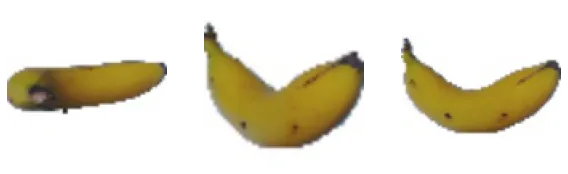
Preprocessing/Setting Up Base Model
prefetch the data for faster training while model is trained
-
Learning more about prefetch and AUTOTUNE
-
AUTOTUNE : https://stackoverflow.com/questions/56613155/tensorflow-tf-data-autotune
AUTOTUNE = tf.data.experimental.AUTOTUNE

train_ds = train_ds.cache().shuffle(1000).prefetch(buffer_size=AUTOTUNE)
val_ds = val_ds.cache().prefetch(buffer_size=AUTOTUNE)
Data Augumentation
- Data augmentation is a set of techniques to artificially increase the amount of data by generating new data points from existing data. This includes making small changes to data or using deep learning models to generate new data points. It’s one of the standard tools for fighting overfitting; see our guide on overfitting and underfitting in machine learning for the other common fixes.
data_augmentation = tf.keras.Sequential([
    tf.keras.layers.experimental.preprocessing.RandomFlip('horizontal'),
    tf.keras.layers.experimental.preprocessing.RandomRotation(0.2)
])
Using ResNEt Model for Transfer Learning
-
Learn more about ResNet by going through paper
preprocess_input = tf.keras.applications.resnet.preprocess_inputbase_model = tf.keras.applications.resnet.ResNet50(
input_shape=(img_height, img_width, 3),
include_top=False,
weights='imagenet'
)Downloading data from https://storage.googleapis.com/tensorflow/keras-applications/resnet/resnet50_weights_tf_dim_ordering_tf_kernels_notop.h5 94773248/94765736 [==============================] - 0s 0us/step 94781440/94765736 [==============================] - 0s 0us/step
- setting base model trainable to False so model take less time
base_model.trainable = Falseglobal_average_layer = tf.keras.layers.GlobalAveragePooling2D()
prediction_layer = tf.keras.layers.Dense(num_classes)Building Model
inputs = tf.keras.Input(shape=(100, 100, 3))
x = data_augmentation(inputs)
x = preprocess_input(x)
x = base_model(x, training=False)
x = global_average_layer(x)
x = tf.keras.layers.Dropout(0.2)(x)
outputs = prediction_layer(x)

model = tf.keras.Model(inputs=inputs, outputs=outputs)
optimizer = tf.keras.optimizers.Adam(learning_rate=0.0001)
model.compile(
optimizer=optimizer,
loss=tf.keras.losses.SparseCategoricalCrossentropy(from_logits=True),
metrics=['accuracy']
)model.summary()Model: “model” _________________________________________________________________ Layer (type) Output Shape Param # ================================================================= input_2 (InputLayer) [(None, 100, 100, 3)] 0 _________________________________________________________________ sequential (Sequential) (None, 100, 100, 3) 0 _________________________________________________________________ tf.operators.getitem (Sl (None, 100, 100, 3) 0 _________________________________________________________________ tf.nn.bias_add (TFOpLambda) (None, 100, 100, 3) 0 _________________________________________________________________ resnet50 (Functional) (None, 4, 4, 2048) 23587712 _________________________________________________________________ global_average_pooling2d (Gl (None, 2048) 0 _________________________________________________________________ dropout (Dropout) (None, 2048) 0 _________________________________________________________________ dense (Dense) (None, 131) 268419 ================================================================= Total params: 23,856,131 Trainable params: 268,419 Non-trainable params: 23,587,712 _________________________________________________________________
Training the model
model.evaluate(val_ds)2022-11-21 23:17:58.112151: I tensorflow/stream_executor/cuda/cuda_dnn.cc:369] Loaded cuDNN version 8005
424/424 [==============================] - 40s 73ms/step - loss: 6.1083 - accuracy: 0.0146
[6.10833215713501, 0.014551632106304169]
- evolution accuracy is very bad but wait for traning
epochs = 15

history = model.fit(
    train_ds,
    epochs=epochs,
    validation_data=val_ds
)
Epoch 1/15
2022-11-21 23:18:54.026118: I tensorflow/core/kernels/data/shuffle_dataset_op.cc:175] Filling up shuffle buffer (this may take a while): 143 of 1000 2022-11-21 23:19:04.017250: I tensorflow/core/kernels/data/shuffle_dataset_op.cc:175] Filling up shuffle buffer (this may take a while): 288 of 1000 2022-11-21 23:19:14.002639: I tensorflow/core/kernels/data/shuffle_dataset_op.cc:175] Filling up shuffle buffer (this may take a while): 431 of 1000 2022-11-21 23:19:24.049675: I tensorflow/core/kernels/data/shuffle_dataset_op.cc:175] Filling up shuffle buffer (this may take a while): 579 of 1000 2022-11-21 23:19:34.018446: I tensorflow/core/kernels/data/shuffle_dataset_op.cc:175] Filling up shuffle buffer (this may take a while): 720 of 1000 2022-11-21 23:19:44.006225: I tensorflow/core/kernels/data/shuffle_dataset_op.cc:175] Filling up shuffle buffer (this may take a while): 865 of 1000
3/1693 […] - ETA: 1:41 - loss: 6.8432 - accuracy: 0.0208
2022-11-21 23:19:53.219212: I tensorflow/core/kernels/data/shuffle_dataset_op.cc:228] Shuffle buffer filled.
1693/1693 [==============================] - 160s 51ms/step - loss: 1.3016 - accuracy: 0.7131 - val_loss: 0.2886 - val_accuracy: 0.9617 Epoch 2/15 1693/1693 [==============================] - 54s 32ms/step - loss: 0.2196 - accuracy: 0.9602 - val_loss: 0.1175 - val_accuracy: 0.9866 Epoch 3/15 1693/1693 [==============================] - 52s 31ms/step - loss: 0.1076 - accuracy: 0.9821 - val_loss: 0.0637 - val_accuracy: 0.9947 Epoch 4/15 1693/1693 [==============================] - 52s 31ms/step - loss: 0.0632 - accuracy: 0.9905 - val_loss: 0.0405 - val_accuracy: 0.9968 Epoch 5/15 1693/1693 [==============================] - 52s 31ms/step - loss: 0.0416 - accuracy: 0.9941 - val_loss: 0.0277 - val_accuracy: 0.9983 Epoch 6/15 1693/1693 [==============================] - 52s 31ms/step - loss: 0.0307 - accuracy: 0.9956 - val_loss: 0.0214 - val_accuracy: 0.9988 Epoch 7/15 1693/1693 [==============================] - 52s 31ms/step - loss: 0.0224 - accuracy: 0.9972 - val_loss: 0.0155 - val_accuracy: 0.9990 Epoch 8/15 1693/1693 [==============================] - 52s 31ms/step - loss: 0.0180 - accuracy: 0.9975 - val_loss: 0.0125 - val_accuracy: 0.9993 Epoch 9/15 1693/1693 [==============================] - 53s 31ms/step - loss: 0.0143 - accuracy: 0.9982 - val_loss: 0.0116 - val_accuracy: 0.9990 Epoch 10/15 1693/1693 [==============================] - 52s 31ms/step - loss: 0.0119 - accuracy: 0.9985 - val_loss: 0.0107 - val_accuracy: 0.9993 Epoch 11/15 1693/1693 [==============================] - 53s 31ms/step - loss: 0.0102 - accuracy: 0.9985 - val_loss: 0.0089 - val_accuracy: 0.9990 Epoch 12/15 1693/1693 [==============================] - 52s 31ms/step - loss: 0.0087 - accuracy: 0.9989 - val_loss: 0.0093 - val_accuracy: 0.9994 Epoch 13/15 1693/1693 [==============================] - 52s 31ms/step - loss: 0.0079 - accuracy: 0.9988 - val_loss: 0.0077 - val_accuracy: 0.9993 Epoch 14/15 1693/1693 [==============================] - 52s 31ms/step - loss: 0.0066 - accuracy: 0.9991 - val_loss: 0.0072 - val_accuracy: 0.9996 Epoch 15/15 1693/1693 [==============================] - 52s 31ms/step - loss: 0.0061 - accuracy: 0.9992 - val_loss: 0.0060 - val_accuracy: 0.9999
Visualization of Accuracy and loss
Loss
train_loss = history.history['loss']
val_loss = history.history['val_loss']

epochs_range = range(epochs)

plt.figure(figsize=(12, 10))
plt.plot(epochs_range, train_loss, label="Training Loss")
plt.plot(epochs_range, val_loss, label="Validation Loss")
plt.legend(loc='upper left')
plt.title('Training and Validation Loss')

plt.show()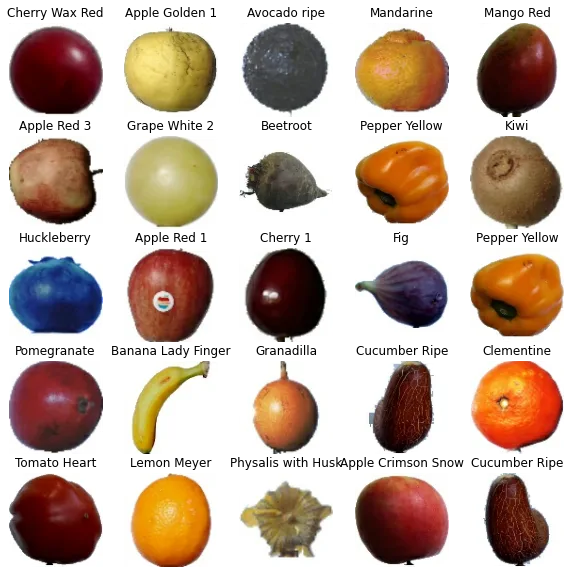
Accuracy
train_acc = history.history['accuracy']
val_acc = history.history['val_accuracy']

epochs_range = range(epochs)

plt.figure(figsize=(12, 10))
plt.plot(epochs_range, train_acc, label="Training Accuracy")
plt.plot(epochs_range, val_acc, label="Validation Accuracy")
plt.legend(loc='upper left')
plt.title('Training and Validation Accuracy')

plt.show()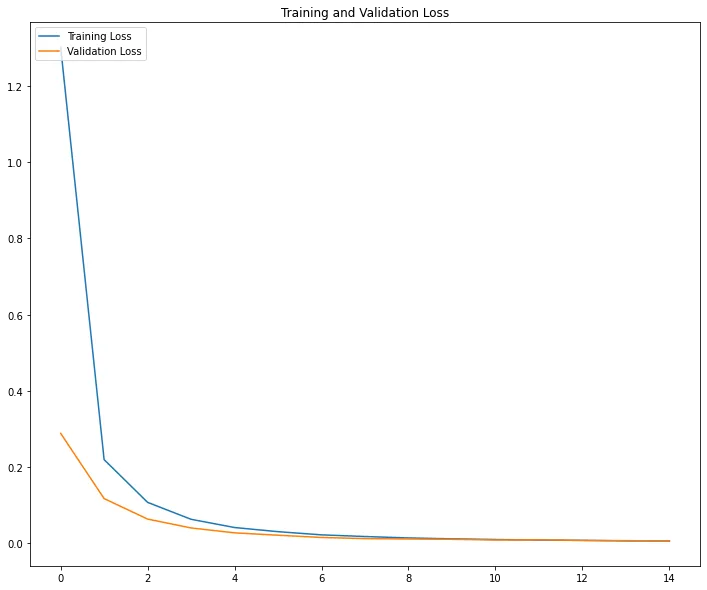
I hope you like this ;)
Frequently asked questions
- Why use ResNet50 instead of training a CNN from scratch for fruit classification?
- ResNet50 pretrained on ImageNet already knows how to detect general visual features like edges, textures, and shapes from millions of images. Reusing those frozen layers and training only a new classification head on top needs far less fruit-specific data and far less training time than starting from random weights.
- How large is the Fruits-360 dataset used in this tutorial?
- The training directory contains 67,692 images across 131 fruit classes, split into 54,154 images for training and 13,538 for validation using an 80/20 split via Keras's `image_dataset_from_directory`.
- Why freeze the base model's layers during transfer learning?
- Setting `base_model.trainable = False` keeps ResNet50's pretrained ImageNet weights fixed, so only the new global-average-pooling and dense output layers get trained. That drops the trainable parameter count from roughly 23.8 million to about 268,000, which trains faster and is far less prone to overfitting on a smaller dataset.
- What does data augmentation do in this pipeline?
- Random horizontal flips and random rotations are applied to training images on the fly, artificially increasing the variety of examples the model sees without collecting new photos. This helps the model generalize instead of memorizing the exact orientation and framing of the training images.
Sponsored
More from this category
More from AI Integration
Sponsored
Discussion
Join the conversation.
Comments are powered by GitHub Discussions. Sign in with your GitHub account to leave a comment.
Sponsored