Design · Accessibility
WCAG-EM 2.0 Now Covers Your App, Not Just Your Website
The W3C's updated accessibility evaluation methodology now covers mobile and desktop apps, not just web pages. The five-step audit, applied to a native app.

Aman Chaudhary
5 min read
Sponsored
Most accessibility audits still stop at the website. The mobile app sitting next to it, often built by a different team on a different timeline, gets a checkbox review at best. The W3C’s newly published WCAG-EM 2.0 makes that gap harder to justify: the accessibility evaluation methodology that used to be scoped to websites now explicitly covers mobile and desktop apps, with a documented process instead of whatever an evaluator improvised last time.
What actually changed
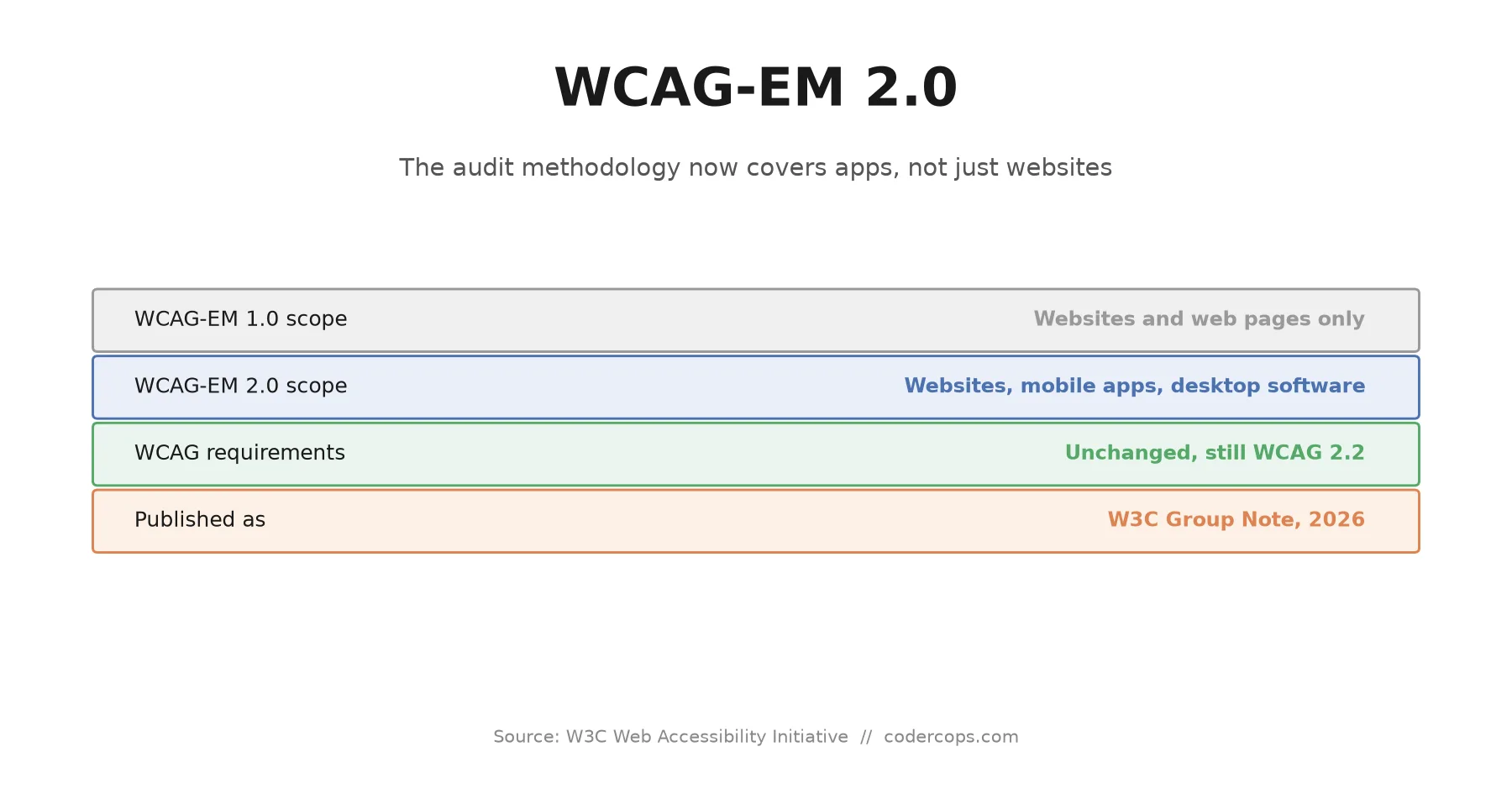
WCAG-EM 2.0 doesn’t touch the accessibility bar itself. WCAG 2.2’s success criteria, the actual rules about contrast ratios, keyboard operability, alt text, and everything else, are exactly what they were before this update. What changed is the evaluation methodology: the step-by-step process for deciding what to test, how to sample it, and how to report the result.
WCAG-EM 1.0 was written for websites. It assumed a structure of pages reachable by URL, which is a reasonable assumption for a site and not a usable one for a native app, which has screens, not pages, and navigation through gestures and state changes rather than links. Evaluators auditing apps have been adapting the web methodology by hand for years. WCAG-EM 2.0 formalizes that adaptation instead of leaving every team to invent its own version.
The five steps, unchanged in structure
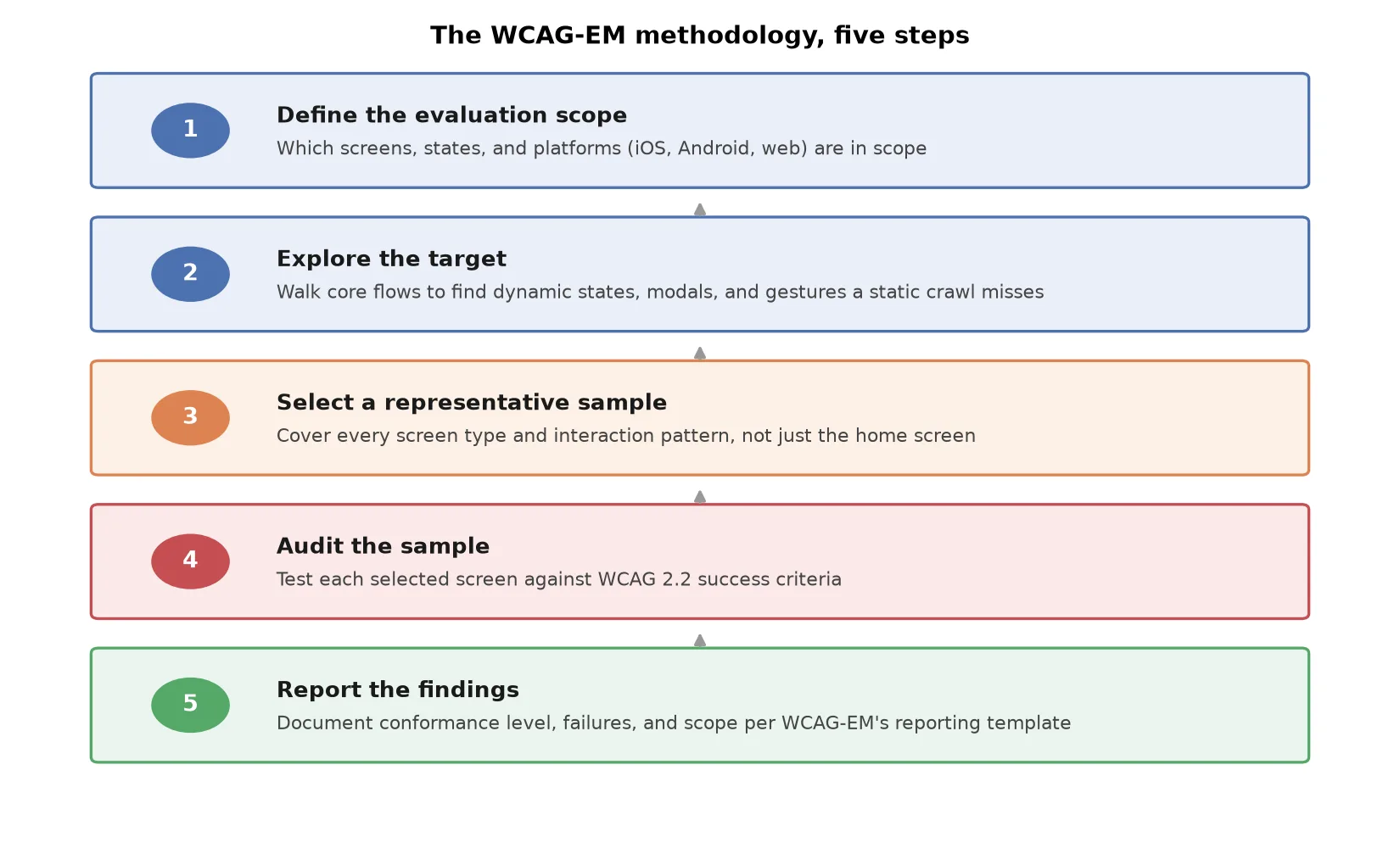
The core process carries over from WCAG-EM 1.0:
- Define the evaluation scope. Which product, which platforms, which parts of it. For a company with both a website and native apps, this step is where teams have historically left the app out by default, simply because the methodology they were following didn’t name it.
- Explore the target. Understand the product’s structure and functionality well enough to sample it intelligently. For an app, this means actually using it, not reading a sitemap, since there’s no equivalent artifact.
- Select a representative sample. Choose the set of screens, states, and flows the audit will actually test.
- Audit the sample. Test each selected item against WCAG’s success criteria.
- Report the findings. Document conformance level, specific failures, and what was and wasn’t in scope, so the report is defensible and reproducible.
Nothing in that list is new. What’s new is that a team auditing a native app can now point to an explicit W3C methodology built for exactly that product type, rather than a website methodology that technically covers “digital content” if you squint.
Sampling a native app instead of a website
This is where the practical work actually differs. A website sample is built around URLs and page templates: home page, a representative product page, a form, a page with embedded media. An app has no URLs, so the sample has to be built around screens and interaction states instead.
A defensible sample for a typical consumer app needs to include:
| Category | Examples |
|---|---|
| Core navigation screens | Home, main tab views, primary menu |
| Forms and input flows | Sign-up, checkout, settings, search |
| Dynamic and state-dependent content | Loading states, empty states, error states, live data updates |
| Modal and overlay content | Confirmation dialogs, bottom sheets, in-app notifications |
| Gesture-only interactions | Swipe-to-delete, pull-to-refresh, long-press menus |
| Platform-specific patterns | iOS VoiceOver rotor behavior, Android TalkBack focus order, native vs. custom components |
That last row matters more than it looks. A screen built with standard native components generally inherits a reasonable amount of accessibility behavior for free, correct focus order, proper labels, functioning screen reader gestures. A screen built with custom-drawn UI elements gets none of that automatically, and it’s exactly the kind of screen a website-oriented sampling process would never have flagged as higher-risk, because the equivalent concept barely exists on the web.
Where this connects to your existing accessibility work
If your team already runs WCAG 2.2 compliance work on the web side, the underlying knowledge transfers directly, contrast ratios, focus order, and alternative text mean the same thing whether they’re implemented in HTML or in a native UI framework. What doesn’t transfer automatically is the audit process itself, since a web-oriented checklist run against an app tends to either miss gesture-based interactions entirely or apply web-specific tests that don’t map cleanly onto native components.
Running an app through the same rigor you already apply to your website, using the sampling categories above instead of a URL list, closes that gap without requiring a different accessibility standard. The bar stays WCAG 2.2. What changes is making sure the audit actually reaches every screen and interaction pattern a user depends on, not just the ones that happen to look like a web page.
If your product ships a native app alongside a website and the accessibility review has only ever covered one of them, that’s the concrete gap WCAG-EM 2.0 is naming. Our design and engineering team runs accessibility audits across both web and native surfaces using this kind of structured sampling, and it usually surfaces gaps a checklist built for websites alone would have missed entirely.
Frequently asked questions
- What is WCAG-EM 2.0?
- It's an updated version of the W3C's Website Accessibility Conformance Evaluation Methodology, published as a W3C Group Note. It describes a technology-agnostic, step-by-step process for evaluating how well a digital product conforms to the Web Content Accessibility Guidelines (WCAG) 2. The 2.0 update extends the methodology's explicit scope beyond websites to mobile apps and desktop software.
- Does WCAG-EM 2.0 change the accessibility requirements themselves?
- No. WCAG-EM 2.0 does not introduce new WCAG success criteria or replace the WCAG 2 standard. It's a methodology for how to conduct an evaluation, not a new set of things to comply with. If your app already meets WCAG 2.2 AA, that hasn't changed; what's new is a documented process for testing whether it does.
- Why did mobile apps need their own evaluation methodology?
- WCAG-EM 1.0 was written with websites in mind: it assumed a crawlable structure of pages reachable by URL, which a native mobile app doesn't have. Evaluators applying it to apps had to improvise how to define scope and sample screens. WCAG-EM 2.0 makes that guidance explicit instead of leaving teams to adapt a web-specific process on their own.
- What are the five steps of a WCAG-EM audit?
- Define the evaluation scope, explore the target to understand its structure and functionality, select a representative sample of screens or pages, audit that sample against WCAG success criteria, and report the findings including conformance level and any failures found. The steps are unchanged from WCAG-EM 1.0; what changed is how to apply each one to a non-web product.
- How is sampling different for a mobile app than a website?
- A website's sample is usually a set of representative pages, chosen by URL and template type. A mobile app has no URLs, so the sample has to be a set of representative screens and states instead, including dynamic content, modals, in-app navigation flows, and any screen reachable only through a specific gesture or multi-step interaction, not just what's visible from the home screen.
Sources
Sponsored

Sponsored
Discussion
Join the conversation.
Comments are powered by GitHub Discussions. Sign in with your GitHub account to leave a comment.
Sponsored