Design · Design Systems
Design Tokens in 2026: The W3C Format Finally Standardizing Cross-Platform Design
Design tokens stopped being a per-tool convention in October 2025, when the W3C Design Tokens Community Group shipped a stable exchange format backed by Adobe, Figma, Google, and 40+ other organizations. Here's what actually changed and how to adopt it.

Abhishek Gupta
5 min read
Sponsored
Design tokens have been a design systems buzzword for years, but until recently the actual file format underneath them was tool-specific fiction. Export tokens from Figma, export the same tokens from Tokens Studio, export them from a hand-rolled Style Dictionary config, and you’d get three different JSON shapes for the same color value. That changed on October 28, 2025, when the W3C Design Tokens Community Group shipped version 2025.10, the first stable release of a shared specification backed by more than 40 organizations, Adobe, Figma, Google, Microsoft, Shopify, and Salesforce among them.
If you’re still treating design tokens as “the JSON file our design tool happens to export,” here’s what the standard actually changes and whether adopting it is worth the migration.
What a token actually looked like before this
The core idea of a design token, a single named value for a color, a spacing unit, a font size, that both design tools and code can reference, was never controversial. What was broken was interoperability. A tool like Tokens Studio represented a color one way. Figma’s own variable export represented it another way. A team’s hand-maintained Style Dictionary config assumed a third shape. Moving tokens between any two of these meant writing a translation layer, and that translation layer broke every time one of the tools changed its export format.
// A rough sketch of the kind of shape mismatch this caused.
// Tool A's export
{ "color-blue-600": "#1D4ED8" }

// Tool B's export for the conceptually identical token
{
  "color": {
    "blue": { "600": { "value": "#1D4ED8", "type": "color" } }
  }
}
Neither shape is wrong. They’re just incompatible, and every team building a real multi-platform design system ended up writing custom import and export scripts to bridge between whatever their design tool produced and whatever their build pipeline expected.
What DTCG actually standardizes
The spec defines a common token shape: every token is an object with a required $value and $type, and tokens can reference other tokens by a dot-path alias instead of duplicating the raw value.
{
  "color": {
    "blue-600": { "$value": "#1D4ED8", "$type": "color" }
  },
  "button": {
    "primary-bg": { "$value": "{color.blue-600}", "$type": "color" }
  }
}
That alias syntax, {color.blue-600}, is doing more work than it looks like. It’s what makes a semantic token layer, a button’s background pointing at a base color rather than hardcoding the hex value again, portable between tools. Change color.blue-600 once and every token that references it updates, in any tool that reads the DTCG format, without a custom resolution step written per destination.
Where this actually shows up in your pipeline
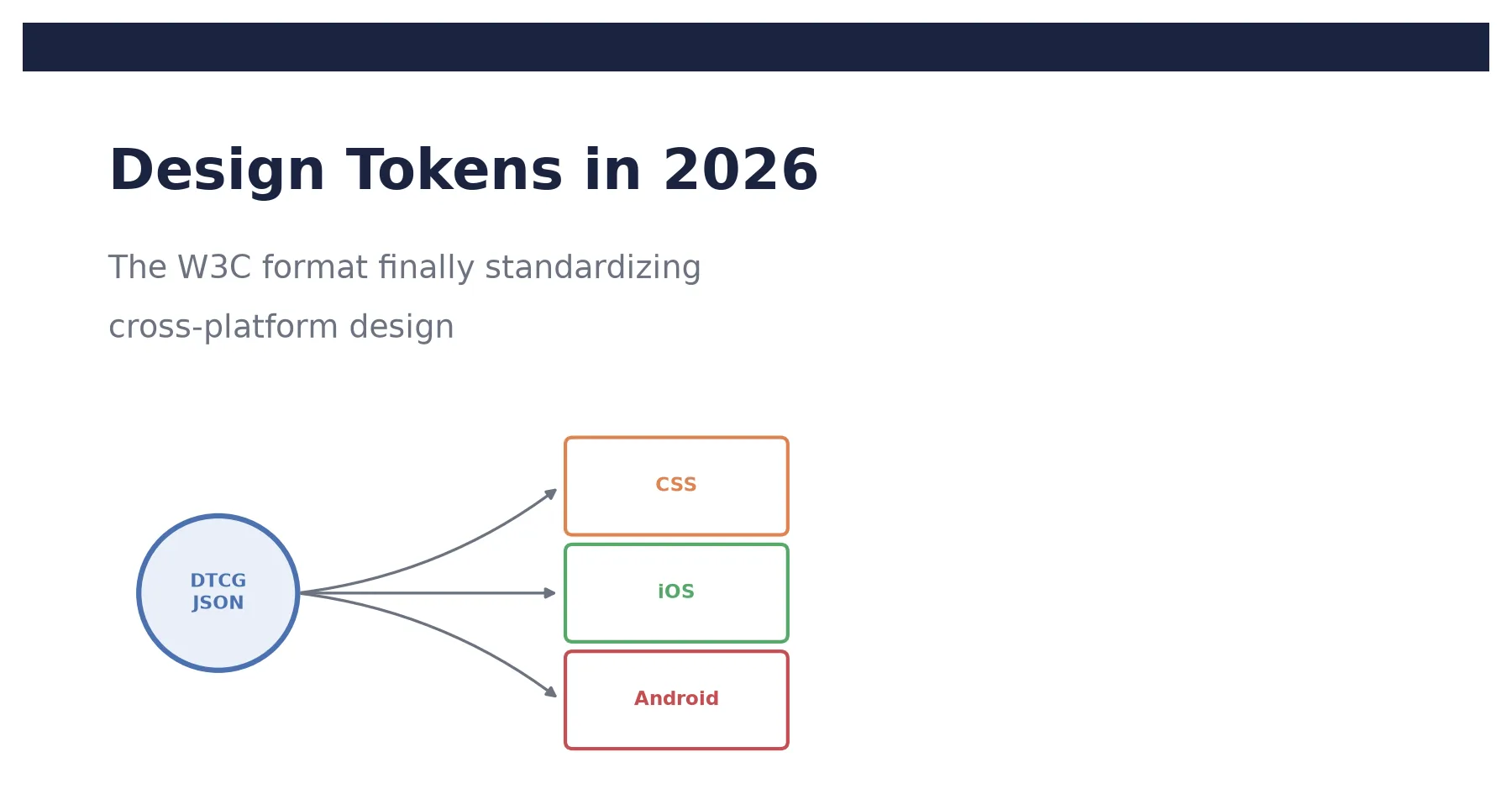
The format change doesn’t replace Style Dictionary or a similar build tool, and it isn’t supposed to. Style Dictionary and Terrazzo both still do the actual work of transforming a token source file into platform-specific output: CSS custom properties for a web app, an asset catalog for iOS, XML resources for Android.
# Style Dictionary reading a DTCG-format source file
style-dictionary build --config tokens.config.js
/* Generated output: CSS custom properties from the same token source */
:root {
--color-blue-600: #1D4ED8;
--button-primary-bg: var(--color-blue-600);
}What changed is the source file itself. Before, that source file was whatever shape your specific build tool expected, meaning a Figma plugin export usually needed a translation step before Style Dictionary could ingest it. Now Figma, Penpot, Sketch, and Tokens Studio can all export the same DTCG-shaped file, and Style Dictionary and Terrazzo can both read it directly. The translation layer that used to be custom, brittle glue code specific to your toolchain is increasingly just… not needed, because the tools on both ends agree on the file shape.
Migrating an existing token setup
If your tokens currently live in a tool-specific format, the migration is usually smaller than it sounds. The structural change is mechanical: wrap each token’s value in a $value key, add a $type, and convert any references to the dot-path alias syntax. Style Dictionary’s newer versions read the DTCG format directly, so for most teams this is a config update and a validation pass against the new schema rather than hand-editing every token file.
The part worth doing carefully is your semantic layer, if you have one. This is a good moment to audit whether your semantic tokens (button-primary-bg, text-error) actually alias to your base tokens the way you think they do, since the migration forces you to make every reference explicit in a format that’s easy to lint. A team that’s been carrying inconsistent or duplicated color values for a while tends to find a handful of them during this pass, the kind of drift that a broader design systems foundation is supposed to prevent but that accumulates anyway without tooling that actually enforces it.
Is it worth adopting now
The return scales directly with how many platforms have to stay visually consistent. A team shipping one web frontend gets a smaller win, mostly the basic discipline of naming values instead of hardcoding hex codes, which is worth doing regardless of file format. A team shipping the same brand across a web app, an iOS app, and an Android app is the case this format was built for: change a brand color once in a DTCG source file, and Style Dictionary can push that change into CSS, Swift, and Kotlin output without anyone touching three codebases by hand.
With Figma, Style Dictionary, and the major design tools now converging on one file shape instead of three, the case for treating your design tokens as a tool-agnostic source of truth, rather than an artifact of whichever design tool your team happens to use, is stronger than it’s been at any point since the concept became popular.
Frequently asked questions
- What is the W3C Design Tokens Community Group format?
- It's a standardized JSON shape for representing design tokens, colors, spacing, typography, and similar design decisions, so different tools can read and write the same token file instead of each tool inventing its own format. The specification reached its first stable version, 2025.10, in October 2025, backed by more than 40 companies and open-source projects including Adobe, Figma, Google, and Salesforce.
- Do I need to rewrite my design tokens to use DTCG?
- If your tokens currently live in a tool-specific format, Tokens Studio's older export shape or a hand-rolled JSON structure, migrating means restructuring each token to use the standard $value and $type keys and updating any tooling that reads the old shape. Style Dictionary and Terrazzo both support reading and writing the DTCG format directly, so the migration is usually a config change plus a validation pass rather than a full rewrite of every token by hand.
- What tools support the DTCG format?
- Figma, Penpot, Sketch, and Tokens Studio all support it on the design side. Style Dictionary and Terrazzo support it as build tools that transform tokens into platform-specific output like CSS custom properties, iOS asset catalogs, or Android XML resources. Documentation platforms including zeroheight and Knapsack also read the format.
- What's the actual difference between a DTCG token file and what teams were doing before?
- Before a shared format existed, a color token might be represented as a flat hex string in one tool's export and as a nested object with metadata in another's, and neither shape was guaranteed to survive a round trip between tools. DTCG defines every token as an object with a required $value and $type, and lets tokens reference other tokens by a dot-path alias, which is what makes a semantic token layer (a button's background token pointing at a base color token) something you can move between a design tool and a build pipeline without writing a custom transform for each direction.
- Is design tokens still worth adopting if my team is small?
- The return scales with how many places the same design decision needs to show up. A single-platform app with one small frontend gets less benefit from full token tooling than a team shipping the same brand across a web app, an iOS app, and an Android app, where a token change today means editing three codebases by hand without it. Even a small single-platform team benefits from the basic discipline, naming spacing and color decisions instead of hardcoding hex values everywhere, without necessarily needing the full multi-platform build pipeline.
Sources
Sponsored
More from this category
More from Design


Sponsored
Discussion
Join the conversation.
Comments are powered by GitHub Discussions. Sign in with your GitHub account to leave a comment.
Sponsored