Web Development · Frameworks
Deploy Astro to Cloudflare Workers with @astrojs/cloudflare
Run npx astro add cloudflare, build, then wrangler deploy. Static pages serve from Workers static assets; on-demand routes run in the Worker. Astro 7 setup.

Anurag Verma
8 min read · Updated Oct 19, 2026

Sponsored
This post started life as a preview of the Astro 6 beta. Astro 6 went stable on March 10, 2026, Astro 7 followed on June 22, and the Cloudflare adapter changed enough along the way that the beta notes aren’t useful anymore. What follows is the current setup: stable Astro on Cloudflare Workers, with static pages on Workers static assets and on-demand routes in the Worker.
How do you deploy Astro to Cloudflare Workers?
Install the adapter with npx astro add cloudflare, run astro build, then wrangler deploy. Prerendered pages upload as Workers static assets and are served first. Any request that doesn’t match a file falls through to the Worker, which renders on-demand routes. The current adapter is @astrojs/cloudflare 14.x, paired with Astro 7.
Versions as of October 2026: Astro 7.4.0 and @astrojs/cloudflare 14.4.0, both released October 15. Adapter v13 shipped alongside Astro 6 and v14 alongside Astro 7, so the major numbers move together.
Some context on Astro and Cloudflare
In January 2026 the team behind Astro joined Cloudflare. Cloudflare’s announcement says Astro will remain open source, and Astro CEO Fred Schott is quoted saying developers can use it “whether they host on Cloudflare or elsewhere.” The visible result in the framework is the adapter. The Astro 6 release describes the rebuilt @astrojs/cloudflare as running workerd “at every stage: development, prerendering, and production.”
If you’re on Astro 5 (this blog is, on the Astro 5 era adapter with Workers static assets), you’re running the older design, where bindings came through Astro.locals.runtime. The jump to adapter v13 is the breaking point covered below.
Setting up a project
For a new project, Cloudflare’s framework guide uses C3:
npm create cloudflare@latest -- my-astro-app --framework=astroFor an existing Astro project:
npx astro add cloudflareThat installs @astrojs/cloudflare and updates your config:
// astro.config.mjs
import { defineConfig } from 'astro/config';
import cloudflare from '@astrojs/cloudflare';

export default defineConfig({
  adapter: cloudflare(),
});
Make sure the build machine has Node 22 or later. Astro 6 dropped Node 18 and 20, and CI images are where that tends to surface first.
The Wrangler config
For a simple project you can skip it. The adapter docs say the Wrangler configuration file is now optional, and Astro generates a default when you have no custom settings. Once you add bindings or variables, create wrangler.jsonc. The documented shape looks like this:
// wrangler.jsonc
{
  "name": "my-astro-app",
  "main": "@astrojs/cloudflare/entrypoints/server",
  "compatibility_date": "2025-05-21",
  "assets": {
    "directory": "./dist",
    "binding": "ASSETS"
  },
  "vars": {
    "MY_VARIABLE": "test"
  },
  "kv_namespaces": [
    { "binding": "MY_KV", "id": "<namespace_id>" }
  ]
}
Use a current compatibility_date for your own project. If you depend on Node built-ins, add "compatibility_flags": ["nodejs_compat"].
You’ll also find guides, Cloudflare’s Astro framework page among them, that point main at ./dist/_worker.js/index.js and add _worker.js and _routes.json to .assetsignore. That’s a different layout from the one the current Astro adapter docs show. For adapter v13 and later, follow the adapter docs.
Static pages vs on-demand routes
This is the part worth understanding properly, because it determines what you pay for and what’s fast.
Astro’s default output is static. Every page is prerendered at build time into dist, and those files deploy as Workers static assets. Cloudflare serves them without running your Worker code. A fully static site doesn’t need a main entry at all.
To render a route on demand, opt it out of prerendering:
---
// src/pages/account.astro
export const prerender = false;

const user = await getUser(Astro.request);
---
<h1>Hello, {user.name}</h1>
Or flip the default with output: 'server' and mark the pages that should be static with export const prerender = true.
At request time, the adapter docs describe the routing order: static assets are matched first from the build directory, and “if no match is found, this will fall back to the Worker for on-demand rendering.” In practice, keep marketing pages, docs and blog posts prerendered, and reserve on-demand rendering for routes that read cookies, sessions or live data.
Prerendering itself runs in workerd by default. If a dependency only works in Node at build time, set prerenderEnvironment: 'node' in the adapter options.
Reading bindings and environment variables
Adapter v13 removed Astro.locals.runtime. Bindings now come from the Workers runtime module:
---
// src/pages/posts.astro
export const prerender = false;
import { env } from 'cloudflare:workers';

const { results } = await env.DB.prepare(
  'SELECT id, title FROM posts ORDER BY created_at DESC LIMIT 10'
).all();
---
<ul>
  {results.map((post) => <li>{post.title}</li>)}
</ul>
The same import works in endpoints and middleware. The full mapping from the old API:
| Before (adapter v12 and earlier) | Now (v13+) |
|---|---|
Astro.locals.runtime.env | import { env } from 'cloudflare:workers' |
Astro.locals.runtime.cf | Astro.request.cf |
Astro.locals.runtime.caches | global caches |
Astro.locals.runtime.ctx | Astro.locals.cfContext |
cfContext is the Workers ExecutionContext, which is how you run work after the response is sent:
---
const cfContext = Astro.locals.cfContext;
cfContext.waitUntil(logPageView(Astro.url.pathname));
---
You can also read plain variables through astro:env, for example import { MY_VARIABLE } from 'astro:env/server', which gives you schema validation on top. Secrets go in with npx wrangler secret put <KEY> for production and in .dev.vars locally.
For types, the adapter docs suggest running wrangler types before dev and build so env is typed from your Wrangler config:
{
  "scripts": {
    "dev": "wrangler types && astro dev",
    "build": "wrangler types && astro check && astro build",
    "preview": "wrangler types && astro preview"
  }
}
Local development on workerd
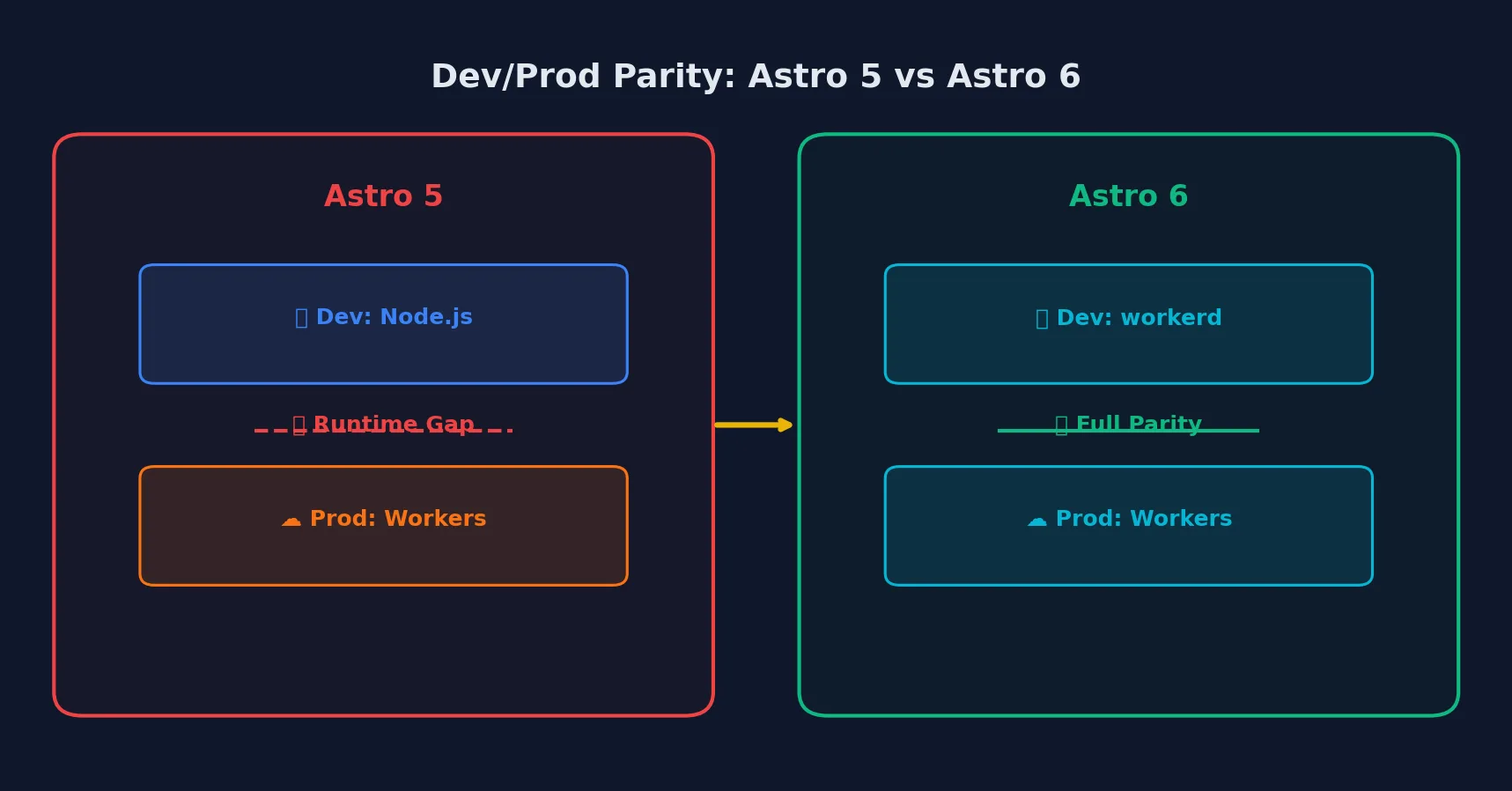 Since Astro 6, development runs in the same runtime as production
Before Astro 6, astro dev ran your server code in Node even if production was Workers, and bindings were emulated. Now the dev server uses Cloudflare’s Vite plugin and workerd, and astro preview runs on workerd as well. KV, D1, R2 and Durable Objects declared in your Wrangler config work locally.
This matters more than it sounds. The class of bug where something works in dev and fails on Workers (a Node API that doesn’t exist, a global that behaves differently) now shows up on your laptop instead of after deploy. The adapter also forwards Vite plugin options such as remoteBindings and persistState if you need to point dev at real remote resources or keep local state between runs.
Sessions, images and caching
Sessions use Workers KV automatically. Astro expects a KV binding named SESSION (change it with sessionKVBindingName), and you read data with await Astro.session?.get('cart').
Images default to the 'cloudflare-binding' service, which uses Cloudflare’s Images binding at runtime. Other options are 'passthrough', 'cloudflare', 'compile' and 'custom', and you can set build and runtime services separately:
adapter: cloudflare({
  imageService: { build: 'compile', runtime: 'cloudflare-binding' },
}),
Route caching became stable in Astro 7 with a platform-agnostic Astro.cache API and routeRules. A Cloudflare CDN cache provider, cacheCloudflare() from @astrojs/cloudflare/cache, exists but is marked experimental in the 7.0 release notes. I’d test it on a staging environment before trusting it with personalized pages.
Live Content Collections, stable since Astro 6, are worth a look here too. They fetch content at request time without a rebuild, which fits on-demand routes reading from D1 or a CMS. If you need per-object state at the edge, Durable Objects work through the same env import.
Deploying
Build, then deploy with Wrangler:
npx astro build
npx wrangler deploy
C3-scaffolded projects wrap this in npm run deploy. For multiple environments, the adapter docs specify a separate build per environment:
CLOUDFLARE_ENV=staging astro build && wrangler deployThat build-per-environment rule surprises people. The environment is baked in at build time, so a build made for staging can’t be promoted to production as-is.
Upgrading from Astro 5 and adapter v12
If you’re moving an existing Workers deployment forward:
- Upgrade Node to 22 or later locally and in CI.
- Run
npx @astrojs/upgradeto move Astro and its integrations together. - Replace every
Astro.locals.runtimeread using the table above. - Update
wrangler.jsoncsomainpoints at@astrojs/cloudflare/entrypoints/server, or delete the file if you have no bindings and let Astro generate it. - Content schemas moved to Zod 4 in Astro 6. Import
zfromastro/zodinstead ofastro:content. - If you go all the way to Astro 7, read our Astro 7 upgrade guide for the Rust compiler and Vite 8 changes. If you want CSP on the same site, our Astro CSP guide covers
security.csp. - Run
astro buildandastro preview, which now runs on workerd, before you deploy.
For a wider look at where Workers fits against other platforms, see our comparison of Cloudflare and Vercel edge computing.
Frequently asked questions
- How do I deploy Astro to Cloudflare Workers?
- Run `npx astro add cloudflare` to install and configure the adapter, then `astro build` and `wrangler deploy`. For a new project, `npm create cloudflare@latest -- my-astro-app --framework=astro` scaffolds everything. Static pages are uploaded as Workers static assets and on-demand routes run in the Worker.
- Should I use Cloudflare Pages or Workers for Astro?
- Workers. The current @astrojs/cloudflare adapter targets Workers with static assets, and Cloudflare's own Astro framework guide is written for Workers. A fully static Astro site doesn't even need a Worker entry, just the assets directory.
- What replaced Astro.locals.runtime on Cloudflare?
- Adapter v13 removed it. Use `import { env } from 'cloudflare:workers'` for bindings and variables, `Astro.request.cf` for the cf object, the global `caches` object for the Cache API, and `Astro.locals.cfContext` for the ExecutionContext (for example `waitUntil`).
- Can I test D1, KV and R2 locally with Astro?
- Yes. Since Astro 6 the dev server runs your code in workerd through Cloudflare's Vite plugin, and bindings declared in your Wrangler config are available in `astro dev` and `astro preview`.
- Do I need a wrangler.jsonc file?
- Not for simple projects. The adapter docs say the Wrangler configuration file is optional and that Astro generates a default when you have no custom settings. Add one when you need bindings, environment variables, or compatibility flags like nodejs_compat.
Sources
Sponsored
More from this category
More from Web Development



Sponsored
Discussion
Join the conversation.
Comments are powered by GitHub Discussions. Sign in with your GitHub account to leave a comment.
Sponsored