Web Development · Runtime
Deno 2.9: Build Native Desktop Apps From Your Web Stack
Deno 2.9 ships deno desktop, turning any web project into a native app with no Electron boilerplate. What it's for, and when to stay on Tauri instead.

Abhishek Gupta
6 min read
Sponsored
Deno 2.9 dropped June 25, 2026, and buried in the release notes between lockfile improvements and startup time numbers is something worth stopping on: deno desktop. Point it at any web project and you get a native, distributable desktop application. No Electron. No Rust toolchain. No rewrite.
Whether that’s the right call for your project is a different question, but it’s a real thing that works now, and it fills a gap that’s been obvious for a while.
What deno desktop actually does
deno desktop is a command in Deno 2.9 that turns a web project into a native desktop app. It detects your framework, builds it, and produces a self-contained binary with platform installers. The UI runs in the operating system’s native webview and your server code runs in Deno, so there is no bundled Chromium.
In practice, you run deno desktop in a project, and Deno auto-detects the framework, builds it, and produces a self-contained binary where:
- The UI runs in the platform’s native webview (WKWebView on macOS, WebView2 on Windows, WebKitGTK on Linux)
- Your server logic and backend code run in Deno
- The output is a single distributable binary with platform-native installers
No bundled Chromium. No extra runtime to install. The binary uses whatever webview the OS provides, which is why the output is small.
# In your existing project root
deno desktop

# Outputs
# ./dist/MyApp.app          (macOS)
# ./dist/MyApp.dmg
# ./dist/MyApp.exe          (Windows)
# ./dist/MyApp.msi
# ./dist/MyApp.AppImage     (Linux)
# ./dist/MyApp.deb
# ./dist/MyApp.rpm
No code changes to your web app. The framework detection runs automatically on Next.js, Astro, Fresh, Remix, Nuxt, SvelteKit, SolidStart, TanStack Start, and Vite SSR projects.
What else shipped in 2.9
The desktop feature is the headline, but 2.9 has two other improvements that matter to people already running Deno in production.
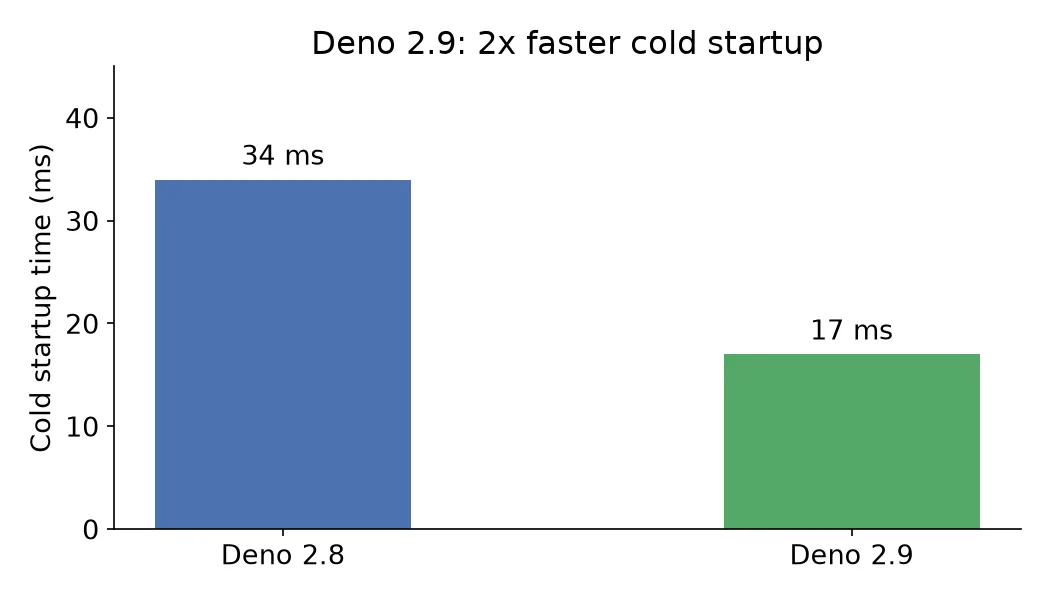
Cold startup is twice as fast. Deno 2.8 started cold in 34ms. Deno 2.9 does it in 17ms. Under load, memory usage dropped by 3x. These numbers come from the release blog and affect serverless and CLI use cases most visibly.
Migration from other package managers got easier. deno install now reads npm, pnpm, yarn, and Bun lockfiles directly. You can switch to Deno without re-resolving your dependency tree:
# If you have a package-lock.json or pnpm-lock.yaml, Deno reads it directly
deno install

# No need to regenerate or convert
This matters because the migration friction was real. Switching runtimes used to mean auditing your lockfile behavior. Now it’s a one-step test.
When deno desktop makes sense
The value is clearest for a few specific cases.
Internal tooling. Dashboard apps, admin UIs, developer utilities, and monitoring tools that your team uses internally are perfect targets. You already have a web frontend. Converting it to a distributable desktop app with deno desktop takes ten minutes. The experimental status matters less when the user base is your own team.
Developer tools and CLI companions. Apps that pair with a CLI tool and need a GUI layer. The Deno backend gives you full filesystem and process access; the webview handles the UI.
Rapid prototyping. When a client or stakeholder asks “can we make this a desktop app,” deno desktop is a fast answer. Ship it for feedback, then decide whether to harden it with Tauri or Electron if the answer is yes.
Where it’s probably not the right move: customer-facing software with auto-update requirements, apps that need native UI components (menus, system tray, notifications beyond what the webview exposes), and anything where you need guarantees about the webview version your users have. The native webview varies across OS versions, and deno desktop doesn’t abstract those differences yet.
How deno desktop compares to the alternatives
There’s already a decent set of tools for “desktop app from web tech,” and deno desktop doesn’t replace them so much as fill a gap.
| Tool | Bundle size | Setup cost | Status |
|---|---|---|---|
| Electron | 150-250MB | Low | Mature |
| Tauri | 4-10MB | Medium (requires Rust) | Mature |
| deno desktop | ~5-15MB | Very low | Experimental |
| NW.js | 80-150MB | Low | Maintained |
Tauri is the closest comparison. Both use native webviews and produce small binaries. The difference is setup: Tauri requires a Rust toolchain and a separate build configuration. deno desktop requires neither if you’re already using Deno, and auto-detects your framework. For teams that want Tauri-like output without the Rust dependency, this is the interesting option.
If you’re coming from a Node.js project rather than a Deno one, the comparison changes. You’d need to migrate (or at least introduce) Deno to use deno desktop, and the performance and startup improvements may or may not justify that on their own. The Deno 2 production guide covers what that migration actually looks like in practice.
Trying it now
If you have an existing Next.js or Vite project and want to test:
# Install or update Deno to 2.9
curl -fsSL https://deno.land/install.sh | sh

# Check version
deno --version

# In your project root
deno desktop
It runs, builds the project, and drops the installers into ./dist. The first run fetches dependencies; subsequent runs are faster.
For frameworks Deno doesn’t auto-detect, you can specify the dev server command and port manually:
deno desktop --command "npm run dev" --port 3000The bigger picture
Deno has been closing the gap with Node.js on compatibility for two years, a shift we compared in our Node.js, Deno, and Bun runtime breakdown. npm support, lockfile interop, and broad framework detection make 2.9 feel less like an alternative runtime and more like a drop-in upgrade with extra features. The desktop output is the most visible new thing, but the startup and memory improvements are probably what production users will notice first.
Desktop support is experimental. That’s the honest qualifier. But “experimental” from Deno in 2026 means something different than “experimental” did from Deno in 2020. The team has a track record of shipping stable versions of things that start as experimental, and the architecture here is well-understood from Tauri’s prior work on native webviews.
For teams already on Deno, 2.9 is worth upgrading to. For teams on Node.js considering a switch, the lockfile migration improvements make 2.9 a good time to run a test. For anyone who’s wanted a dead-simple way to ship a web app as a desktop binary without the Electron overhead, this is worth trying now.
The source is open: deno.com/blog/v2.9.
Frequently asked questions
- What is deno desktop and how does it work?
- deno desktop is a new command in Deno 2.9 that wraps a web project in a native, self-contained application. The UI runs in the platform's native webview (not a bundled Chromium), and your logic runs in Deno. The result compiles to a single binary with platform-native installers — .app/.dmg on macOS, .exe/.msi on Windows, .AppImage/.deb/.rpm on Linux.
- How is deno desktop different from Electron or Tauri?
- Electron bundles a full Chromium binary, which adds 100-200MB to every app. Tauri uses the native webview but requires Rust and a separate build system. deno desktop sits in between: it uses the native webview (small binary) and your existing web framework with zero config changes. The tradeoff is that it's newer and experimental, while Electron and Tauri are production-hardened.
- Which web frameworks does deno desktop support?
- Deno 2.9 auto-detects Next.js, Astro, Fresh, Remix, Nuxt, SvelteKit, SolidStart, TanStack Start, and Vite SSR projects. You run deno desktop in your project root and it figures out the framework.
- Is deno desktop production-ready?
- It's experimental in 2.9. For internal tools, developer utilities, and personal projects it's practical now. For customer-facing software where you need mature update mechanisms and platform-specific APIs, Tauri or Electron are still more hardened.
Sources
Sponsored
More from this category
More from Web Development



Sponsored
Discussion
Join the conversation.
Comments are powered by GitHub Discussions. Sign in with your GitHub account to leave a comment.
Sponsored