Career · Job Search Security
That "Coding Challenge" Might Be a RAT
North Korea-linked campaigns hide malware in take-home coding tests, using steganography in SVGs to pass review. How to vet a challenge before you run it.

Anurag Verma
5 min read
Sponsored
If you’re job hunting right now and a recruiter has asked you to clone a repo and “walk through the setup” before your first real conversation with a human, slow down. A campaign researchers call Contagious Interview has spent the past few years refining exactly this move, and its newest version hides the malware somewhere a normal code review won’t catch it.
How the attack actually works
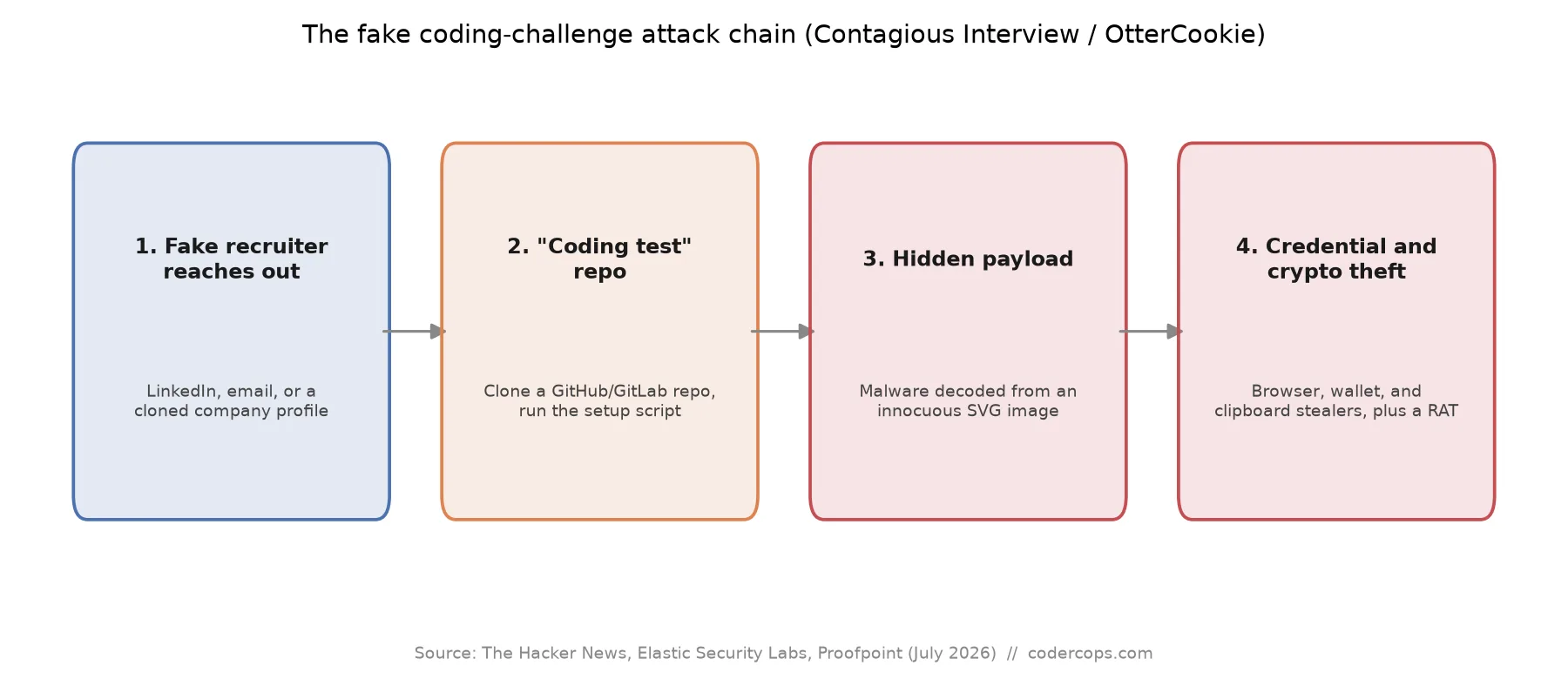
The pitch looks ordinary. A recruiter, often representing a fake or convincingly cloned crypto, blockchain, or AI startup, reaches out on LinkedIn, by email, or through a job board. The role sounds real, the comp sounds competitive, and the next step is a technical assessment: clone a private GitHub or GitLab repo, follow the setup instructions, and improve or debug a small project as your “interview.”
That’s the entire attack surface. The repo looks like a normal small project, because for the most part, it is one. The difference is a project asset, most often an SVG file labeled as something innocuous like a flag icon or a logo, that has a malicious payload encoded directly into its image data using steganography. A loader script elsewhere in the project decodes and executes that payload during the normal “run the project” step. You don’t get a security warning. You get a working demo, because from your side, the project genuinely runs.
What actually lands on your machine
Security researchers tie the payload to a malware family called OtterCookie, delivered in four stages once the loader runs: a browser and cryptocurrency wallet credential stealer, a general file stealer, a Socket.IO-based remote access trojan for ongoing control, and a clipboard stealer that specifically watches for copied crypto wallet addresses and silently swaps in the attacker’s own. That last piece is a deliberate touch aimed at developers who hold or trade crypto, a meaningful share of the population this campaign targets in the first place.
This isn’t the only version of the trick in circulation. A related operation tracked as Graphalgo used 192 malicious packages tied to fake crypto-trading companies, asking candidates to run and improve a given project as their skills test. Another, tracked by Proofpoint as UNK_DeadDrop, sent more than 250 emails in April and May 2026 alone, each pointing to a GitHub or GitLab repo dressed up as a coding assignment with instructions to clone it and open the folder directly in an editor like VS Code or Cursor. Different packaging, same core move: get the candidate to execute unreviewed code before anyone’s verified who’s actually on the other end of the conversation.
| Signal | Legitimate technical assessment | Contagious Interview-style test |
|---|---|---|
| Company verification | Confirmable outside the recruiter’s messages | Only exists inside the conversation thread |
| Timing | Usually after at least one real conversation | Often the very first ask, before any call |
| Setup step | Standard npm install / pip install against known packages | Custom setup script, sometimes with elevated permissions |
| Assets in the repo | Only what the project logically needs | Unexplained image or binary assets |
| Where you’re asked to run it | Your choice, including a sandboxed environment | Insists on your normal dev machine, sometimes with a deadline |
How to actually protect yourself
Verify the company and the person independently of how they contacted you. A real recruiter’s identity should hold up to a five-minute check: a real company domain, a real LinkedIn presence with history, colleagues who can confirm the role exists. If none of that is verifiable outside the thread itself, that’s the whole signal you need.
Don’t run a take-home assignment on your primary machine. Use a disposable VM, a fresh container, or a throwaway cloud dev environment for anything you haven’t fully reviewed yet. This is the one habit that matters most here: it doesn’t require you to catch the malicious code, it just removes the blast radius if you don’t.
Actually read the setup script before running it. If a “coding challenge” ships with a custom install or setup script rather than a standard npm install or pip install -r requirements.txt, read through what it does line by line first. This is the same discipline that made npm’s decision to turn off install scripts by default matter so much this year, the industry is actively trying to close this exact gap at the tooling level, but a custom setup script sidesteps that protection entirely.
Treat unexplained media assets as a red flag. An SVG, PNG, or other binary asset that doesn’t obviously belong to the project’s stated purpose is worth a second look, especially in a repo you were told to clone and run quickly.
Trust your timeline instincts. Real hiring processes rarely insist on an unreviewed code execution step as the very first interaction, before a recruiter call, before you’ve spoken to an actual engineer. Urgency paired with “just clone this and run it” is the combination worth pausing on.
If you’re navigating a job search and want to know what a legitimate, well-run hiring process actually looks like end to end, our guide on how to get hired as a remote developer covers what real screening steps look like from the other side of the table, which is a useful comparison the next time an assignment shows up in your inbox. The market for remote developer roles is real and the vast majority of recruiters are exactly who they say they are. The cost of the ones who aren’t is high enough that a five-minute verification habit is worth building into how you job hunt from here on.
Frequently asked questions
- What is the Contagious Interview campaign?
- It's a long-running set of operations, attributed with medium-to-high confidence to North Korean state-linked actors (the Lazarus Group), that targets software developers during the job search process. Attackers pose as recruiters or hiring managers, often for fake or cloned crypto and blockchain companies, and get candidates to run a 'coding assignment' that's actually a malware delivery vehicle.
- How does the SVG image trick work?
- Reported in July 2026, the newest variant hides a malicious payload using steganography, encoding it inside the pixel data of what looks like an ordinary SVG image, often labeled as a flag or icon asset in the project. A normal code review of the repository's JavaScript or Python won't reveal anything, because the executable content isn't in the code you'd naturally read, it's decoded and run by a small loader script elsewhere in the project at runtime.
- What does the malware actually do once it runs?
- Researchers link the payload to a malware family called OtterCookie, delivered in four stages: a browser and cryptocurrency wallet credential stealer, a file stealer, a Socket.IO-based remote access trojan, and a clipboard stealer, which is particularly effective against crypto users because it swaps a copied wallet address for the attacker's own. Together they're built to extract credentials, funds, and ongoing remote access, not just to make a quick smash-and-grab.
- How can I tell if a coding challenge is legitimate?
- Verify the company and recruiter independently of the channel that contacted you, a real hiring manager's identity should be confirmable outside the DM or email thread. Be cautious of any assignment that requires cloning a private repo and running a setup script before you've had a real conversation with a human at the company. Read through what a setup script actually does before running it, and treat any assignment that asks you to disable security software, run something with elevated permissions, or install unfamiliar global packages as a hard no.
- What should I do if I already ran a suspicious coding test?
- Assume compromise and act quickly. Disconnect the machine from sensitive accounts, rotate credentials for anything you're logged into on that machine (email, GitHub, cloud provider consoles, banking), move cryptocurrency to a wallet you control from a different, clean device, revoke active browser sessions and API tokens, and run a full malware scan. If it's a work machine, tell your employer's security team immediately rather than trying to quietly clean it up yourself; the earlier a real compromise is contained, the smaller the blast radius.
Sources
- The Hacker News: North Korea-Linked Hackers Hide OtterCookie-Aligned Malware in SVG Flag Images
- Elastic Security Labs: Contagious Interview malware in SVG images, DPRK campaign
- BleepingComputer: Fake job recruiters hide malware in developer coding challenges
- The Register: Suspected North Korean actors send 250+ fake dev job pitches to steal crypto
Sponsored



Sponsored
Discussion
Join the conversation.
Comments are powered by GitHub Discussions. Sign in with your GitHub account to leave a comment.
Sponsored