Cloud & Infrastructure · Architecture Patterns
Serverless Cold Starts Explained: Causes and Fixes
A cold start is the fresh execution environment a platform builds before running your code. Some take 5ms, others 2 seconds. Here's why, and how to cut it.

Shashikant Gupta
8 min read
Sponsored
Send a request to a Cloudflare Worker that has never run before, and it responds in under 5 milliseconds. Send the same kind of request, cold, to a standard AWS Lambda function, and you’re routinely looking at 100 to 400 milliseconds, sometimes north of a full second. Both get marketed as “serverless.” Both promise you never think about servers. The gap between them is not a tuning difference, it’s architecture, and understanding it is the difference between guessing at fixes and actually closing it.
What causes a serverless cold start
A cold start happens when a platform gets a request with no already-running instance of your function ready to handle it, so it has to build one from nothing: provision compute, load your code and dependencies, run your initialization logic, and only then execute your handler. The duration is set almost entirely by what the platform has to build. A platform that boots a full virtual machine takes tens to hundreds of milliseconds longer than one that just allocates memory inside a process already running.
That’s the whole mechanism in one sentence, but “what the platform has to build” hides a lot, and it’s the part worth actually understanding instead of memorizing.
MicroVM boot vs. V8 isolate: the real difference
AWS Lambda runs your function inside Firecracker, a purpose-built microVM. Firecracker is genuinely lightweight as VMs go, AWS designed it specifically to boot fast, but it still boots: it starts a minimal kernel, sets up a virtualized device layer, and initializes an execution environment before your runtime even loads. That’s real operating-system work, and operating systems don’t start instantly no matter how much you trim them down.
Cloudflare Workers and Vercel’s Edge Runtime skip that step entirely. They run on V8, the same JavaScript engine inside Chrome, and V8 already supports isolates: independent, memory-safe execution contexts inside one running process. Starting a new isolate means allocating some memory in an engine that’s already up and loading your compiled code into it. No kernel, no device layer, no process fork. Cloudflare’s own engineering writeup, Eliminating cold starts with Cloudflare Workers, puts isolate creation under 5 milliseconds, with a large share of requests landing under 3ms.
That also explains the tradeoff nobody markets as loudly: an isolate can’t do what a full microVM can. You can’t shell out to a native binary, spin up arbitrary language runtimes, or hold a long-lived connection the way a Lambda container can. The speed comes from the isolate being a narrower thing by design, not a faster version of the same thing.
Cold-start ranges, platform by platform
The gap holds up in real numbers, not just architecture diagrams. Here’s how the major platforms compare, based on Cloudflare’s own reporting, AWS’s own SnapStart documentation, and third-party benchmark data:
| Platform | Typical cold start | Why |
|---|---|---|
| Cloudflare Workers (V8 isolate) | Under 5ms, often under 3ms | No OS boot; memory allocated in a running process |
| AWS Lambda, Java with SnapStart | ~90-200ms | Resumes from a pre-initialized snapshot instead of booting cold |
| Vercel Edge Functions (V8 Edge Runtime) | ~50-250ms | V8 isolate, similar mechanism to Workers, different sharding |
| AWS Lambda, Node.js/Python (standard) | ~100-400ms, up to ~2.8s unoptimized | Firecracker microVM boot, plus package size and init cost |
| Vercel Serverless Functions (container) | ~200-800ms | Fuller container runtime, not a V8 isolate |
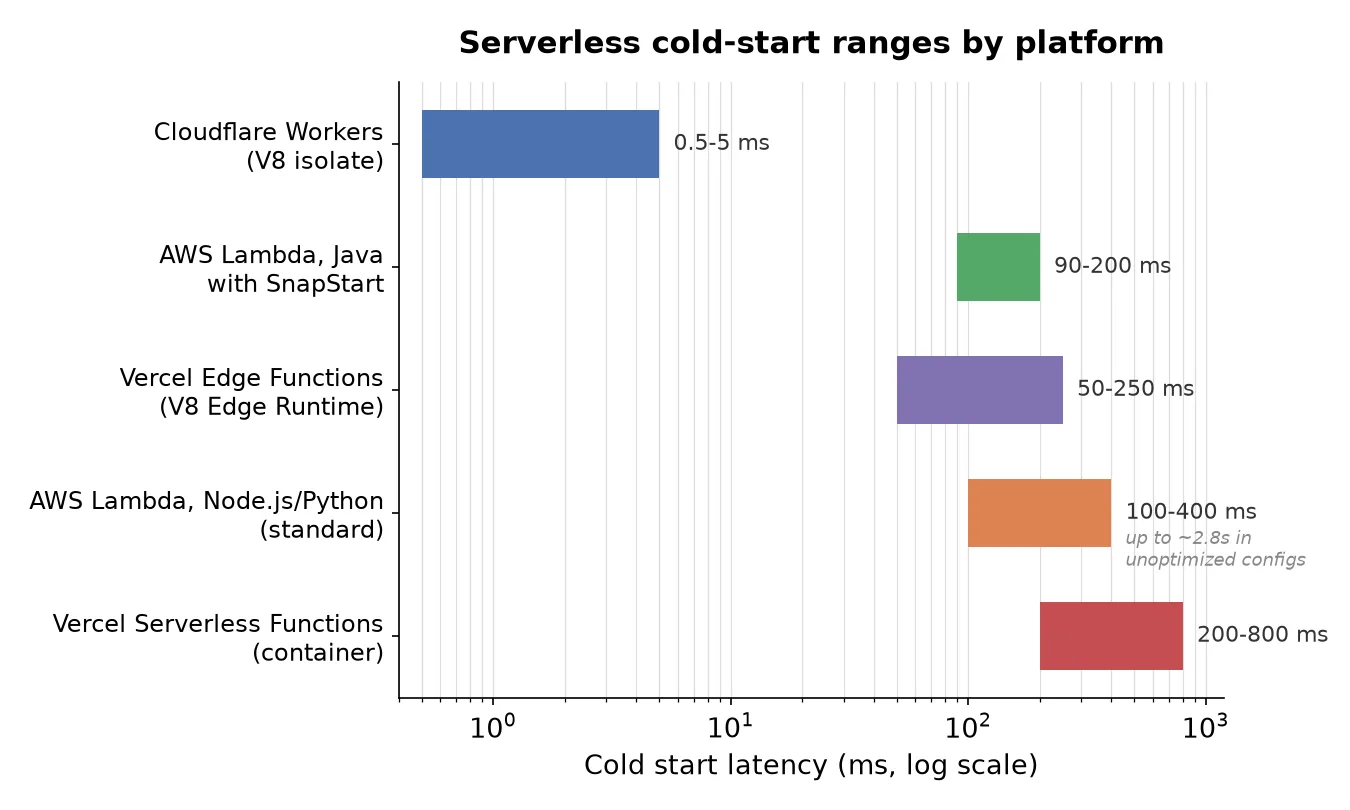
The x-axis is log scale for a reason: Cloudflare Workers and standard AWS Lambda aren’t on the same order of magnitude. Benchmark writeups like tech-insider.org’s 2026 Cloudflare Workers vs. Lambda comparison put the gap at roughly 240x versus Lambda’s p95, and that number tracks with the architecture, not against it. A process that’s already warm beats a process that has to boot, every time, by whatever margin the boot itself costs.
Notice where SnapStart sits on that table: nearly as fast as a V8 isolate, despite running inside the exact same Firecracker microVM as every other Lambda function. That’s the interesting case, because it proves the microVM boot isn’t the only lever. It’s just the one you pay for by default.
Why SnapStart closes most of the gap without changing the runtime model
SnapStart works by snapshotting the memory and disk state of an already-initialized execution environment, then caching that snapshot and restoring new instances from it instead of running your init code from scratch each time. AWS’s own docs on improving startup performance with Lambda SnapStart describe a launch example that took a Java function from over 6 seconds cold to under 200ms, with typical Java cold starts landing around 90-140ms once SnapStart is enabled versus multiple seconds without it.
The reason this matters beyond Java: it’s a general proof that most of a Lambda cold start isn’t the microVM boot itself, it’s everything that happens after the microVM is up, your runtime initializing, your framework wiring up, your dependencies loading. SnapStart doesn’t make Firecracker boot faster. It skips redoing the expensive part every single time. SnapStart currently covers Java, Python, and .NET; other runtimes don’t have it yet, which is exactly why standard Node.js functions still carry the full 100-400ms.
Five levers that actually move the number
Provisioned concurrency keeps a set number of instances pre-warmed and ready, so requests that land on them skip the cold path entirely. It works, and it’s the most direct fix available on Lambda, but you pay for those instances whether or not traffic shows up to use them. It’s a cost-for-latency trade, not a free lunch.
Smaller deployment packages and lazy-loaded dependencies cut down what has to load before your handler runs. A function that imports a 40MB SDK it uses in one rarely-hit code path is paying that load cost on every cold start, not just the requests that need it. Moving that import inside the function that actually uses it, instead of at the top of the file, defers the cost to when it’s genuinely needed. This is the same instinct behind multi-stage Docker builds: strip what doesn’t need to be there before the thing that starts up has to load it.
Runtime choice matters more than people expect. Node.js and Python initialize faster than JVM-based runtimes without snapshotting, because there’s no bytecode-heavy runtime to spin up before your code even starts. If your workload doesn’t specifically need the JVM ecosystem, that’s latency you’re paying for nothing.
Snapshot-and-restore, where your platform supports it, is the closest thing to a structural fix rather than a workaround. SnapStart is the concrete example; if your runtime is on the supported list, it’s usually worth turning on before reaching for provisioned concurrency, since it doesn’t carry an ongoing idle cost the same way.
Scheduled pings (“keep the function warm” cron jobs) are the honest, slightly hacky option. Pinging a function every few minutes keeps an instance alive so real traffic doesn’t hit a cold one, and it costs real money in invocations for zero user-facing work. It also has a ceiling: it stops helping the moment traffic gets bursty enough that concurrent requests outrun however many instances your pings happen to be keeping warm. It’s a patch, not an architecture, and treating it as one eventually breaks under exactly the load spike it was meant to protect against.
The platform decision is the real fix
Tuning a slow platform only gets you so far. The pattern that’s actually taken hold in production by 2026 is a hybrid split rather than a single-platform bet: V8-isolate edge platforms (Cloudflare Workers, Vercel Edge Functions) for stateless, latency-sensitive, user-facing endpoints, and container or microVM-based serverless (Lambda, Cloud Run) for backend and batch work that needs full runtime flexibility, longer execution windows, or heavier dependencies. This is the same tradeoff explored in more depth in edge functions vs. serverless: the fast platform and the flexible platform aren’t competing for the same job, they’re built for different ones.
If you’re weighing this at the architecture level rather than the per-function level, it’s worth reading alongside edge functions vs. serverless vs. containers, which walks the same decision from the cost side rather than the latency side. The two lenses usually agree: put the auth check, the redirect, the A/B test, the thing a user is waiting on, at the edge. Put the thing doing real work behind it, where a 200ms boot is a rounding error against the work itself.
Cold starts aren’t a bug in serverless computing, they’re the visible cost of the abstraction, paid at a different rate depending on what the platform actually has to build before your code runs. Pick the platform that matches what each endpoint needs, and most of this stops being a problem you have to solve by hand.
Frequently asked questions
- What causes a serverless cold start?
- A cold start happens when a serverless platform receives a request and has no already-running instance of your function ready to handle it, so it has to build one from scratch: provisioning compute, loading your code and its dependencies, and running your initialization code before the first line of your handler executes. How long that takes depends on what the platform has to build. Some boot a full microVM; others just allocate memory in a process that's already running.
- How long does an AWS Lambda cold start take?
- For standard Node.js or Python functions, typically 100-400ms depending on package size and memory allocation, because Lambda has to boot a Firecracker microVM before your code runs. Larger, less-optimized Node.js 20 functions have been benchmarked as high as 1.2-2.8 seconds at p95. Java functions with SnapStart enabled land around 90-200ms instead, because SnapStart resumes from a pre-initialized snapshot rather than booting cold.
- Does Cloudflare Workers have cold starts?
- Technically yes, but they're consistently under 5 milliseconds and often under 3ms, according to Cloudflare's own engineering blog. That's because Workers run in V8 isolates rather than microVMs or containers: an isolate is memory allocated and code loaded inside a process that's already running, not an operating system booting from scratch, which is the step that makes container and microVM cold starts slow.
- How do I reduce cold starts in production?
- Use provisioned concurrency to keep a set number of instances warm (it costs money even when idle), shrink your deployment package and lazy-load dependencies you don't need on every invocation, pick a runtime that initializes fast (Node.js and Python beat JVM-based runtimes without snapshotting), use SnapStart-style snapshot-and-restore where your platform supports it, or move latency-critical endpoints to a V8-isolate edge platform like Cloudflare Workers instead of tuning around a slower one.
Sources
Sponsored
More from this category
More from Cloud & Infrastructure



Sponsored
Discussion
Join the conversation.
Comments are powered by GitHub Discussions. Sign in with your GitHub account to leave a comment.
Sponsored