Cloud & Infrastructure · Architecture
Vector Clocks: Ordering Events Without a Clock
Two writes hit different replicas at once. Which came first? Sometimes neither. How vector clocks tell a real conflict from a false one, without wall time.

Prathviraj Singh
7 min read
Sponsored
Vector clocks, explained through one conflict: two replicas of the same record get written to almost simultaneously. Replica A says the value is 42. Replica B says it’s 17. Which one is right?
The honest answer, most of the time, is that the question is malformed. “Which one is right” assumes one write happened after the other and should win. Often neither did. They happened concurrently, on different nodes, each with no idea the other was happening. Wall-clock timestamps will confidently give you an answer anyway, because a clock always returns a number. It just might be the wrong one. Vector clocks exist because “wrong answer, delivered with total confidence” is a bad way to resolve write conflicts in distributed systems, where the real question is causality.
Why wall-clock time doesn’t work
Wall-clock time cannot order writes across machines because clocks are never perfectly synchronized. NTP keeps them within tens of milliseconds at best, and GC pauses, VM migrations, or bad corrections widen the gap. Conflicting writes usually land inside that window, so a timestamp cannot say which one truly happened first.
The instinct is to timestamp every write and let the later timestamp win. This is “last write wins,” and it’s simple enough that a lot of production systems use it anyway, accepting the tradeoff. The problem is that clocks on different machines are never perfectly synchronized. NTP keeps them close, typically within tens of milliseconds under good conditions, but “close” isn’t “ordered,” and even brief GC pauses, VM migrations, or a bad NTP correction can widen that gap. For two writes that land within the same tens-of-milliseconds window, which describes the overwhelming majority of real write conflicts, wall-clock time cannot reliably tell you which one a human would agree happened first.
What you actually want to know is not “what time did this happen” but “did the node making this write know about the other write when it made this one.” That’s a causality question, and it has a precise, computable answer that doesn’t depend on any clock agreeing with any other clock.
The mechanism
A vector clock is a list of counters, one per node in the system. Every node maintains its own copy of the full vector.
Two rules govern how it updates:
- On a local event (a write, typically), a node increments only its own position in the vector.
- On receiving a message from another node, a node merges the incoming vector into its own by taking the element-wise maximum, then increments its own position.
class VectorClock:
    def __init__(self, node_id, nodes):
        self.node_id = node_id
        self.clock = {n: 0 for n in nodes}

    def local_event(self):
        self.clock[self.node_id] += 1
        return dict(self.clock)

    def receive(self, incoming: dict):
        for node, count in incoming.items():
            self.clock[node] = max(self.clock[node], count)
        self.clock[self.node_id] += 1
        return dict(self.clock)
Three nodes, A, B, and C, each start at {A: 0, B: 0, C: 0}. A writes locally: its vector becomes {A: 1, B: 0, C: 0}. It sends that write to C, which merges it and increments its own slot: {A: 1, B: 0, C: 1}. Meanwhile B, which never heard from A, makes its own independent write: {A: 0, B: 1, C: 0}.
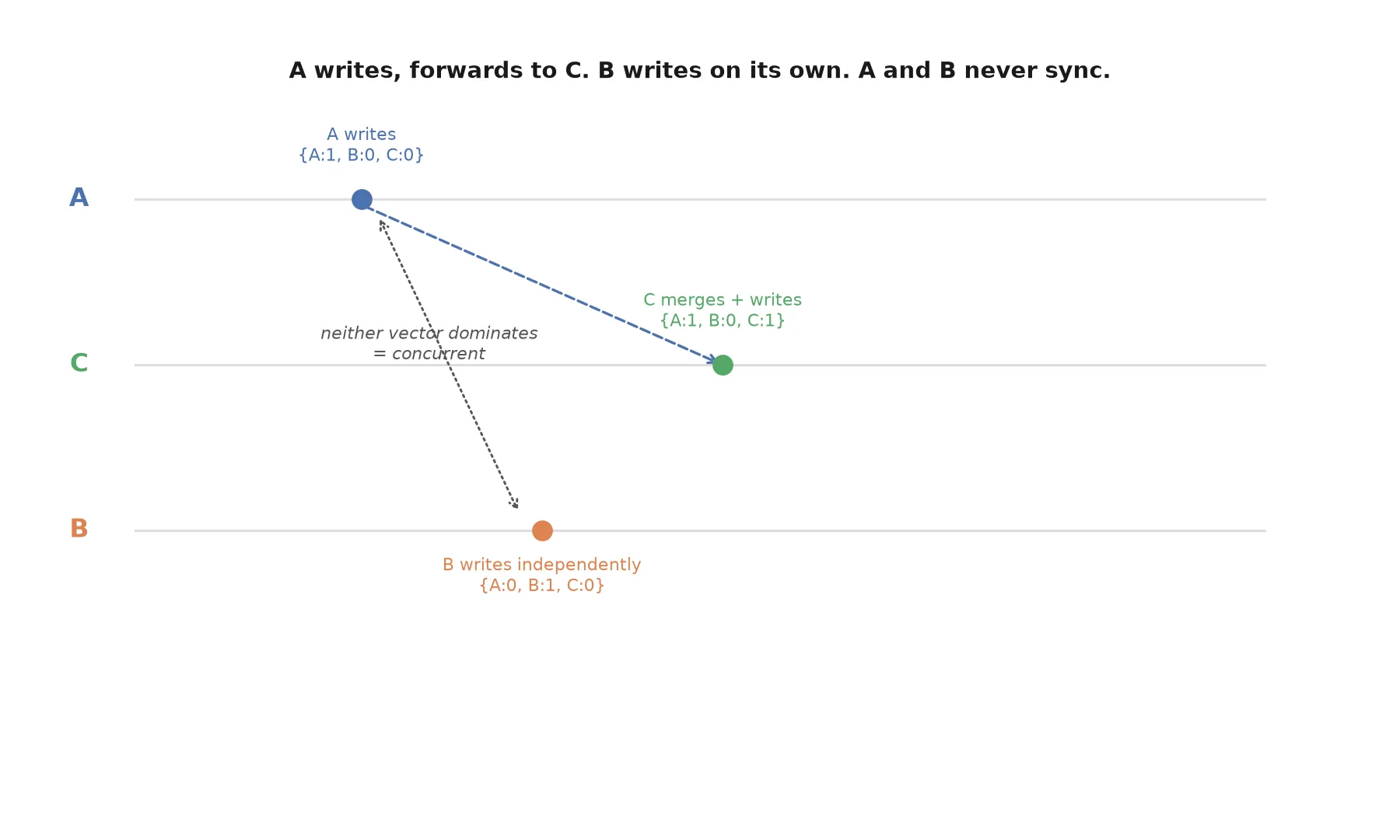
Now compare A’s vector, {A: 1, B: 0, C: 0}, against B’s, {A: 0, B: 1, C: 0}. Neither vector is entrywise less-than-or-equal to the other. A’s is higher in the A slot; B’s is higher in the B slot. That’s the formal definition of concurrency: two events where neither vector dominates the other. And it’s exactly right. B genuinely had no knowledge of A’s write when it made its own.
Reading the comparison
Given two vector clocks V1 and V2, there are exactly three possible relationships:
| Relationship | Condition | Meaning |
|---|---|---|
| V1 happened before V2 | every entry of V1 ≤ the corresponding entry of V2, and at least one is strictly less | V1’s node’s state was known to V2’s node when V2 happened |
| V2 happened before V1 | the reverse of the above | V2’s node’s state was known to V1’s node when V1 happened |
| V1 and V2 are concurrent | neither dominates the other | neither node knew about the other’s event |
That third case is the one wall-clock time can’t give you honestly. It isn’t a failure of the algorithm; it’s the algorithm correctly reporting that there is no causal relationship to report. A system that needs to make a decision anyway, pick a winner, merge the values, ask the user, now has an accurate signal to decide from instead of an arbitrary one.
Where this actually gets used
Amazon’s Dynamo paper, which underpins a lot of the “eventually consistent, multi-master” database design used across the industry, popularized vector clocks specifically for this: detecting when two replicas have diverged in a way that a simple timestamp comparison would paper over. Riak used them the same way for years, exposing conflicting “sibling” values to the application when vectors came back concurrent rather than silently picking one.
Most teams today reach this problem indirectly, through CRDTs and local-first sync engines, which use vector clocks or close relatives (dotted version vectors, interval version vectors) internally to decide when two changes need a merge function instead of a simple overwrite. If you’ve used a sync engine that resolves offline edits from two devices without losing either one, there’s a good chance a vector clock, or something descended from the idea, is doing the causality tracking underneath the friendly merge API. Understanding the mechanism doesn’t mean you should hand-roll it. If you want the broader context, leader election with Raft, etcd, and ZooKeeper shows the other way systems avoid concurrent writers, and event sourcing explained shows where ordered event logs fit. Understanding the mechanism also means you can correctly predict what your database’s “last write wins” setting is actually going to do the next time two writes land close together, and recognize that it’s silently discarding a concurrent write rather than merging it.
The real cost: the vector grows with the cluster
The catch that keeps vector clocks from being a free upgrade over a plain counter: the vector has one entry per node that has ever written to a piece of data. In a system with a small, fixed set of replicas, that’s cheap. In a system where clients themselves are nodes, every mobile device, every browser tab, that vector can grow without bound, and it has to travel with every write.
Production systems handle this with pruning strategies: capping the vector to the most recent N contributors and dropping the oldest, or using a variant like dotted version vectors that tracks contribution more compactly. That’s a real engineering tradeoff, not a footnote. If you’re evaluating a database or sync engine that advertises vector-clock-based conflict resolution, that pruning strategy is worth understanding before you depend on it. This is the same category of tradeoff you run into with distributed locks: the primitive that gives you a correctness guarantee also has an operational cost, and the interesting engineering decision is how a specific implementation manages that cost, not whether the underlying idea is sound.
The takeaway
A vector clock answers one question precisely: did this node know about that event when it acted. It can’t tell you which write a human would prefer, and it can’t make a conflict disappear. What it does is replace a false certainty (a timestamp says one write is “later”) with an honest uncertainty (these two writes are provably concurrent, and something now has to decide how to merge them). In distributed systems, that trade is usually the right one. A wrong answer delivered with confidence is worse than a correct “I don’t know which came first,” because only the second one tells you where to actually put the resolution logic.
Frequently asked questions
- What's the difference between a vector clock and a Lamport timestamp?
- A Lamport timestamp is a single number per event that guarantees if A causally happened before B, then A's timestamp is less than B's. But the reverse doesn't hold: a smaller timestamp doesn't prove causal precedence, because Lamport timestamps can't distinguish 'A caused B' from 'A and B are unrelated but A happened to get a smaller number.' A vector clock fixes exactly this gap. Comparing two vector clocks lets you prove causal order when it exists and correctly detect concurrency when it doesn't, which a single Lamport number cannot do.
- Why not just use synchronized wall-clock timestamps?
- Because 'synchronized' is a matter of degree, not a guarantee. Even with NTP, clocks across machines can differ by tens of milliseconds under normal conditions and far more under clock skew, VM pauses, or NTP correction jumps. For events that happen close together in time, which describes most real write conflicts, that drift is enough to get the order wrong. Vector clocks sidestep the problem entirely by tracking causality (what each node actually knew about) instead of time (what a clock claims happened when).
- What does it mean when two vector clocks are 'concurrent'?
- It means neither event's node had seen the other event when it made its write. Concretely: if node A writes v=[1,0,0] and node B independently writes v=[0,1,0] without having synced with A first, those two writes are concurrent. Neither is 'more correct' or 'more recent' in any way the system can prove. That's not an edge case to paper over; it's an accurate description of what happened, and the application (or a CRDT merge function) has to decide how to resolve it.
- Do I need to implement vector clocks myself?
- Almost never, and that's the honest answer. Riak used them internally for years, Amazon's original Dynamo paper popularized the technique, and modern CRDT libraries and sync engines implement the causality tracking for you under a friendlier API. The value in understanding the mechanism isn't to hand-roll it in a typical CRUD app; it's to correctly reason about the 'last write wins' behavior your database or sync engine actually gives you, and know when that behavior is silently dropping a concurrent write instead of merging it.
Sponsored
More from this category
More from Cloud & Infrastructure



Sponsored
Discussion
Join the conversation.
Comments are powered by GitHub Discussions. Sign in with your GitHub account to leave a comment.
Sponsored