Cloud & Infrastructure · Backend Infrastructure
BullMQ vs Celery vs Sidekiq vs Cloud Queues
BullMQ for Node, Celery for Python, Sidekiq for Ruby, and Temporal or a cloud queue when you need durability without owning a broker. The reasoning.

Shashikant Gupta
7 min read
Sponsored
If you searched “BullMQ vs Celery vs Sidekiq,” here’s the direct answer: use BullMQ if your backend is Node or TypeScript, Celery if it’s Python, Sidekiq if it’s Ruby, and look at Temporal or a cloud-managed queue like SQS or Cloud Tasks if you need durability across crashes and deploys without running your own broker, or if you’re not in any of those three ecosystems. The rest of this post is the reasoning behind that answer, a comparison table, and enough code to get a queue running today.
Why the language should decide this, not a feature checklist
Job queue feature comparisons tend to bury the one variable that matters most: which language your team already writes in. BullMQ, Celery, and Sidekiq have converged on the same core feature set over the past decade, retries with backoff, scheduled and delayed jobs, priority queues, dead-letter handling for jobs that keep failing. The differences between them are real but second-order next to the cost of running a queue in a language your team doesn’t already use for the rest of the backend.
A Python shop bolting on BullMQ means either a Node sidecar service just for job processing, or writing a Redis-based queue client from scratch in Python to talk to a Node-shaped protocol. Neither is worth it. Pick the queue native to your stack and move on.
The comparison
| BullMQ | Celery | Sidekiq | |
|---|---|---|---|
| Language | Node.js / TypeScript | Python | Ruby |
| Broker | Redis only | Redis or RabbitMQ | Redis only |
| Delivery guarantee | At-least-once | At-least-once | At-least-once |
| Web UI | Bull Board (separate package) | Flower (functional, dated) | Built-in, best of the three |
| Multi-step workflows | Manual (flows exist but are more limited) | Strong (chains, groups, chords) | Manual |
| Free tier limits | None significant | None significant | Single-process; Pro/Enterprise add reliable fetch and more |
| Best fit | Node/TS backends already on Redis | Python, especially ML/data pipelines | Rails apps |
Two rows deserve more than a table cell.
Delivery guarantee is the same word in all three rows for a reason: it’s genuinely the same guarantee. Every one of these systems can and will redeliver a job that already ran, typically because a worker crashed after doing the work but before acknowledging it, or because a retry fired while the original attempt was still in flight. This is not a bug or a configuration mistake, it’s how at-least-once delivery works everywhere, including SQS and Cloud Tasks. If a job charges a credit card or sends an email, give it an idempotency key and check it before doing the side effect, otherwise you will eventually double-charge someone or send two welcome emails on a bad network day.
Multi-step workflows is where Celery pulls ahead if that’s a real requirement for you. Its chain, group, and chord primitives let you express “resize the image, then in parallel generate a thumbnail and extract EXIF data, then once both finish, update the database record” as a single composed expression, with Celery handling the coordination and partial-failure bookkeeping. BullMQ has flow producers for parent-child job relationships, and Sidekiq has Sidekiq Pro’s batches, but neither reads as cleanly for genuinely branching task graphs. If your background work is mostly independent, unrelated jobs, this difference won’t matter to you. If you’re building ML or data pipelines with real dependency graphs, it matters a lot, and it’s a decent reason to pick Celery even outside a Python shop, though I’d still weigh that against the cost of running a second language stack.
A minimal BullMQ producer and worker
Here’s a complete, runnable example: a producer that enqueues an image-processing job, and a worker that processes it with retries.
// queue.ts: shared queue definition
import { Queue } from 'bullmq';

export const imageQueue = new Queue('image-processing', {
  connection: { host: '127.0.0.1', port: 6379 },
});
// producer.ts: call this from your API route
import { imageQueue } from './queue';
async function enqueueResize(userId: string, imageUrl: string) {
await imageQueue.add(
'resize',
{ userId, imageUrl },
{
attempts: 3,
backoff: { type: 'exponential', delay: 5000 },
removeOnComplete: 1000,
removeOnFail: false,
}
);
}// worker.ts: run this as a separate process
import { Worker, Job } from 'bullmq';
const worker = new Worker(
'image-processing',
async (job: Job) => {
const { userId, imageUrl } = job.data;
// idempotency: skip if this exact job already completed
const alreadyDone = await checkIfProcessed(userId, imageUrl);
if (alreadyDone) return;
await resizeAndStore(imageUrl);
},
{ connection: { host: '127.0.0.1', port: 6379 }, concurrency: 5 }
);
worker.on('failed', (job, err) => {
console.error(`Job ${job?.id} failed after ${job?.attemptsMade} attempts:`, err.message);
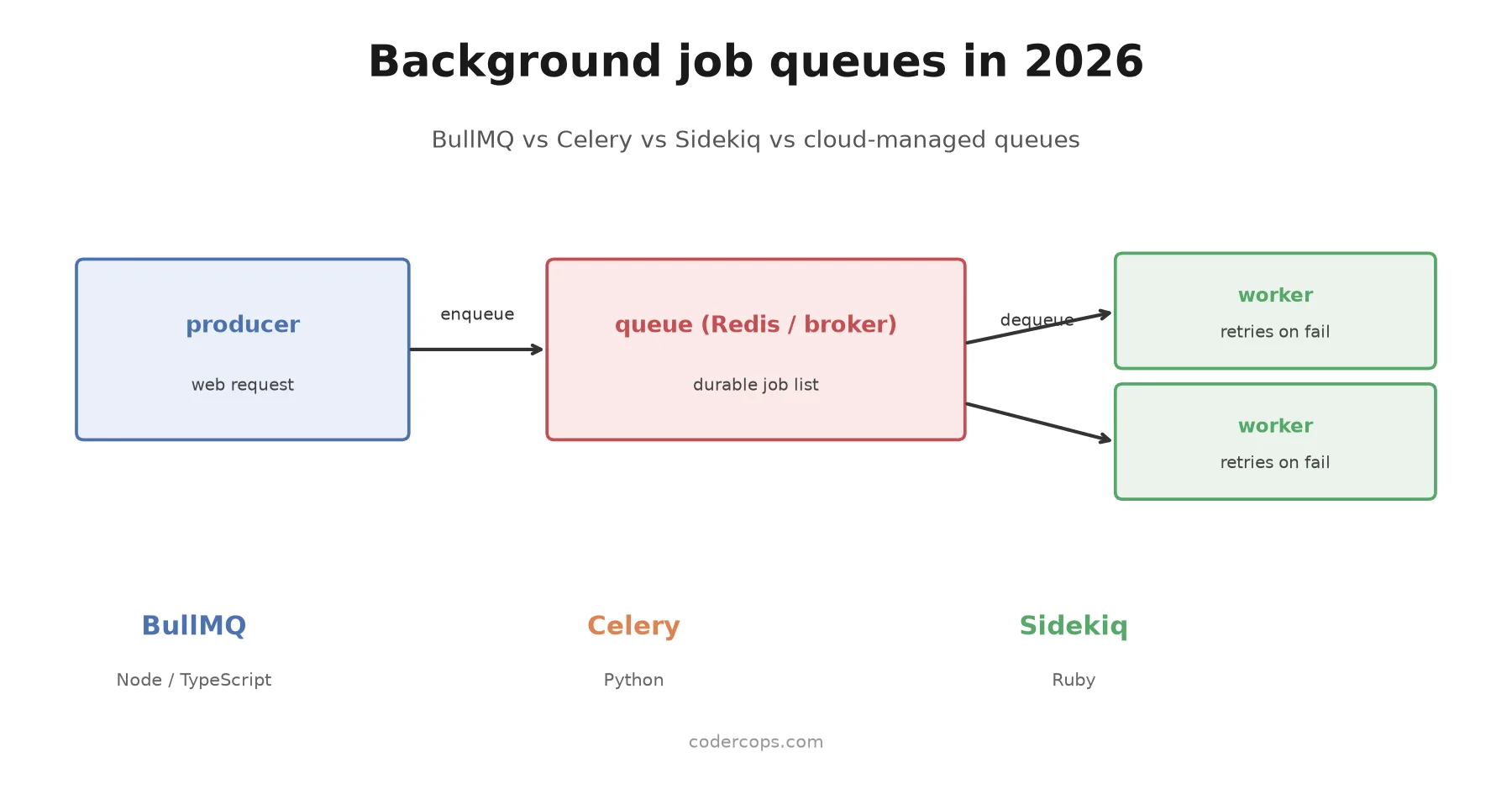
});That’s the whole shape of it: a Queue to enqueue from your API, a Worker running as its own process (or container) that pulls jobs off Redis and executes them, with retry count and backoff configured per job. Bull Board gives you a web UI over this queue, but it’s an install and mount step of its own, not something that shows up by running npm install bullmq.
Where a plain queue isn’t enough
A job queue is built for short, independent tasks: send this email, resize this image, retry this webhook. It is not built for a process that spans hours, waits on human approval, or needs to resume exactly where it left off, local state included, after a crash three steps in. That’s the gap Temporal fills: it persists the full execution history of a workflow so it can replay and continue rather than just “retry the last failed step.” It’s a heavier piece of infrastructure to run and reason about, and I wouldn’t reach for it until a plain retry-with-backoff queue has genuinely stopped being enough, which for most background job workloads, it doesn’t.
If you’d rather not run Redis or RabbitMQ at all, SQS with Lambda or ECS workers, or Google Cloud Tasks, hands the durability problem to your cloud provider. You give up some local-dev convenience and take on a bit of vendor lock-in, but you also stop being on call for a queue outage. This tradeoff is closely related to the broader question of when to reach for an event-driven pattern instead of synchronous request handling, which I covered in more depth in event-driven architecture: Kafka, Redis Streams, and when each fits. A job queue is the simplest form of that decoupling, and Kafka or Redis Streams is what you reach for once you need replay and fan-out on top of it. Worth noting too: workers pulling from a shared queue often end up needing mutual exclusion around a specific resource (don’t let two workers resize the same image at once), which is a distributed locking problem, not a queueing one, and worth understanding separately if you hit it.
The actual takeaway
Stop treating this as a bake-off. If you’re on Node, install BullMQ and move on. If you’re on Python, install Celery and move on, and lean on its chain and chord primitives the moment your background work has real dependencies between steps. If you’re on Ruby, Sidekiq is not a close call, it’s the default for a reason, just budget for Pro if you need reliable fetch in production. Build every job handler as if it will run twice, because eventually it will. And only bring in Temporal or a fully managed queue once you’ve actually hit the durability or operational ceiling of the tool you already have, not before.
Frequently asked questions
- Should I use BullMQ, Celery, or Sidekiq?
- Match it to your backend language rather than picking a queue and building around it. BullMQ if you're on Node or TypeScript, Celery if you're on Python (especially with multi-step pipelines), Sidekiq if you're on Ruby or Rails. Cross-language rewrites just to get a marginally better queue are rarely worth it; the queue is not usually your bottleneck.
- Do these job queues guarantee a job only runs once?
- No. BullMQ, Celery, and Sidekiq are all at-least-once by default when configured correctly: a job can be delivered and executed more than once, typically after a worker crashes mid-job or a visibility timeout expires before an ack is recorded. Exactly-once execution is something you build, not something the queue hands you. Give every job an idempotency key and make the handler safe to run twice.
- What's the difference between a job queue and Temporal?
- A job queue like BullMQ, Celery, or Sidekiq runs a discrete unit of work, retries it on failure, and moves on. Temporal is a workflow engine: it persists the entire execution state of a long-running, multi-step process so that if a worker crashes halfway through a 10-step saga, the workflow resumes from where it left off, including local variables and control flow, not just 'try the last job again.' Reach for Temporal when a process spans hours or days and involves human approval steps, external waits, or complex compensation logic; reach for a job queue for the more common case of short, independent background tasks.
- Is Redis required for BullMQ and Sidekiq?
- Yes, both are built directly on Redis and there's no supported alternative broker for either. Celery is broker-agnostic and commonly runs on Redis or RabbitMQ, which matters if you need RabbitMQ's routing features or already run it for other services.
- When should I use a cloud-managed queue instead of self-hosting one of these?
- When you don't want to own broker uptime, or your team isn't in the Node/Python/Ruby ecosystems these tools target. AWS SQS paired with Lambda or ECS workers, or Google Cloud Tasks, hands durability and scaling to the cloud provider at the cost of vendor lock-in and a less rich local development story than running Redis on your laptop.
Sponsored
More from this category
More from Cloud & Infrastructure



Sponsored
Discussion
Join the conversation.
Comments are powered by GitHub Discussions. Sign in with your GitHub account to leave a comment.
Sponsored