Cloud & Infrastructure · Reliability Engineering
SLO, SLA, and Error Budget: The Three Numbers People Mix Up
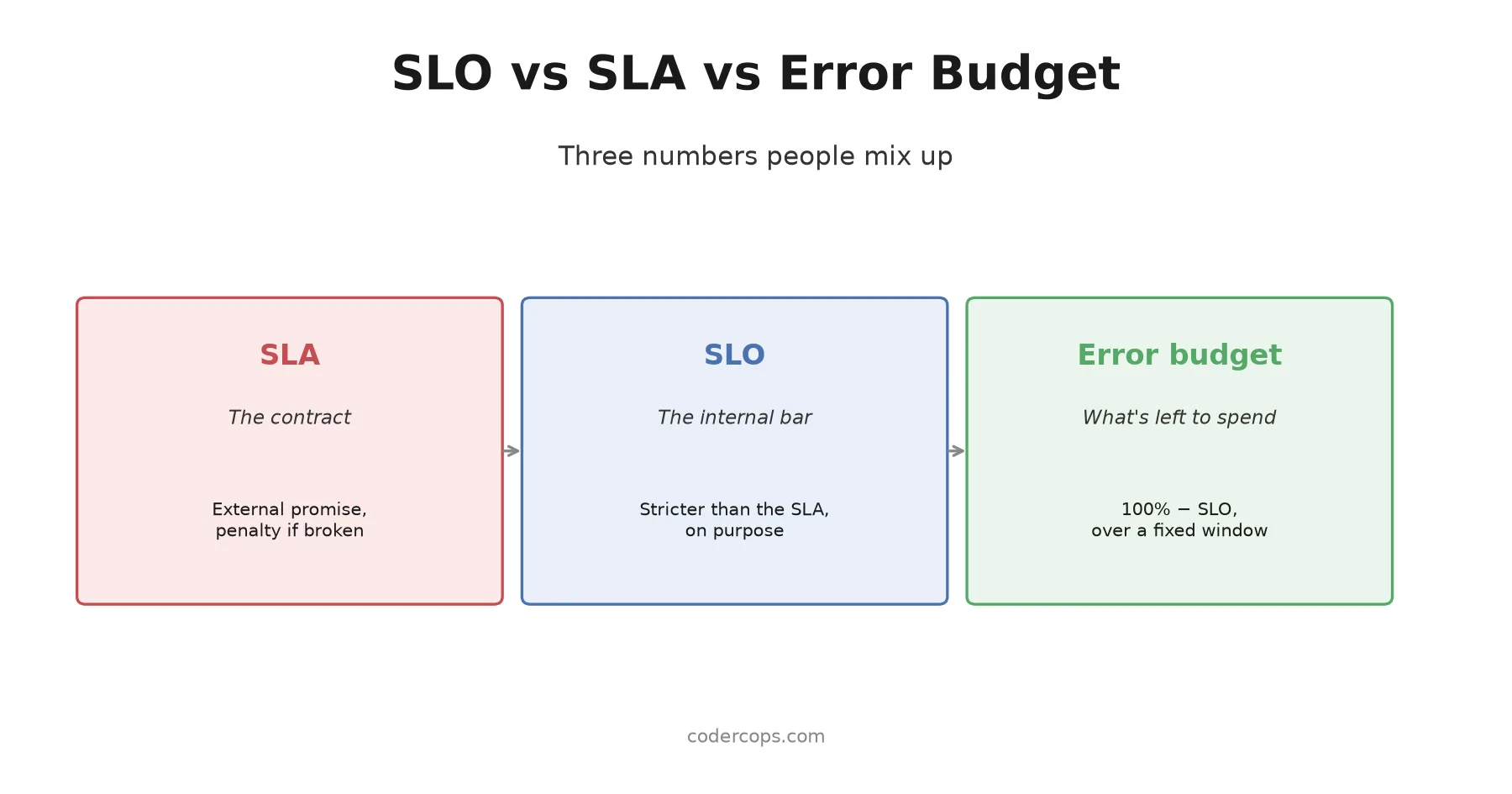
An SLA is a promise with a penalty. An SLO is the internal target that keeps you inside it. An error budget is what's left. The math, on a real example.

Prathviraj Singh
5 min read
Sponsored
Three numbers get used interchangeably in reliability conversations, and they’re not the same number. An SLA is a promise to someone outside your team, with a penalty attached if you break it. An SLO is the internal bar you hold yourself to, set tighter than the SLA on purpose. An error budget is what’s left of that internal bar before you’ve used it up. Confusing them is how a team ends up treating “we’re still meeting our SLA” as good news while quietly burning through the margin that was supposed to protect it.
The SLA is the contract, not the target
A service level agreement is what you promise a customer, usually with a financial consequence attached: 99.9% uptime, or we issue a service credit. It’s written down, it’s external, and breaking it costs money or trust, sometimes both.
The mistake is treating the SLA number as the thing your team should be aiming for day to day. If your SLA promises 99.9% uptime and your team’s actual operating target is also 99.9%, you have zero margin between “meeting the contract” and “in breach of the contract.” Any incident at all, however small, is now a contractual problem, not just an engineering one.
The SLO is your actual internal bar, and it’s stricter on purpose
A service level objective is the number your team actually tracks and holds itself to. It should always be set tighter than the SLA it supports. If the SLA promises 99.9%, a reasonable internal SLO is 99.95%, the gap between the two is deliberate slack, room to detect a problem, fix it, and recover before the contractual promise is actually at risk.
That gap is the whole point. Without it, your monitoring dashboard and your legal exposure are the same threshold, and by the time an alert fires, you’re already in breach. With it, an SLO violation is an internal signal to act, not yet a customer-facing failure.
The error budget turns the SLO into something you can spend
This is the piece that makes the other two numbers actionable instead of just informational. An error budget is 100% minus your SLO, over a fixed time window, expressed as an actual quantity of allowed failure.
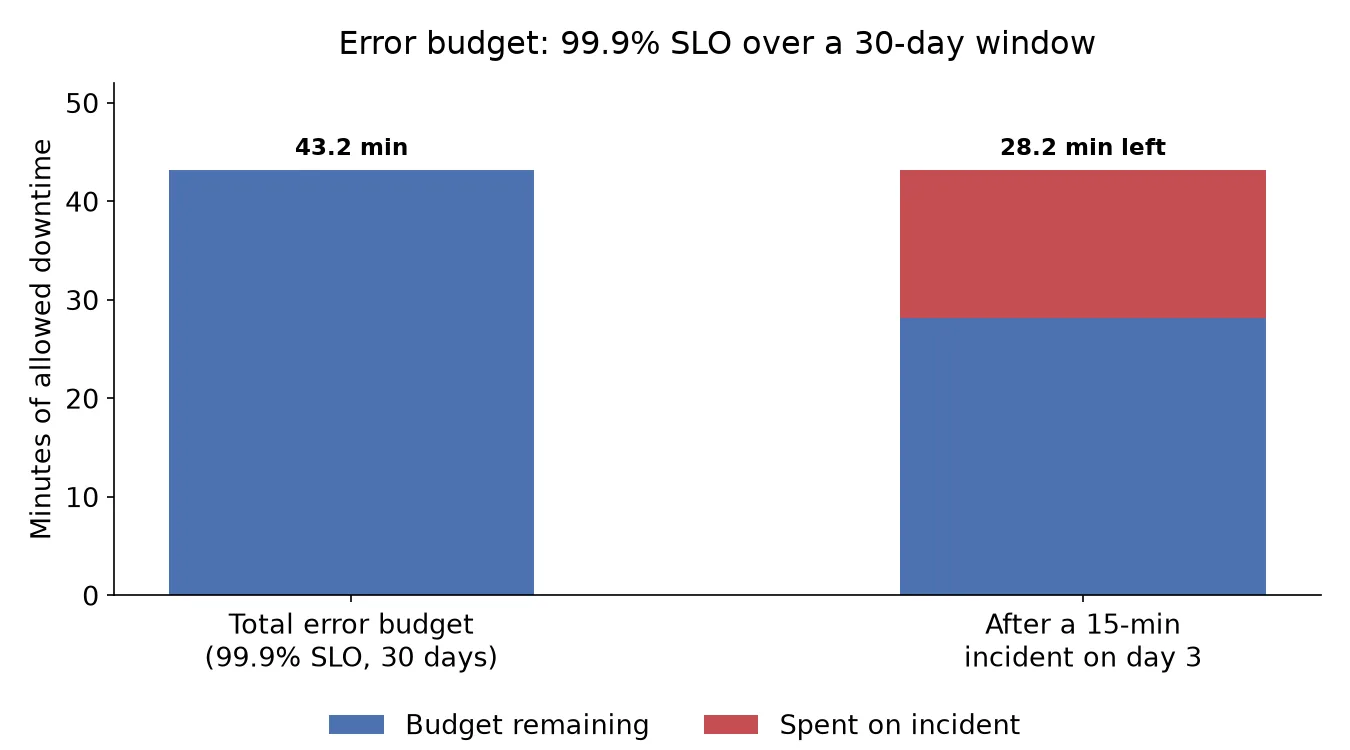
SLO: 99.9% availability over 30 days
Error budget: 100% − 99.9% = 0.1%
30 days = 43,200 minutes
Error budget in minutes: 43,200 × 0.001 = 43.2 minutes
Forty-three minutes of downtime, spread across a month, is what you’re allowed before you’ve spent the entire budget. Every incident draws it down. A 15-minute outage on day 3 leaves 28.2 minutes for the rest of the month. Run out before the window resets, and you’re not meeting your own internal target anymore, even if you’re still technically inside the SLA.
| Concept | What it is | Who sets it | What breaking it costs |
|---|---|---|---|
| SLA | External promise | Sales, legal, or leadership, in a contract | Money, usually a service credit or refund |
| SLO | Internal target, stricter than the SLA | Engineering | An internal signal to change behavior |
| Error budget | The SLO expressed as spendable failure | Derived from the SLO automatically | Nothing directly, it’s a gauge, not a contract |
The policy is the part that actually changes anything
An error budget that isn’t attached to a policy is just a number on a dashboard nobody acts on. The value shows up specifically in the decision it’s supposed to drive: what happens when the budget runs low or hits zero.
A common, workable policy: while error budget remains, ship features at normal pace, including some acceptable risk. Once the budget is exhausted for the window, feature releases pause and the team’s priority shifts entirely to reliability work, stabilizing whatever’s causing the burn, until the budget resets or recovers. This is the same underlying logic behind blue-green and canary deployments: both are ways of controlling how much risk you’re willing to accept at a given moment, just applied to release strategy instead of budget tracking.
The policy is also what turns error budgets into a genuinely cross-functional tool rather than an engineering-only metric. A product team that wants to ship a risky feature this sprint has a concrete, shared number to negotiate against: how much budget is left, and is this feature worth spending it on. That’s a very different conversation than “is this safe,” which tends to default to whoever’s most confident in the room.
Where teams get this wrong
The most common mistake is setting the SLO equal to the SLA, leaving no margin between “we’re fine” and “we’re in breach.” The second most common is tracking an error budget without a policy behind it, so it becomes a number people glance at and ignore rather than something that changes what gets built next. The third is setting an SLO so loose it never actually constrains anything, which defeats the purpose just as thoroughly as setting one too tight.
None of these require sophisticated tooling to fix. They require picking numbers with actual margin, writing down what happens when the budget hits zero, and then actually doing that thing when it happens. Most of the value in error budgets isn’t the math, the math is arithmetic. It’s the discipline of having a pre-agreed answer to “should we ship this or fix reliability first” before the moment you’re actually arguing about it in an incident channel. If your team is setting up SRE practices for the first time or auditing whether your current SLOs have any real teeth, our infrastructure team has helped a number of clients build this from scratch rather than retrofit it after an outage made the gap obvious.
Frequently asked questions
- What's the difference between an SLA and an SLO?
- An SLA is a contract with a customer, usually with a financial penalty if you miss it, like a refund or service credit. An SLO is an internal target your team sets to stay comfortably inside that SLA. The SLO is always stricter than the SLA: if your SLA promises 99.9% uptime, your internal SLO might target 99.95%, so you have room to notice and fix problems before you've actually broken the customer promise.
- What is an error budget, concretely?
- It's your SLO's tolerance for failure, expressed as a number you can spend. If your SLO is 99.9% availability over 30 days, your error budget is the other 0.1%, which works out to about 43 minutes of allowed downtime in that window. Every outage or failed request draws down that budget. Once it's gone, it's gone until the window resets.
- Why bother with an error budget if you already have an SLO?
- The SLO tells you the target. The error budget tells you how much room you have left against that target, right now, which is the number that should actually change what your team does. A team with 80% of its error budget left can take more risk, ship a bigger change, run a riskier migration. A team that's burned 95% of its budget should be freezing feature work and fixing reliability, regardless of how good the SLO number still looks on a dashboard.
- What happens when the error budget runs out?
- That's a policy decision each team has to make explicitly, and the answer only works if it's decided in advance and actually enforced. A common pattern: when the error budget hits zero, feature releases pause and all engineering effort redirects to reliability work until the budget resets or recovers. Without a pre-agreed policy, an exhausted error budget is just a red number nobody acts on.
- Do I need Google-scale infrastructure to use error budgets?
- No. The concept works at any scale, the only requirement is that you can measure your actual reliability against your target reliably enough to know when you've crossed the line. A small team can track error budget with a spreadsheet and a monitoring dashboard; the math is the same whether you're serving a thousand requests a day or a billion.
Sponsored
More from this category
More from Cloud & Infrastructure



Sponsored
Discussion
Join the conversation.
Comments are powered by GitHub Discussions. Sign in with your GitHub account to leave a comment.
Sponsored