Cloud & Infrastructure · Databases
How Database Indexes Work, and When They Slow You
An index turns a table scan into a few comparisons, but only for the queries it was built for. How B-trees work, and the write cost nobody budgets for.

Abhishek Gupta
7 min read
Sponsored
Database indexes are the single biggest lever most teams have over query performance, and also one of the most commonly misunderstood. Add the right one and a query that scanned two million rows now touches twenty. Add the wrong one, or too many, and every write to that table gets slower for no query that actually benefits. For the wider picture of query tuning, see Postgres query optimization for application developers.
The problem an index solves
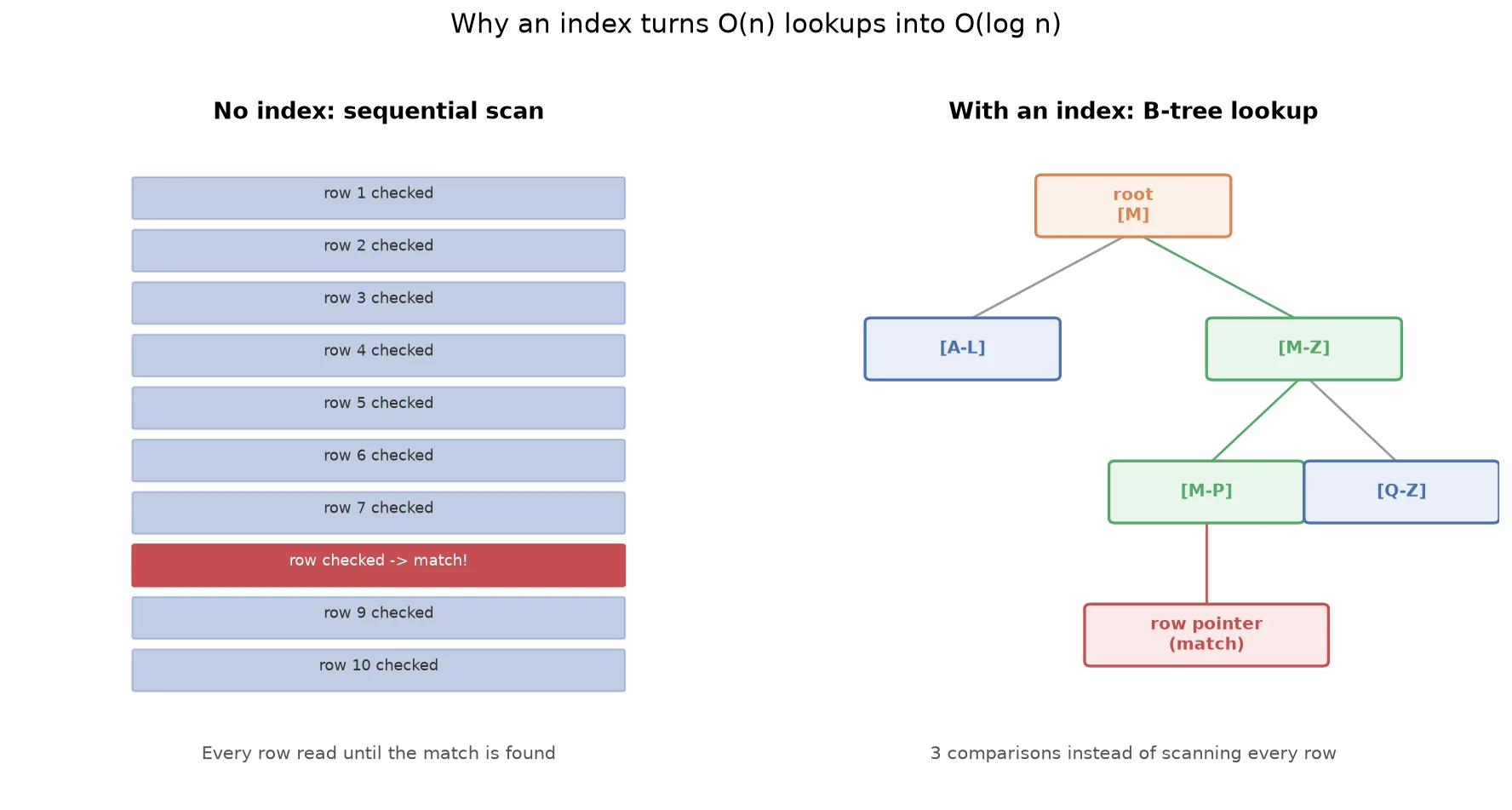
Without an index, finding a row that matches a condition means checking every row in the table, in order, until the database finds what it’s looking for, or confirms nothing matches. That’s a sequential scan, and its cost grows linearly with table size: twice the rows, roughly twice the work.
An index changes the shape of that search entirely. Instead of a flat list the database checks row by row, an index organizes the indexed column’s values into a sorted tree structure, almost universally a B-tree in relational databases. Finding a match means starting at the root node, comparing the search value, and following one branch downward, repeatedly halving the remaining search space, until you land on a pointer to the actual row. A table with a million rows needs roughly 20 comparisons to find a match through a B-tree index, versus up to a million for a sequential scan.
-- Without an index, this is a sequential scan on a large table
SELECT * FROM orders WHERE customer_id = 48213;

-- Adding an index gives the planner a B-tree to search instead
CREATE INDEX idx_orders_customer_id ON orders (customer_id);
That’s the entire mechanical idea. Everything else about indexing is really about when this tradeoff is worth making, and for which queries.
Clustered vs. non-clustered: where the data actually lives
This is the distinction that trips people up most, because the terminology implies more magic than there is.
A clustered index determines the physical order rows are stored on disk. In PostgreSQL, tables are heap-organized by default and don’t have an automatic clustered index (you can CLUSTER a table around one, but it doesn’t stay maintained automatically on subsequent writes). In SQL Server and MySQL’s InnoDB engine, the primary key is the clustered index by default, and the table’s rows are physically stored in that order. Because physical storage can only be sorted one way, a table has at most one clustered index.
A non-clustered index is a separate structure entirely: its own sorted B-tree containing the indexed column’s values, each paired with a pointer back to the actual row’s location. Looking up a value through a non-clustered index means two steps: search the index’s B-tree, then follow the pointer to fetch the full row from wherever it actually lives. A table can have as many non-clustered indexes as you’re willing to pay the write cost for. The same idea of splitting data by a key shows up in database partitioning.
| Clustered | Non-clustered | |
|---|---|---|
| Determines physical row order | Yes | No, it’s a separate structure |
| Max per table | One | Many |
| Lookup cost | Direct, data is the index | An extra hop to fetch the row |
| Best for | The column you range-query most (often the primary key) | Any other column you filter or join on frequently |
The practical takeaway: your clustered index (or InnoDB’s primary key) should be the column your most frequent range queries and lookups actually use, because it’s the one index where there’s no extra hop to the underlying row. Everything else is a non-clustered tradeoff between read speed and write cost.
The write cost nobody budgets for
This is the part that gets skipped in most “add an index” advice, and it’s the part that actually determines whether an index is a good idea. Every index on a table has to be kept in sync with every write:
- Insert: every index gets a new entry, in the right sorted position.
- Update: if an indexed column changes, its index entry has to move, not just update in place.
- Delete: every index loses an entry.
A table with one index pays this cost once per write. A table with eight indexes, common on tables that accumulated indexes reactively over a year of “this query is slow, add an index” fixes, pays it eight times. On a high-write table (an events table, an audit log, anything ingesting at volume), that compounding cost is often the actual bottleneck, not the reads the indexes were added to speed up.
-- Check which indexes exist on a table and get a sense of whether they're earning their keep
SELECT indexname, indexdef FROM pg_indexes WHERE tablename = 'orders';

-- In production, pg_stat_user_indexes shows actual usage counts:
-- idx_scan near zero on an index that's existed for months is a real candidate to drop
SELECT indexrelname, idx_scan, idx_tup_read
FROM pg_stat_user_indexes
WHERE relname = 'orders'
ORDER BY idx_scan ASC;
An index nobody’s queries actually use isn’t free insurance. The classic query pattern that indexes on foreign keys help with is the N+1 query problem, and the write cost is also felt on the primary when you add read replicas. It’s pure write overhead with no offsetting benefit, and it’s worth pruning the same way you’d prune dead code.
Why the index you added isn’t being used
The most common source of confusion is an index that exists, is correctly built, and still doesn’t get used by the query you built it for. A few patterns cause this reliably:
Wrapping the column in a function. WHERE LOWER(email) = 'user@example.com' can’t use a plain index on email, because the index stores the original values, not their lowercased form. A functional index (CREATE INDEX ON users (LOWER(email))) fixes this by indexing the transformed value directly.
A leading wildcard. LIKE '%gmail.com' can’t use a standard B-tree index efficiently, because a B-tree is sorted for prefix matching, not suffix matching. LIKE 'user%' can use the index; LIKE '%gmail.com' generally can’t without a different index type (a trigram index, for full-text-style matching).
Wrong leading column in a composite index. An index on (status, created_at) helps queries filtering on status alone or on status and created_at together, but does little for a query filtering on created_at alone, because the index is sorted by status first. Column order in a composite index isn’t cosmetic, it determines which query shapes the index actually serves.
The planner decided a scan is cheaper. Sometimes the index exists, is usable, and the query planner still chooses a sequential scan, usually because the table is small enough that the scan is genuinely faster, or the filter matches such a large fraction of rows that following an index pointer to each one costs more than just reading the table in order. This is correct planner behavior, not a bug, and it’s a sign the index isn’t the right fix for that particular query.
The only reliable way to know which of these is happening is to check:
EXPLAIN ANALYZE SELECT * FROM orders WHERE customer_id = 48213;Index Scan or Index Only Scan in the output means the index is being used. Seq Scan means it isn’t, for one of the reasons above, or because the planner genuinely thinks it shouldn’t be.
The practical rule
For broader server-level advice, see PostgreSQL performance tuning.
Index the columns your actual queries filter, join, and sort on, in the order those queries need, and periodically check what you’ve built against real usage stats rather than assuming every index you’ve ever added is still earning its cost. This is the same discipline that shows up in zero-downtime migration work: changes to a schema, indexes included, need to be evaluated against how the table is actually queried in production, not against intuition about what “should” be fast.
An index is not a universal performance fix. It’s a specific tradeoff, faster reads on the query shapes it matches, slower writes on every insert and update to that table, that’s worth making deliberately, and worth reversing when the query patterns that justified it stop showing up.
Frequently asked questions
- What's the actual difference between a clustered and non-clustered index?
- A clustered index defines the physical order rows are stored on disk, so a table can have only one (the rows can only be sorted one way at a time). A non-clustered index is a separate structure, essentially its own small sorted table, that stores the indexed column's values alongside a pointer back to where the full row actually lives. A table can have many non-clustered indexes, and each one speeds up lookups on its specific column at the cost of an extra hop to fetch the rest of the row.
- Why does adding an index slow down writes?
- Every index on a table has to stay in sync with the data. When you insert a row, every index on that table gets a new entry. When you update an indexed column, the index has to be rebalanced in that spot. When you delete a row, every index loses an entry. A table with six indexes pays that update cost six times on every write, which is why indexing every column you might someday query against is a real production cost, not a free optimization.
- Why isn't my query using the index I created?
- The most common causes: a WHERE clause wrapping the column in a function (WHERE LOWER(email) = ...) instead of matching the raw column, a leading wildcard in a LIKE pattern (LIKE '%gmail.com'), filtering on a column that isn't the leftmost column in a composite index, or a query planner deciding a sequential scan is actually cheaper because the table is small or the filter matches most of the rows anyway. Run EXPLAIN ANALYZE and check whether it says Index Scan or Seq Scan before assuming the index is being used.
- How many indexes is too many on one table?
- There's no fixed number, it depends on your write volume and how many of your indexes are actually earning their keep. A table that's read-heavy and rarely written to can carry more indexes without much cost. A table under heavy write load with a dozen barely-used indexes is a common, quietly expensive mistake. Periodically checking which indexes your query planner actually uses (most databases expose this) and dropping the ones that don't get hit is worth doing on any table that's grown organically over a year of feature work.
- Do I need a composite index or several single-column indexes?
- It depends on your queries. A composite index on (status, created_at) helps a query filtering on status and sorting by created_at, but only if status is the leading column in that filter, column order in a composite index matters. Two separate single-column indexes on status and created_at can each help queries that filter on just one of those columns, but the database generally can't combine them as efficiently as a single composite index built for the combined query. Design the index around your actual query patterns, not around each column in isolation.
Sponsored
More from this category
More from Cloud & Infrastructure



Sponsored
Discussion
Join the conversation.
Comments are powered by GitHub Discussions. Sign in with your GitHub account to leave a comment.
Sponsored