Cybersecurity · Vulnerability Management
CVE-2026-34908: The UniFi OS Root Chain, Explained
Three 10.0-severity UniFi OS flaws chain into unauthenticated root, and a Mirai botnet is already using them. What's affected, and how to patch today.

Prathviraj Singh
5 min read
Sponsored
Three bugs, three maximum CVSS scores of 10.0, one chain that ends with an unauthenticated attacker holding a root shell on your UniFi hardware. CISA added CVE-2026-34908, CVE-2026-34909, and CVE-2026-34910 to its Known Exploited Vulnerabilities catalog on June 23, 2026, and a botnet is already using them. If you run UniFi OS anywhere in your network, this is a patch-today, not patch-this-sprint, situation.
The three bugs, and why chaining them is the actual problem
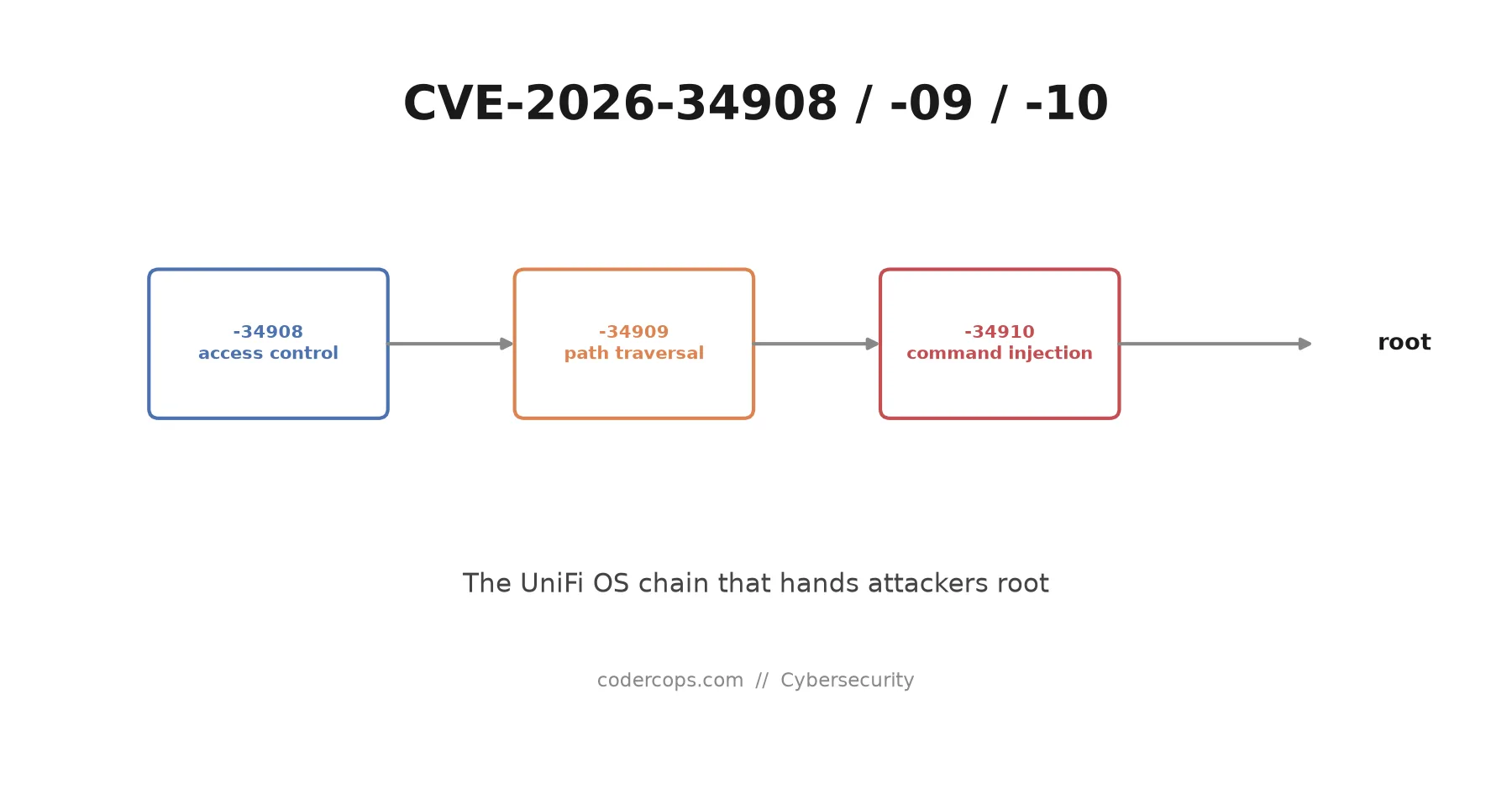
Each vulnerability on its own is bad. Together, they’re a straight line from “no access” to “root on the box.”
| CVE | Type | What it does alone |
|---|---|---|
| CVE-2026-34908 | Improper access control | Lets an attacker make unauthorized configuration changes without authenticating |
| CVE-2026-34909 | Path traversal | Reaches files outside the intended directory on the underlying operating system |
| CVE-2026-34910 | Improper input validation | Lets a network-adjacent attacker inject and execute arbitrary OS commands |
Researchers demonstrated that chaining all three achieves full remote code execution with elevated privileges on a vulnerable UniFi OS host. The access control bypass gets you past the login screen. The path traversal pulls configuration and credential files you shouldn’t be able to reach. The command injection turns that access into arbitrary code execution as root. None of the three steps requires a valid account.
This is the pattern that makes chained vulnerabilities more dangerous than their individual CVSS scores suggest, even when each one already scores maximum severity. A defender patching one CVE and assuming the risk is contained is still exposed to the other two, and an attacker only needs the full chain to work once.
Who’s affected
Every device running UniFi OS is in scope: Cloud Gateways, Network Application controllers, Protect NVRs, Access Hubs, and Talk appliances. This isn’t limited to consumer routers. A lot of small businesses and agencies run UniFi hardware as their edge network controller, their camera system’s NVR, or their VoIP backbone, and all three categories share the underlying OS these bugs live in.
The exploitation activity reported alongside the CISA advisory ties back to a Mirai/Gafgyt-derived botnet, the same family of malware that’s been recruiting exposed IoT and networking devices into DDoS botnets for close to a decade. That’s the realistic threat model here: mass, automated scanning for exposed UniFi management interfaces, not a targeted attack against your specific organization. Automated scanning doesn’t care how likely you think you are to be a target.
What to do right now
Ubiquiti has shipped patches. There’s no meaningful workaround that substitutes for updating; the access control and input validation issues are architectural, not configuration mistakes you can harden around.
# Check your UniFi OS build from the console
# Settings > System > About, or via SSH on the gateway:
info

# Update through the UniFi Network Console UI, or:
# Settings > System > Updates > Check for Updates
Prioritize in this order:
- Internet-facing management interfaces first. Anything with its UniFi OS console reachable from the public internet is exploitable by anyone scanning for it, with no prior access needed.
- Anything on a shared or guest VLAN second. CVE-2026-34910 only requires network adjacency, not internet exposure, so a compromised device on the same segment is a viable attack path.
- Everything else, this week. Even air-gapped or internal-only UniFi hardware should get the update on a normal patch cycle; internal-only today doesn’t guarantee internal-only next quarter.
If you can’t patch immediately, pull the management interface off the public internet and restrict it to a VPN or management VLAN as a stopgap. That reduces exposure but doesn’t close the underlying bugs, so treat it as a bridge to patching, not a substitute for it.
Why this keeps happening to network edge devices
UniFi OS joins a growing list of edge and network devices that get chained vulnerabilities disclosed together rather than one at a time: the access control layer, the file handling layer, and the command execution layer each had a separate bug, and none of the three teams building those layers caught that a flaw in one undermined the isolation the others depended on. That’s a structural risk in any device that bundles authentication, a web management UI, and a command execution surface into one OS image, and it’s the same reasoning behind zero trust architecture: don’t assume a device is safe just because it’s inside your network boundary.
It also lands in the same month as a heavy general patch cycle, which is worth remembering when you’re prioritizing: an actively exploited CVSS 10.0 chain on internet-facing infrastructure outranks almost everything else on this month’s patch list.
Check your UniFi OS build number today. If it predates Ubiquiti’s fix, update it before you do anything else on your security backlog this week.
Frequently asked questions
- What do CVE-2026-34908, CVE-2026-34909, and CVE-2026-34910 actually do?
- CVE-2026-34908 is an improper access control flaw that lets an attacker make unauthorized changes to the system without logging in. CVE-2026-34909 is a path traversal bug that reaches files outside the intended directory on the underlying OS. CVE-2026-34910 is an input validation flaw that lets a network-adjacent attacker inject and execute arbitrary OS commands. Chained together, they take an attacker from no access to root shell without a password.
- Which UniFi devices are affected?
- Anything running UniFi OS: Cloud Gateways, Network Application controllers, Protect NVRs, Access Hubs, and Talk appliances. This is broader than just routers. If a device shows a UniFi OS version in its dashboard, assume it needs the patch until you've confirmed the build number against Ubiquiti's advisory.
- Is this actually being exploited, or is it theoretical?
- It's active. Security researchers observed exploitation attempts within days of disclosure, and reporting links a Mirai/Gafgyt-derived botnet campaign to the chain. CISA's Known Exploited Vulnerabilities catalog only lists flaws with confirmed real-world exploitation, and all three CVEs are on it.
- How do I patch it?
- Update UniFi OS to the version specified in Ubiquiti's security advisory through the device's system settings or the UniFi Network Console. If you manage devices remotely, prioritize anything with its management interface exposed to the public internet; those are the devices attackers can reach without first being on your LAN.
- My UniFi device isn't internet-facing. Do I still need to patch now?
- Yes, just with less urgency than an exposed device. CVE-2026-34910 is described as reachable by a network-adjacent actor, meaning anyone who gets a foothold on the same network segment, not just the public internet, can use it. A compromised IoT device or a guest network sharing the same VLAN is enough of a foothold in a lot of home and small-office setups.
Sources
Sponsored
More from this category
More from Cybersecurity
Sponsored
Discussion
Join the conversation.
Comments are powered by GitHub Discussions. Sign in with your GitHub account to leave a comment.
Sponsored