Web Development · Web Platform
WebMCP: How Chrome Lets a Website Expose Its Own Tools to AI Agents
WebMCP is a W3C proposal that lets a web page register JavaScript functions as tools an AI agent can call directly in the browser, no server-side MCP deployment required. Here's how the API works, what Chrome's origin trial supports today, and where it breaks down.

Abhishek Gupta
6 min read
Sponsored
An AI agent browsing your site today has one real option: read the rendered HTML and guess. It clicks buttons, fills forms, and scrapes text the same way a human would, except slower and more error-prone, because none of it was built for a machine to parse. WebMCP changes that by giving a page a second interface, one built specifically for agents, sitting right next to the one built for humans.
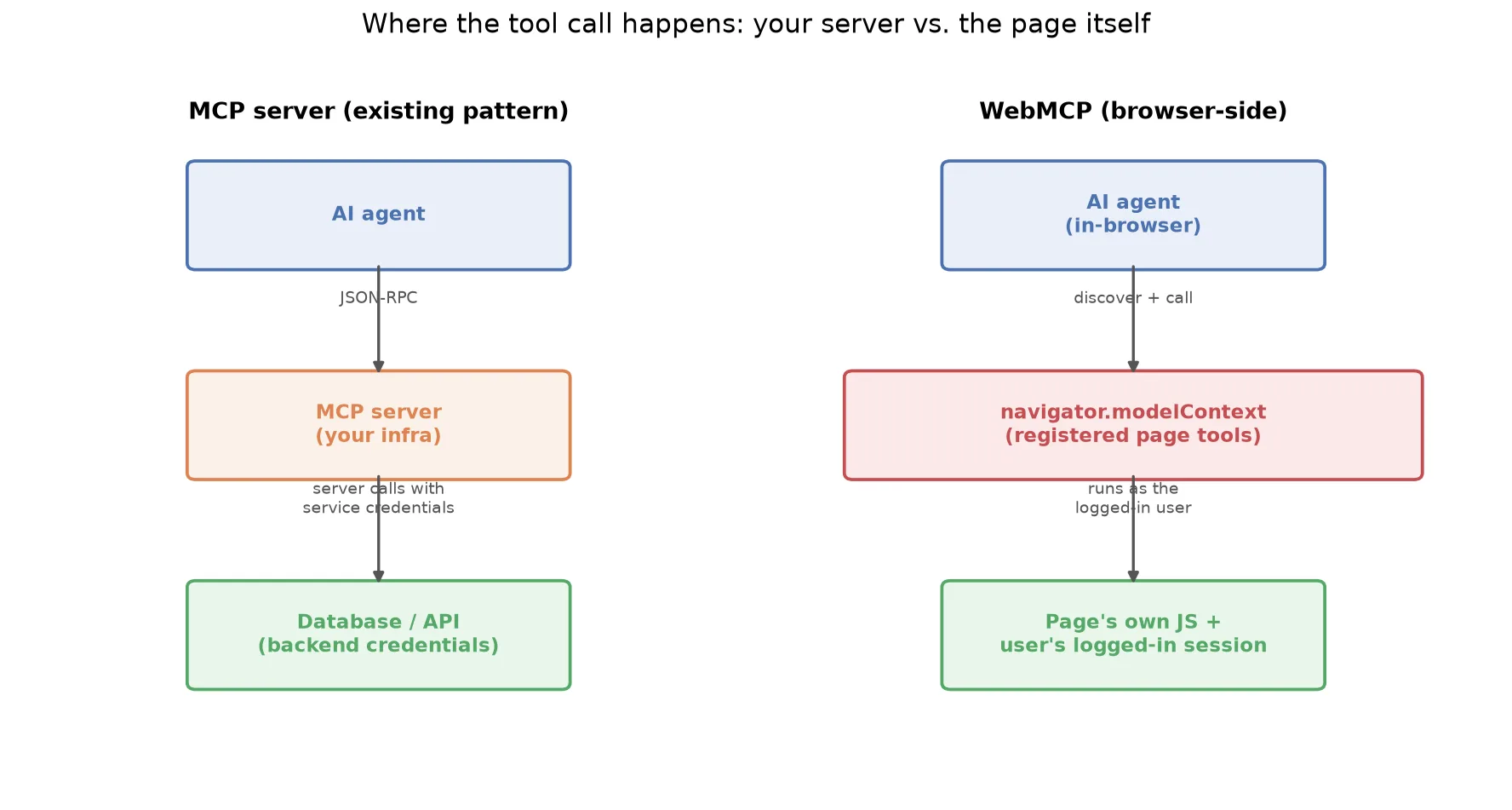
We covered the server-side pattern in detail: a deployed MCP server exposing your database or internal APIs as tools over JSON-RPC. WebMCP is the same idea, moved into the browser, with a different tradeoff.
What actually gets exposed
A WebMCP tool is a JavaScript function with a name, a description, and a JSON Schema describing its inputs, registered against navigator.modelContext:
// Requires HTTPS (SecureContext)
navigator.modelContext.registerTool({
  name: "searchProducts",
  description: "Search the product catalog by keyword. Returns matching products with name, price, and availability.",
  inputSchema: {
    type: "object",
    properties: {
      query: {
        type: "string",
        description: "The search keyword or phrase"
      },
      category: {
        type: "string",
        enum: ["all", "clothing", "electronics", "books"],
        description: "Product category to filter by"
      }
    },
    required: ["query"]
  },
  execute: async (input) => {
    // Reuses your existing frontend search logic
    const results = await productStore.search(input.query, input.category);
    return { products: results, total: results.length };
  },
  annotations: { readOnlyHint: true }
});
That execute function is doing nothing exotic. It’s calling productStore.search, the same function your search bar already calls. WebMCP’s job isn’t to build new functionality, it’s to describe functionality you already built in a shape an agent can discover and invoke without guessing at your DOM structure.
The browser throws InvalidStateError if you register two tools with the same name, or if inputSchema doesn’t validate as proper JSON Schema, so the failure mode is loud and immediate rather than a silently ignored tool.
Where the call actually runs
This is the part worth sitting with. A server-side MCP server acts with its own credentials, a service account, an API key, something provisioned separately from any one user’s session. A WebMCP tool runs inside the page the user already has open, using whatever they’re already authenticated as. There’s no separate credential to provision or rotate, because there’s no separate service. The tool’s permissions are exactly the permissions that browser tab already has.
That’s a real security simplification for one class of problem (nothing new to lock down) and a real constraint for another (the tool can only do what the logged-in user is already allowed to do, in that session, from that tab). If you need an agent to act outside any specific user’s session, on a schedule, from a backend job, WebMCP isn’t the tool for that. Server-side MCP still is.
The Chrome origin trial, and a rename to watch for
Google announced the move from a behind-a-flag prototype to a public origin trial at I/O 2026, landing in Chrome 149 and running through Chrome 156. Origin trial means opt-in: a site registers a trial token, and users on Chrome 149+ with that token active get WebMCP support without needing to flip a flag themselves. You can also test it locally by enabling the WebMCP flags in chrome://flags.
One detail worth flagging if you’re prototyping against the current docs: Chrome 150 deprecates navigator.modelContext in favor of document.modelContext. If you’re writing code today against navigator.modelContext (as most current examples, including the one above, still do), expect a migration once you upgrade past Chrome 149. It’s a small change, but it’s the kind of thing that breaks a demo silently if you’re not watching the changelog.
Why the token-usage number matters more than the API itself
The API surface is straightforward. The actual case for adopting it shows up in cost and reliability. One early implementer who built a WebMCP layer reported up to a 90% reduction in LLM token usage compared to letting an agent scrape the rendered DOM. That tracks: a full page’s HTML, styling, and layout markup is enormous compared to a structured JSON response with exactly the fields a tool call needs. An agent that gets { products: [...], total: 12 } back from a tool call spends far fewer tokens than one that has to parse a rendered product grid out of a DOM tree, and it’s far less likely to misread a price or miss a button that moved between page versions.
That reliability point compounds. DOM scraping breaks every time you ship a CSS redesign that an agent wasn’t tested against. A registered tool with a stable schema doesn’t care what the page looks like, only that the function signature stays the same.
What to actually do with this today
WebMCP is origin-trial software, not a shipped standard. Treat it accordingly:
- Prototype it on a low-stakes surface first. A search tool or a read-only lookup is a safer first WebMCP tool than anything that mutates state, both because
readOnlyHintgives agents an explicit signal and because a read path failing is cheaper than a write path failing. - Don’t build a core user flow that depends on it exclusively. Origin trial APIs change. Build WebMCP as a progressive enhancement, agents that support it get a better path, everything else falls back to the page working the way it always has.
- Watch the
navigator.modelContexttodocument.modelContexttransition if you start today, so a Chrome upgrade in your test environment doesn’t silently break your registered tools. - Keep your existing server-side MCP servers, if you have them, for anything that needs to run outside a specific browser session. The two patterns are complementary, not competing.
If you’re already investing in agent-facing infrastructure, worth talking to our team about which of your workflows actually belong client-side versus server-side, WebMCP makes that a real architectural decision now instead of a hypothetical one.
Frequently asked questions
- What is WebMCP in one sentence?
- It's a JavaScript API that lets a web page describe its own functionality as structured tools, the same shape as Model Context Protocol tools, so an AI agent operating in the browser can call them directly instead of clicking through the rendered page.
- How is WebMCP different from a regular MCP server?
- A regular MCP server runs on your backend infrastructure, with its own deployment, its own credentials, and its own JSON-RPC endpoint that an agent connects to over the network. WebMCP tools are registered in the page's own client-side JavaScript and execute in the browser, using whatever session and permissions the current user already has. There's no separate service to deploy or secure independently.
- Do I need to rewrite my backend to support WebMCP?
- No. A WebMCP tool's execute function typically calls your existing frontend logic, the same API calls your React or Vue components already make. You're exposing an interface to functionality that already exists, not building a new backend.
- Is WebMCP stable enough to use in production?
- Not yet, in the strict sense. It's in origin trial in Chrome 149 through 156, which means it's opt-in per site with a trial token and subject to change before it becomes a shipped, unflagged standard. Treat it as something to prototype and evaluate now, not something to build a core user flow around without a fallback.
- Does WebMCP replace server-side MCP?
- No, they solve different problems. Server-side MCP is the right choice when an agent needs to act outside a browser session entirely, a scheduled job, a CLI tool, a backend service calling another backend service. WebMCP is the right choice when the action should happen inside a specific user's already-authenticated browser session, using the permissions and state that session already has.
Sources
Sponsored
More from this category
More from Web Development
 R.01
R.01 Webhook Design: Signatures, Retries, and Idempotency Done Right
 R.02
R.02 Node.js Is Moving to One Major Release a Year. What That Means for Your Upgrade Plan
 R.03
R.03 We Audited Our Own 800-Post Blog. Seven Numbers That Were Lying to Us.
Sponsored
Discussion
Join the conversation.
Comments are powered by GitHub Discussions. Sign in with your GitHub account to leave a comment.
Sponsored