Cloud & Infrastructure · Observability
Structured Logging Done Right: JSON, Correlation IDs, and What to Skip
A log line that's just a sentence is fine until you have to search a million of them at 2am. Here's how structured logging actually works, how to thread a correlation ID through a request, and which fields are worth the storage cost.

Abhishek Gupta
6 min read
Sponsored
A log line that reads “checkout failed for user 4821, card declined” is perfectly readable at 2pm when you’re the one who just wrote it. At 2am, three months later, searching a million log lines from a service you didn’t write, that sentence is a string you have to grep and hope the wording didn’t change between versions. Structured logging exists to fix exactly that gap: instead of a sentence a human parses, you emit fields a machine can filter, aggregate, and join across services.
What structured logging actually changes
The mechanical difference is small. Instead of formatting a message string, you emit a set of key-value pairs, almost always as JSON in production systems, where each field is independently queryable.
// Unstructured: readable, but only searchable by string matching
console.log(`Checkout failed for user ${userId}, reason: ${reason}`);

// Structured: the same information, but every field is independently
// queryable in whatever log platform is ingesting this
logger.warn({
  event: "checkout_failed",
  user_id: userId,
  reason: reason,
  order_id: orderId,
  amount_cents: amountCents,
});
The payoff shows up the first time you need to answer a question the original log author didn’t anticipate. “How many checkouts failed with reason: card_declined in the last hour, broken down by amount_cents bucket” is a filter and an aggregation against structured fields. Against a free-text log, it’s a regex that breaks the next time someone tweaks the wording of the message, which happens more often than log line stability gets credit for.
Correlation IDs: the piece that makes distributed logs useful
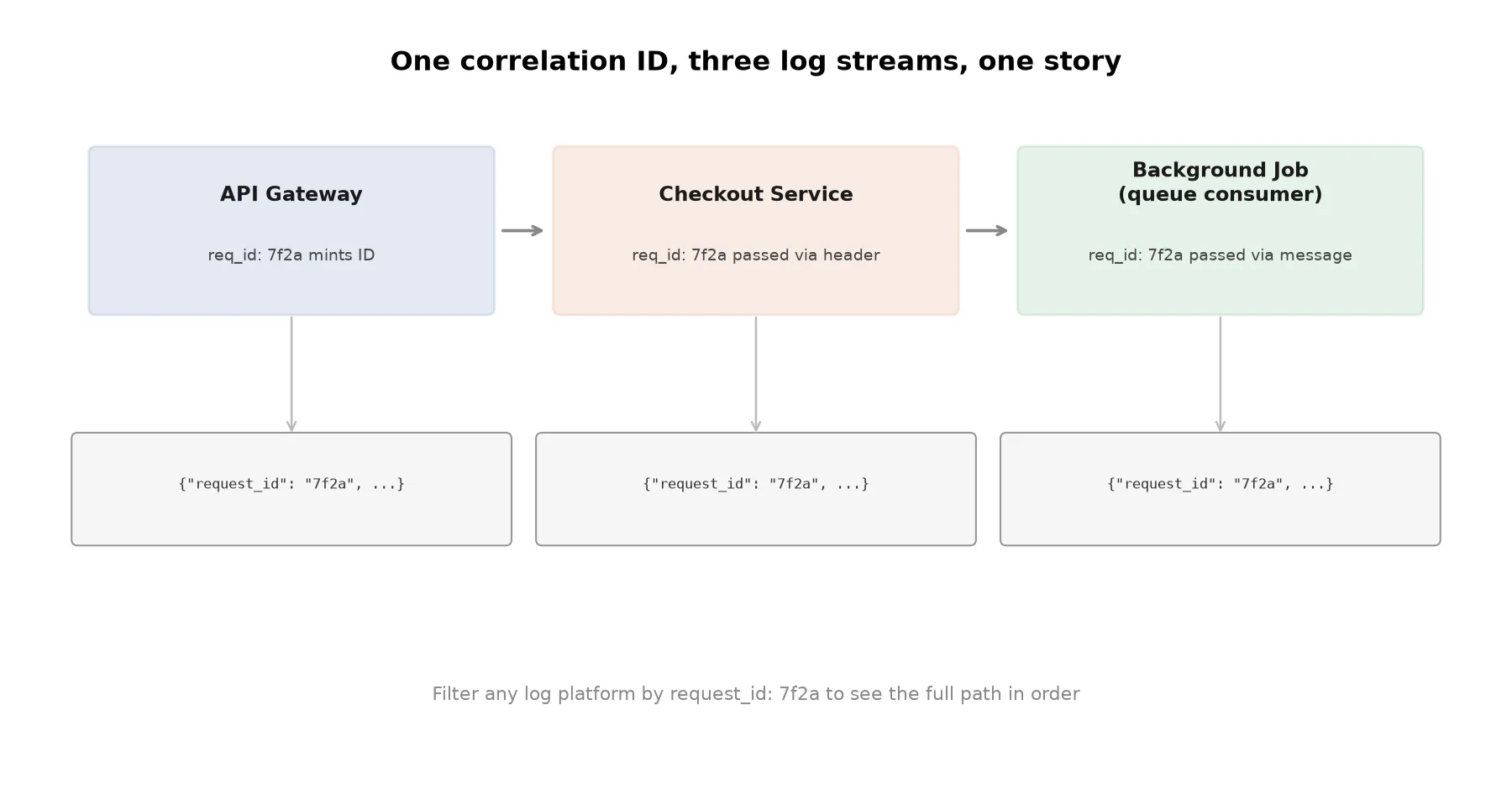
A single field does more to make logs usable in a real system than any formatting choice: a correlation ID, sometimes called a request ID or trace ID, generated once when a request enters your system and carried through every log line, service call, and queue message that request produces.
import structlog
import uuid
from contextvars import ContextVar

request_id_var = ContextVar("request_id", default=None)

def request_id_middleware(get_response):
    def middleware(request):
        # Reuse an inbound ID if an upstream service already set one,
        # otherwise mint a new one at the edge.
        request_id = request.headers.get("X-Request-ID", str(uuid.uuid4()))
        request_id_var.set(request_id)
        response = get_response(request)
        response["X-Request-ID"] = request_id
        return response
    return middleware

# structlog processor: every log call in this request's lifetime
# automatically carries the same request_id, without passing it explicitly
def add_request_id(logger, method_name, event_dict):
    request_id = request_id_var.get()
    if request_id:
        event_dict["request_id"] = request_id
    return event_dict

structlog.configure(processors=[add_request_id, structlog.processors.JSONRenderer()])
The part worth noticing: the middleware both reads an inbound X-Request-ID if one exists and sets it on the outbound response. That’s what lets the same ID survive a hop from your API gateway to a downstream service to a background job picking work off a queue. Every log line any of those components emit during that one request carries the same ID, so debugging a user’s failed checkout becomes “filter every log stream in the platform by this one ID” instead of correlating four separate timelines by eye.
Log levels are a cost decision, not just a debugging one
Once logs are shipped to an aggregation platform billed by volume, which is most of them, log level stops being a purely technical choice and becomes a budget line. DEBUG-level logging left permanently enabled in production is one of the more common ways teams end up paying for terabytes of log data that nobody queries.
| Level | When to use it in production | Leave on by default? |
|---|---|---|
| ERROR | Something failed and needs attention | Yes |
| WARN | Something unexpected but recoverable happened | Yes |
| INFO | Normal but noteworthy events (request completed, job started) | Yes, usually |
| DEBUG | Detail useful only while actively troubleshooting | No, toggle it on temporarily |
A workable pattern is running INFO as the production floor and giving yourself a way to raise verbosity for a specific service, or even a specific request via its correlation ID, when you’re actively chasing something down, rather than eating the ingestion cost of DEBUG-level detail on every request all the time. Rate limiting your ingestion pipeline the same way you’d protect any other API is worth considering if a single misbehaving service can flood your logging platform with a retry loop.
What not to log
The two most common accidental leaks are logging an entire request or response body, which often contains a password, token, or card number somewhere in the payload without anyone intending to log it, and logging an object by reference without checking what fields it actually carries.
// Risky: logs whatever fields happen to be on the user object today,
// including ones added later that nobody thought to exclude
logger.info({ event: "user_updated", user: updatedUser });

// Safer: an explicit allowlist. Adding a sensitive field to the user
// model later can't silently start appearing in logs.
logger.info({
  event: "user_updated",
  user_id: updatedUser.id,
  fields_changed: Object.keys(changes),
});
Explicit allowlisting catches this by construction: a log line can only leak a field you deliberately chose to include. A redaction step in your logging middleware for known-sensitive field names (password, token, ssn, card_number) is a reasonable backstop, but it’s a backstop, not a substitute for the discipline of not logging entire objects on reflex.
The practical shape of a good log line
Structured fields should describe what happened, not just restate the message in field form. {"event": "checkout_failed", "message": "checkout failed"} adds a field without adding information. {"event": "checkout_failed", "reason": "card_declined", "order_id": 8821, "amount_cents": 4999} gives you something to filter, group, and alert on.
Start every log line with a consistent core: a correlation ID, timestamp, level, service name, and a specific event name, then add fields particular to that event rather than trying to force every log line through one universal schema. That’s the setup that turns your observability stack from a place you search in a panic into a place you can actually answer a specific question, on the first try, at 2am or otherwise.
Frequently asked questions
- What's the actual difference between structured and unstructured logging?
- Unstructured logging is a free-text string: 'User 4821 failed to check out, card declined.' Structured logging emits the same event as discrete fields, typically JSON: {"event": "checkout_failed", "user_id": 4821, "reason": "card_declined"}. The structured version is queryable directly, filter by reason or user_id without parsing a sentence, while the unstructured version requires regex or full-text search to extract the same information reliably.
- What is a correlation ID and why do I need one?
- A correlation ID is a unique identifier generated once when a request enters your system, then passed along to every log line, downstream service call, and queue message that request touches. Without one, a single user-facing failure that spans an API gateway, three microservices, and a background job leaves you correlating log lines across four separate log streams by timestamp and guesswork. With one, you filter every log system by the same ID and see the full path in order.
- Should I log at DEBUG level in production?
- Usually no, as a default. DEBUG logging is useful while actively troubleshooting a specific issue, but left on permanently it multiplies your log volume, and therefore your ingestion and storage cost, for information you're not looking at most of the time. A better pattern is INFO or WARN as the production default with the ability to temporarily raise verbosity for a specific service or request when you're actively debugging something.
- How do I avoid logging sensitive data by accident?
- The two most common leaks are logging an entire request or response body (which often contains passwords, tokens, or card numbers somewhere in the payload) and logging an object without checking what fields it carries. Explicit allowlisting, log only the specific fields you've deliberately chosen, catches this by construction. A logging middleware that redacts known-sensitive field names (password, token, ssn, card_number) as a backstop catches what allowlisting misses.
- What log fields are actually worth including on every request?
- At minimum: a correlation/request ID, timestamp, log level, service name, and the specific event or action being logged. For anything user-facing, a user or account identifier (not full PII) and the HTTP status code or outcome. Beyond that, add fields specific to the event, an order ID for checkout logs, a query duration for database logs, rather than a fixed universal schema that doesn't fit every log line.
Sponsored
More from this category
More from Cloud & Infrastructure
 R.01
R.01 Leader Election Explained: How a Cluster Picks Who's in Charge
 R.02
R.02 How Database Indexes Actually Work (And When They Make Queries Slower)
 R.03
R.03 Backpressure Explained: What to Do When Producers Outrun Consumers
Sponsored
Discussion
Join the conversation.
Comments are powered by GitHub Discussions. Sign in with your GitHub account to leave a comment.
Sponsored