Web Development · Browser Platform
Chrome's Two-Week Release Cycle: What Changes for Dev Teams
Chrome's stable channel now ships every two weeks, not four, starting with Chrome 153 on Sept. 8, 2026. Here's what changes for testing and extensions.

Anurag Verma
7 min read
Sponsored
Chrome 153 shipped to Stable on September 8, 2026. Under the schedule Chrome has run for the past five years, that release wouldn’t have landed until September 22. The two weeks in between are the whole story: Google just cut Chrome’s stable release cycle in half, from four weeks to two, and every team shipping a web product or a browser extension now ships against a target that moves twice as often as it did last month.
If you don’t track Chrome versions closely, this barely touches you. If you do, the Chrome release cycle change is worth thirty minutes of planning before it quietly doubles your regression-testing load.
What Chrome’s two-week release cycle actually changed on September 8
Chrome’s Stable channel now ships a new major version every two weeks instead of every four, starting with Chrome 153 on September 8, 2026. Beta ships three weeks ahead of each release, and Extended Stable, the enterprise channel, keeps its existing 8-week cadence unchanged.
Chrome 154 followed on schedule two weeks later, on September 22, 2026, confirming this wasn’t a one-off. Every branch date, beta promotion, and stable cut moved up by roughly a week to make room for the new rhythm, and Dev and Canary are untouched.
That Extended Stable detail matters more than it sounds like it should, and we’ll get to why.
Why Google decided a four-week Chrome release cycle wasn’t fast enough
Google’s own framing, from the Chrome for Developers announcement, leans on two ideas: the platform moves fast enough now that developers and users deserve quicker access to fixes and capabilities, and smaller release batches are just easier to manage. Their words: a shorter cycle’s “smaller scope minimizes disruption and simplifies post-release debugging.” Fewer changes per release means a regression is easier to isolate to the specific two-week window that caused it, instead of getting lost in four weeks of accumulated diffs.
There’s a security angle too, and it’s the more interesting one. A shorter release cycle also shortens the gap between a fix landing in Chromium’s public codebase and that fix reaching the people running Chrome. That gap has a name in the industry: the N-day window, the stretch where an attacker who’s read the public patch can build an exploit faster than most users can update. TechCrunch’s coverage of the change ties this directly to a rise in AI-assisted vulnerability research moving faster than a four-week cadence could realistically track. Weekly security patches already existed outside the major-version schedule, so this isn’t a claim that Chrome was unsafe between releases. It’s a claim that the feature and API surface attached to each version needs to move at the same speed as everything else in the browser world already has.
Worth knowing: Google has done exactly this once before. Chrome moved from a 6-week cycle to a 4-week one back in September 2021, with Chrome 94, and that’s the same release that introduced Extended Stable as a slower option for enterprises that couldn’t keep pace. Five years later, Google is running the identical playbook at a faster tempo.
What the faster Chrome release cycle means for your CI and QA
Here’s the number that should actually change your planning: Chrome now ships roughly 26 major versions a year instead of about 13. That’s not a rounding difference. If your team runs a full regression pass against new Chrome releases, you’re either doing that twice as often now, or you’re quietly falling two releases behind between checks, which is a worse position than falling one release behind used to be.
Feature flags move on the same clock. Origin trials that used to have four weeks to graduate into a Stable default now have two, which is good news if you’ve been waiting on a flag to ship and bad news if you were relying on that four-week window as informal warning time before a behavior change hit production. DevTools updates land on the same accelerated schedule, so the protocol changes and panel updates your automated testing might depend on now arrive twice as fast, too.
None of this changes what breaks. It changes how often you find out.
The Stable-to-Extended-Stable gap just doubled
This is the detail worth sitting with. Before September 8, Extended Stable was already the slower option, trailing Stable’s 4-week cadence by roughly 2x, at 56 days versus 28. Now that Stable moved to 14 days and Extended Stable didn’t move at all, that gap is closer to 4x.
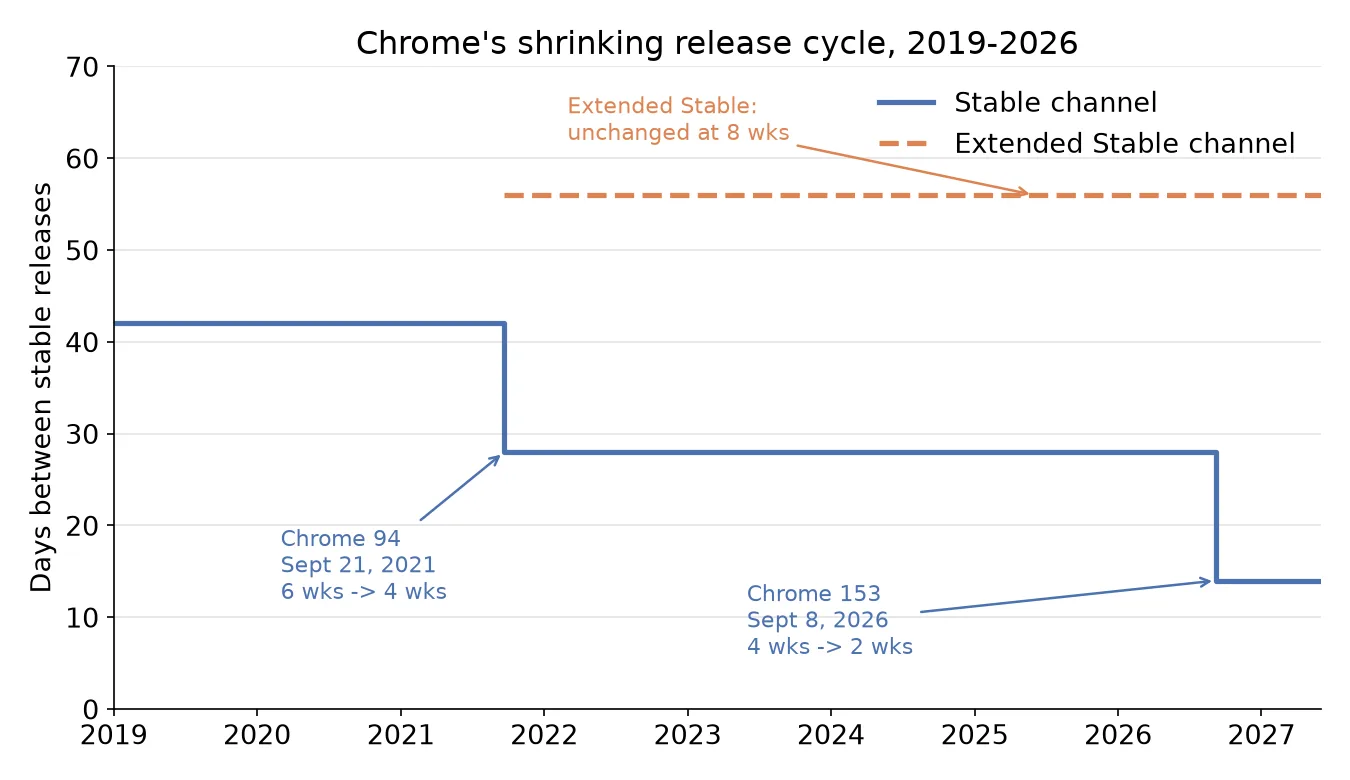
That widening gap is the actual decision point for most teams. If your product tracks Stable and you’ve been comfortable with a monthly release-testing rhythm, you now have two honest options: double your testing cadence to match Chrome, or move your baseline to Extended Stable and stop chasing every version. For an internal tool, an admin dashboard, or anything where “two versions behind” isn’t a business risk, Extended Stable is the more defensible default going forward, not a compromise. For a consumer-facing product where you want the newest platform capabilities the week they land, Stable is still the right channel, but budget the QA time that comes with it.
Unless there’s a specific reason to chase Stable, the second option is the better default for most teams. It’s the same tradeoff that comes up when clients ask what they’re actually paying for in ongoing browser compatibility work.
If you maintain a browser extension, watch this closely
Extension developers already have a faster-moving target than most web teams, thanks to ongoing Manifest V3 enforcement that’s been reshaping what extensions can do for the past two years. A two-week Stable cycle means less runway between a policy or API change showing up and it reaching every Stable user. The old pattern of “we’ll catch the deprecation notice and fix it before the next monthly release” gets a lot less forgiving when “monthly” is now “biweekly.”
The practical fix is the same one performance-sensitive teams already use for CSS and JS feature adoption: track Beta directly instead of waiting for Stable to surface a problem, the way teams already do when deciding whether a newly Baseline-available feature is safe to ship. Beta now runs three weeks ahead of Stable. That’s your actual warning window, and it just got more valuable, not less, because Stable itself gives you less runway once something does land.
It’s also worth pairing this with an existing habit: reading Chrome’s security release notes as they come out rather than batching that review monthly. Faster major versions plus a decoupled weekly patch schedule means more, smaller updates to track, not fewer.
Should you actually care?
Most teams, honestly, don’t need to change anything today. If your product already tests against Extended Stable or against “current minus one,” this change is invisible to you, and it should stay that way.
The teams that need to act are the ones running CI against latest Stable, anyone maintaining a browser extension, and anyone who leans on feature flags or origin trials as an early-warning system for upcoming platform behavior. For those three groups, the move is concrete: pick a channel deliberately instead of defaulting to whichever one you’ve always used, and if you stay on Stable, plan for a QA cycle that runs on Chrome’s clock, not the one you inherited from the four-week era.
The takeaway
Don’t try to double your testing cadence just because Chrome doubled its release cadence. Pick the channel that actually matches your risk tolerance: Extended Stable if two-versions-behind is fine for your product, Stable with a tightened QA cycle if it isn’t, and Beta tracking on top of either if you maintain an extension. The one mistake worth avoiding is doing nothing and finding out which category you’re in from a broken production build.
Frequently asked questions
- When did Chrome move to a two-week release cycle?
- Chrome 153 was the first release on the new cadence, shipping to Stable on September 8, 2026, two weeks earlier than the September 22 date it would have hit on the old four-week schedule. Chrome 154 then followed right on the new two-week schedule, landing September 22, 2026, the next version after 153.
- Does Extended Stable also move to a two-week cycle?
- No. Google explicitly confirmed Extended Stable keeps its existing 8-week cadence. The practical effect is that the gap between Stable and Extended Stable widened from about 2x (28 vs. 56 days) to about 4x (14 vs. 56 days).
- Why did Google speed up Chrome's release cycle now?
- Google's official reasoning is that a smaller scope per release means less disruption and faster regression isolation, plus a shorter window between a vulnerability entering the codebase and a fix reaching users. Reporting from TechCrunch also ties the timing to AI-assisted vulnerability discovery accelerating faster than a four-week cycle could keep up with.
- Should my team change its QA process because of this?
- If you gate releases on Chrome Stable and track it closely, yes: tighten your regression cadence or watch Beta (which now ships three weeks ahead of Stable) for earlier warning. If you don't have the bandwidth to double your testing frequency, pin your baseline to Extended Stable instead and treat Stable as a preview of what's coming.
- What does this mean for browser extension developers?
- Faster releases mean less time between a Manifest V3 API or policy change appearing and it reaching every Stable user, on top of the deprecation work already underway. Extension maintainers should watch the Beta channel directly rather than waiting for Stable to surface a problem.
- Did anything change for Chrome's security update schedule?
- Not directly. Google already shipped security patches on their own schedule, independent of major version bumps, and that continues. What changed is how often the major version itself, and the features and APIs tied to it, moves forward.
Sources
Sponsored
More from this category
More from Web Development



Sponsored
Discussion
Join the conversation.
Comments are powered by GitHub Discussions. Sign in with your GitHub account to leave a comment.
Sponsored