Cybersecurity · Vulnerability Management
CVE-2026-20316: Cisco FMC Hardcoded Password Fix
A static credential baked into on-prem Cisco Secure FMC is being exploited. Who's affected, why a 5.3 CVSS undersells it, and what to check right now.

Prathviraj Singh
4 min read
Sponsored
If you run an on-premises Cisco Secure Firewall Management Center, stop reading and go check your patch level. CVE-2026-20316 is a hardcoded password baked into the software itself, it’s being actively exploited, and CISA’s federal remediation deadline lands today, August 1, 2026. Everything below is the detail, but the action item doesn’t wait for you to finish the article.
What’s actually in FMC
FMC is the box that manages Cisco’s Secure Firewall (formerly Firepower) appliances at scale: policy, logging, updates, all of it, from one console. That makes it one of the highest-value targets in a network, because compromising the manager can mean compromising every firewall it controls.
CVE-2026-20316 is classified as CWE-259, use of a hardcoded password. A low-privileged account exists inside the on-prem FMC software with a credential that’s the same across affected installs, not something an admin set or can rotate through the UI. Anyone who knows that credential, and it’s now public knowledge among threat actors, can log in remotely without going through the appliance’s actual authentication flow.
Why the CVSS score is misleading
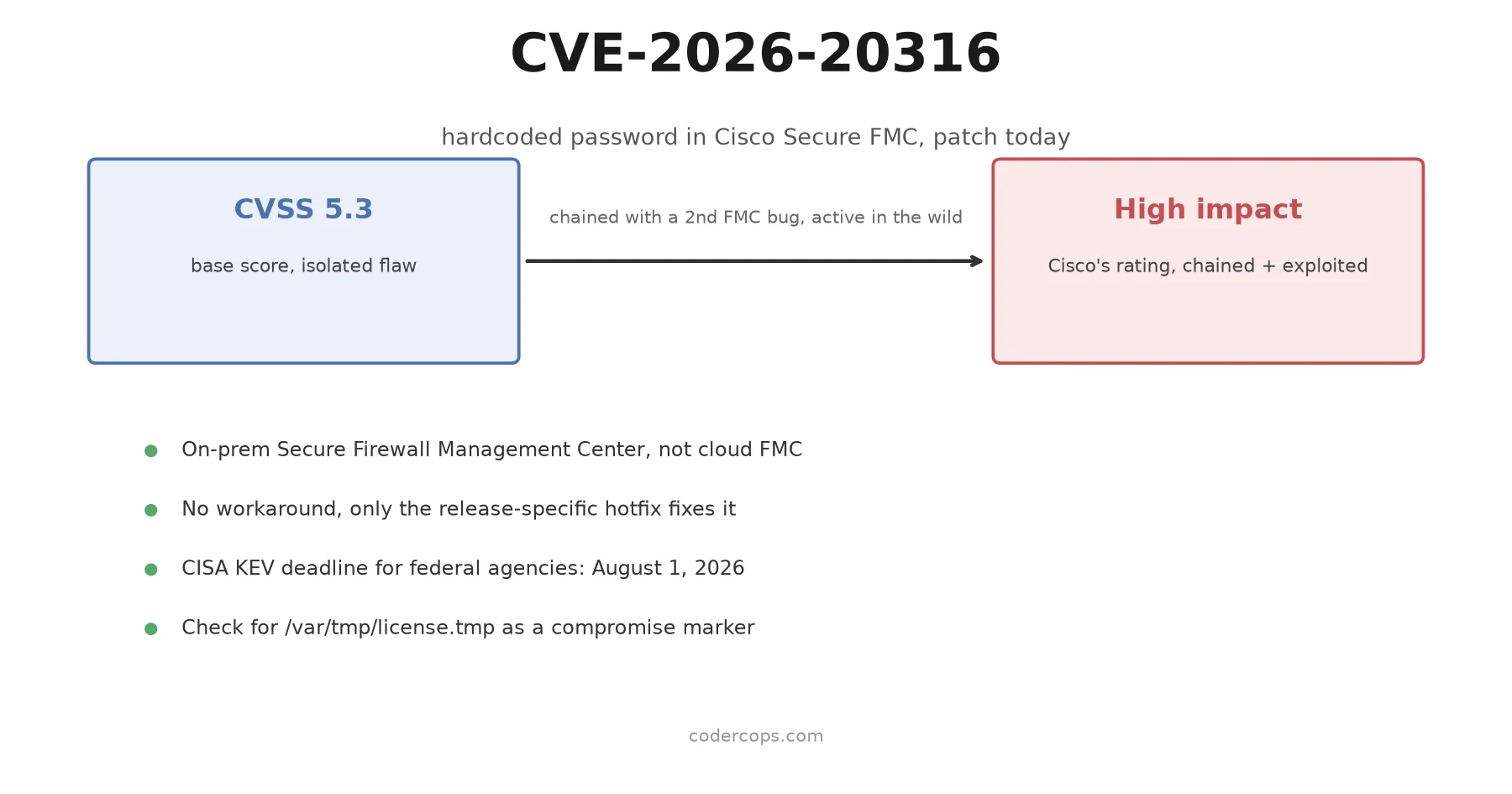
Cisco’s base score for this one is 5.3, which normally reads as “patch it during the next maintenance window, not tonight.” Don’t do that here. Cisco assigned it a High Security Impact Rating instead, and the gap between those two numbers is the whole story.
CVSS scores the vulnerability in isolation: what can this specific bug do on its own? On its own, the hardcoded account only grants low-privilege access, hence 5.3. But Cisco has confirmed that attackers in the wild are chaining this credential with a second, separate FMC vulnerability to escalate from that low-privilege foothold to meaningfully more control over the appliance. A score that measures one link in the chain misses the chain.
This is the same pattern security teams have seen with plenty of “medium” CVEs that turn into real incidents: the number describes the lock, not what’s behind the door once someone’s inside the house.
Who’s exposed
Cisco’s advisory covers on-premises Secure Firewall Management Center running affected release trains. Cloud-delivered FMC and Cisco Defense Orchestrator are not implicated here, so if you manage your firewalls entirely through Cisco’s cloud offering, this specific advisory isn’t your fire to put out. If you’re running FMC on your own hardware or in your own virtual environment, you’re in scope until you’ve applied the hotfix.
Cisco released hotfixes for the following release trains:
| Release | Status |
|---|---|
| 7.0 | Hotfix available |
| 7.2 | Hotfix available |
| 7.4 | Hotfix available |
| 7.6 | Hotfix available |
| 7.7 | Hotfix available |
| 10.0 | Hotfix available |
If your FMC is on a release not listed, check Cisco’s advisory directly. Cisco has been explicit that upgrading to the fixed software, via the release-specific hotfix, is the only complete remediation. There is no configuration change, firewall rule, or access-control workaround that closes this off, because the credential lives inside the software rather than in a setting you control.
What to do today
Three steps, in order:
- Identify every on-prem FMC instance you run and its current release. If you manage a network for a client through a cybersecurity services engagement, this is the moment to run that inventory across every environment you touch, not just the one that comes to mind first.
- Apply the release-specific hotfix. Don’t wait for a broader version upgrade cycle. Cisco published these as targeted hotfixes specifically so teams could patch fast without a full release migration.
- Check for the compromise indicator. Cisco’s advisory points to a file at
/var/tmp/license.tmpon affected appliances as a marker tied to exploitation attempts. If you find it, treat the box as potentially compromised: pull logs, check for unexpected admin accounts or config changes, and escalate through your incident response process rather than just patching and moving on.
CISA’s Known Exploited Vulnerabilities catalog entry sets August 1, 2026 as the remediation deadline for covered federal agencies. Private-sector teams aren’t bound by that date, but the KEV catalog only lists vulnerabilities with confirmed active exploitation, so the deadline is a reasonable proxy for “the attackers are already using this, not might.”
The actual takeaway
A CVSS 5.3 on a network management appliance that controls your firewalls is not a low-priority ticket when the vendor itself is telling you it’s being chained into something worse and actively exploited. Patch on Cisco’s severity rating and the confirmed exploitation, not on the raw number. If you run on-prem FMC, apply the hotfix for your release train today, check for /var/tmp/license.tmp, and only then get back to whatever this article interrupted.
Frequently asked questions
- What is CVE-2026-20316?
- It's a use-of-hardcoded-password vulnerability (CWE-259) in on-premises Cisco Secure Firewall Management Center. A static credential for a low-privileged account ships inside the software itself, so anyone who knows it can log in remotely without authenticating through normal means.
- Why is a 5.3 CVSS score getting a CISA emergency deadline?
- CVSS base scores measure a single flaw in isolation. This one only grants low-privilege access on its own, which keeps the number down. But Cisco has confirmed attackers are chaining it with a separate FMC vulnerability to escalate to full control, and it's already being exploited, which is why the practical risk is far higher than 5.3 suggests.
- Is cloud-managed FMC affected?
- No. This affects on-premises Secure Firewall Management Center deployments. Cisco Defense Orchestrator and cloud-delivered FMC are not implicated in this advisory.
- Is there a workaround if I can't patch immediately?
- No. Cisco has stated explicitly that there is no mitigation short of installing the release-specific hotfix. You cannot disable the account or firewall it off reliably because the credential is embedded in the software, not configurable through the admin interface.
- How do I check if my FMC has already been compromised?
- Cisco's advisory points to a specific artifact: a file at /var/tmp/license.tmp that shouldn't normally exist. Its presence is a strong signal of prior exploitation attempts. Check appliance logs and that file path before and after you patch, and treat any hit as an incident, not a false positive.
Sources
Sponsored
More from this category
More from Cybersecurity
Sponsored
Discussion
Join the conversation.
Comments are powered by GitHub Discussions. Sign in with your GitHub account to leave a comment.
Sponsored