AI Integration · Engineering
Context engineering: a practical guide for LLM apps
Context engineering means choosing what enters an LLM's context window: instructions, retrieved docs, tool output, memory and history. Eight techniques.

Anurag Verma
14 min read · Updated Oct 19, 2026
Sponsored
The term “context engineering” took off in June 2025. Shopify CEO Tobi Lutke posted that he preferred it to “prompt engineering” because it “describes the core skill better: the art of providing all the context for the task to be plausibly solvable by the LLM.” Andrej Karpathy agreed, calling it “the delicate art and science of filling the context window with just the right information for the next step” (Simon Willison collected both). Three months later Anthropic published Effective context engineering for AI agents, which is still the most useful write-up of the practice.
This guide is the practical version: what goes into the context window, why a bigger window does not save you, and eight techniques for choosing what the model sees.
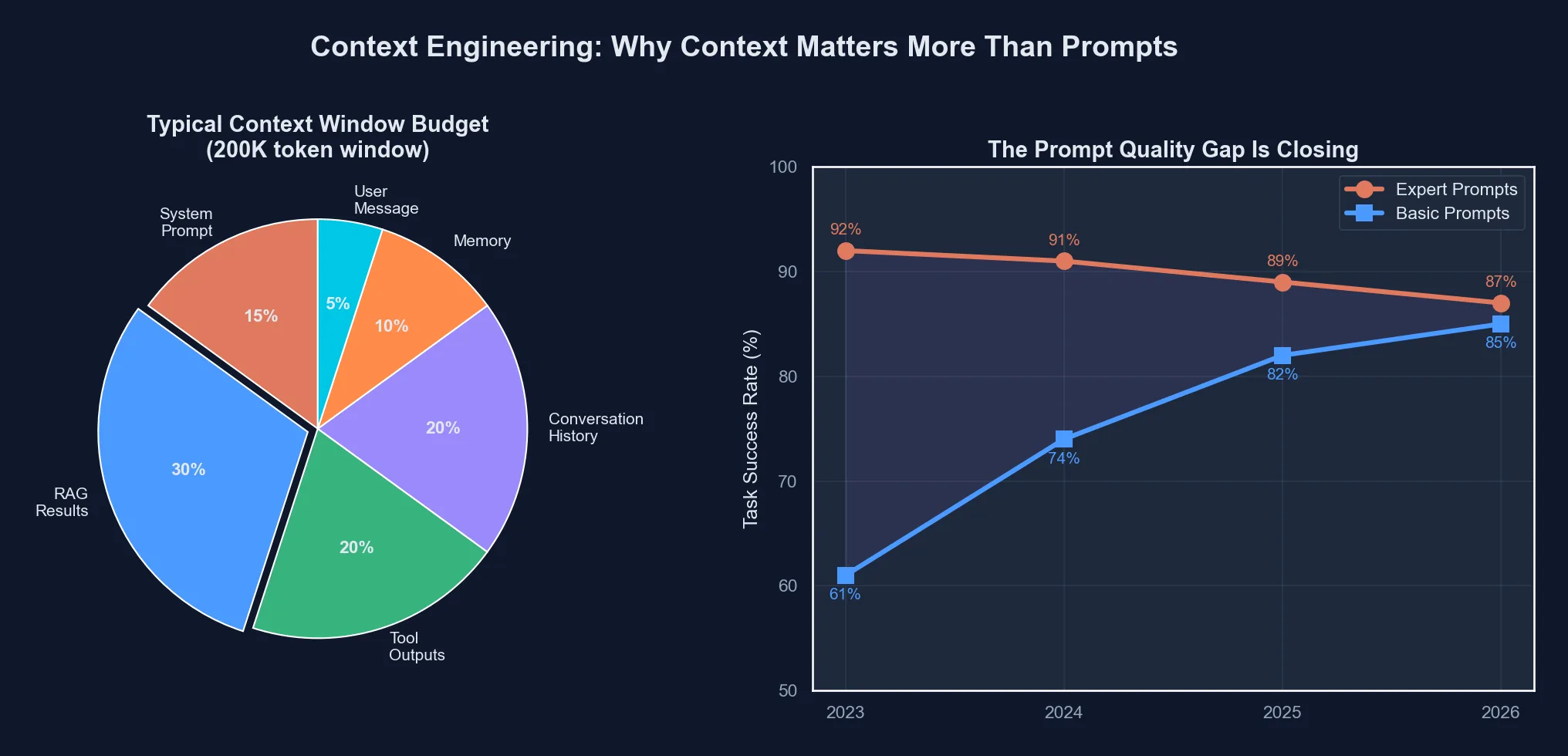 The shift from crafting individual prompts to engineering the full context window that shapes AI behavior
What context engineering is
Context engineering is deciding what goes into a language model’s context window on every call: the system prompt, retrieved documents, tool results, conversation history and memory. Anthropic defines it as “the set of strategies for curating and maintaining the optimal set of tokens (information) during LLM inference.” Prompt wording still matters, but it is one input among several.
Here is what usually ends up in the window, and how each piece tends to go wrong:
| Context source | What it is | Typical failure |
|---|---|---|
| System prompt | Persistent instructions for the model | Either brittle if/else logic or vague advice |
| Project memory (CLAUDE.md, AGENTS.md) | Curated facts about the codebase or domain | Goes stale, grows until nobody reads it |
| Retrieved documents (RAG) | Chunks pulled in at query time | Old versions, near-duplicates, wrong chunks |
| Tool definitions | Descriptions of what the model can call | Overlapping tools the model cannot choose between |
| Tool results | API responses, file reads, query output | Raw dumps with cryptic field names |
| Conversation history | Prior turns in the session | Keeps growing until early constraints get lost |
| User context | Who is asking, what they can access | Missing, so the model guesses |
Prompt engineering, as most people practiced it, worked on the first row. Context engineering is about all of them at once. An analogy I find useful: prompt engineering is writing a clear exam question, and context engineering is deciding which books and notes are on the student’s desk. Both matter. For an agent working through a real codebase, the desk usually matters more.
Is prompt engineering dead, then? I don’t think so, and Anthropic’s post doesn’t argue that either. It spends a whole section on writing system prompts. What has faded is the bag of tricks (“you are a world-class expert”, “take a deep breath”, offering the model a tip). Those were workarounds for fussier models. Clear instructions are still part of the job.
Why a bigger context window does not fix it
Every current Claude model listed in Anthropic’s models overview has a 1M token context window. It is tempting to read that as “stop choosing, include everything”. The research says otherwise.
Chroma’s Context Rot report (July 2025) tested 18 models, including GPT-4.1, Claude 4, Gemini 2.5 and Qwen3, and found that “performance grows increasingly unreliable as input length grows.” Two results stick with me. Adding a single distractor (text that looks relevant but is not) lowered accuracy, and four distractors lowered it more. And on LongMemEval, every model did noticeably better with a focused prompt of about 300 tokens than with a full prompt of about 113k tokens that contained the same answer plus irrelevant history.
Anthropic’s explanation is that models have an “attention budget”. Self-attention relates every token to every other token, which the post summarizes as n² pairwise relationships for n tokens, so each extra token thins the attention left for the rest. The practical rule from both sources is the same. Treat context as a budget, and find the smallest set of high-signal tokens that gets the job done.
| Context source | Signal quality | Default treatment |
|---|---|---|
| System prompt | High (you write it) | Always include, keep it tight |
| Project memory file | High if curated | Always include |
| Relevant source files | High when targeted | Include selectively |
| RAG results | Depends on retrieval quality | Filter and re-rank before including |
| Tool output | High but often verbose | Format, then truncate |
| Conversation history | Falls over time | Summarize or clear old turns |
| Whole-repository dump | Low, mostly noise | Don’t |
Technique 1: write the system prompt at the right altitude
Anthropic describes two failure modes for system prompts. One is hardcoding complex, brittle logic to force exact behavior. The other is high-level guidance so vague it gives the model nothing concrete. The target is in between, which the post calls the “right altitude”. Its suggested process is to start with a minimal prompt on the best model you have, test it, and add instructions in response to the failures you see.
Compare a typical 2024 code review prompt with what actually helps:
You are a senior staff engineer with 15 years of experience
in TypeScript, React, and distributed systems. You are known
for your thorough yet constructive code reviews. Please review
the following pull request with attention to:
1. Security vulnerabilities
2. Performance implications
3. API design consistency
4. Test coverage gaps
Think step by step. Be specific. Cite line numbers.
# What a good review needs in context:
context:
- The actual diff (not a summary)
- The full files being modified (not just changed lines)
- The project's conventions (CLAUDE.md or style guide)
- Related test files
- The PR description and linked issue
- Recent commit history on those files
- CI resultsThe persona paragraph is not harmful, it is just low value. The second list is what lets the model say something specific about this pull request. If you have the second, a one-line request (“Review this PR; flag anything that breaks our conventions”) is usually enough.
Technique 2: keep a project memory file
For coding agents, the cheapest context improvement is a file the agent reads at the start of every session. Claude Code loads CLAUDE.md from ./CLAUDE.md or ./.claude/CLAUDE.md, plus a personal ~/.claude/CLAUDE.md and a gitignored CLAUDE.local.md. If a repository has an AGENTS.md and no CLAUDE.md, Claude Code reads that instead. Cursor’s rules files do the same job, and our guide to team coding standards in Cursor covers that side.
A compact example:
# CLAUDE.md

## Architecture
Content is authored as git files, validated via CI,
then synced to Supabase. The website queries Supabase
at request time (SSR). No Astro Content Collections.

## Commands
npm run dev          # Start dev server
npm run build        # Production build
npm run test         # Run vitest

## Conventions
- CSS custom properties only (no Tailwind)
- TypeScript strict mode
- Path alias @/* maps to src/*
- Test files in src/**/*.test.ts

## Known issues
- TypeScript Buffer type mismatch in OG image files

## Key files
- src/lib/content.ts: all data access functions
- src/lib/supabase.ts: Supabase client singleton
Each line in that file prevents a specific, repeated mistake: suggesting Tailwind classes in a project that does not use Tailwind, reaching for a framework feature the team migrated away from, putting tests in the wrong folder, writing relative imports where an alias exists. That is the test for whether a line belongs. If you have corrected the agent about the same thing twice, write it down.
A few details from the docs are worth knowing. /init generates a starting file from your codebase. Files can pull in others with @path/to/file imports, but imported files still load at launch, so they organize context without shrinking it. And the docs recommend keeping each CLAUDE.md under 200 lines, because longer files cost more context and reduce adherence. Instructions that only matter for part of the codebase can go in path-scoped rules under .claude/rules/, which load only when Claude works on matching files.
Technique 3: retrieve just in time, through tools
Anthropic’s post makes a distinction I keep coming back to. You can retrieve everything up front and paste it in, or you can give the agent lightweight identifiers (file paths, stored queries, links) and tools to load the details at runtime. Claude Code uses a hybrid. CLAUDE.md goes in up front, and the agent uses glob and grep to find the rest as it works.
MCP is the standard plumbing for the “tools” half. Instead of pasting a database schema into the chat, you connect a server that lets the model read the live schema when it needs it. A project-level .mcp.json for Claude Code that connects Supabase and GitHub through their hosted servers looks like this:
{
  "mcpServers": {
    "supabase": {
      "type": "http",
      "url": "https://mcp.supabase.com/mcp?project_ref=${SUPABASE_PROJECT_REF}&read_only=true"
    },
    "github": {
      "type": "http",
      "url": "https://api.githubcopilot.com/mcp/",
      "headers": {
        "Authorization": "Bearer ${GITHUB_PAT}"
      }
    }
  }
}
Claude Code expands ${VAR} in the url and headers of HTTP servers, so tokens stay out of the committed file. The Supabase options are from Supabase’s MCP docs, which also recommend scoping the server to one project, using read-only mode, and connecting to production only when the task needs production data. Take that advice seriously. The server runs with your permissions, and any text in your data can try to instruct the model, which is the problem our prompt injection guide covers. For setup across other clients, see our practical MCP guide.
The payoff is easy to see. Without a schema tool, you paste the schema, the model still guesses a column name, you correct it, and you go around again. With the tool, the model reads the real column names and types before it writes the query.
Technique 4: design tool definitions and outputs for the model
Tools are context twice: their definitions sit in the window all the time, and their results land in it every call. Anthropic’s advice is that tools should be self-contained, clear about their intended use, and economical with tokens, and it names bloated tool sets with overlapping functions as a common failure. If a human engineer cannot say which of two tools to use in a situation, the model cannot either. Our write-up on pruning MCP tools to cut agent token costs goes deeper on the definitions side.
For results, shape the output before it reaches the model. This raw result:
{"rows": [{"id": 1, "t": "My Post", "s": "published", "ca": "2026-01-15"}]}is harder to reason about than this one:
{
  "source": "supabase/blog_posts",
  "query": "SELECT * FROM blog_posts WHERE status = 'published'",
  "result_count": 1,
  "results": [
    {
      "id": 1,
      "title": "My Post",
      "status": "published",
      "created_at": "2026-01-15"
    }
  ],
  "note": "Column 'status' accepts: draft, published, archived"
}
The second costs more tokens and usually saves a round of confused back and forth, because the model can see the query, the field names and the allowed values. For large results, return a count and the first page, and let the model ask for more.
Technique 5: load context in layers
Not every request needs the same context. A simple layering scheme:
# Layer 1: always present
context = load_system_prompt() + load_project_memory()

# Layer 2: task-relevant, chosen from the request
if task_involves_database:
    context += load_schema_via_mcp()
    context += load_related_queries()

if task_involves_frontend:
    context += load_component_tree()
    context += load_design_tokens()

# Layer 3: on demand
# Tools let the model pull more while it works, so this
# layer is never loaded up front.

# Layer 4: persistent memory
context += load_user_preferences()
context += load_recent_decisions()
The point is that layer 1 is small and stable, layer 2 is picked per task, and layer 3 is the model’s job. A stable layer 1 has a side benefit: it is the part of the prompt that prompt caching can reuse across calls.
Technique 6: keep retrieved context fresh
Stale context can be worse than none. If retrieval returns documentation from before a migration, the model will confidently write code against the old API, and the retrieved text makes it look justified. Store a last_updated date with every document, filter or down-weight old ones at query time, and when docs are versioned, retrieve the version that matches the dependency actually installed. Put the date in the text the model sees as well, so it can tell an old document from a current one. Our RAG architecture guide covers chunking, re-ranking and the rest of retrieval quality, which matters more here than any prompt.
Technique 7: compact long sessions
Long conversations fill the window with old turns, and per the Chroma results, more input means less reliable answers. Anthropic describes three tools for long-horizon work:
- Compaction. When a conversation nears the window limit, summarize it and continue in a fresh context with the summary. Clearing old tool results is the lightest form of this, since a file read from 40 turns ago rarely needs to stay verbatim.
- Structured note-taking. The agent writes notes (a to-do list, a decisions log, a progress file) that live outside the window and get read back in when needed.
- Sub-agents. A sub-agent explores in its own clean context, possibly spending tens of thousands of tokens, and returns a condensed summary to the lead agent. Anthropic cites summaries of 1,000 to 2,000 tokens.
You can apply the first one by hand today. When a long chat starts contradicting constraints from early on, ask the model to write the current state (goal, decisions, open questions, constraints) and start a new session with that summary. It feels like overhead, and it is much faster than arguing with a confused context.
Memory that persists across sessions is the same idea stretched over days. Claude Code’s auto memory now writes notes for you, and the patterns in our guide to AI agent memory apply to custom agents. My one opinion here: review automated memory regularly. Notes nobody prunes turn into a junk drawer, and a junk drawer in the context window is just more distractors.
Technique 8: use a few canonical examples
Few-shot examples still work, but Anthropic warns against stuffing a prompt with every edge case you can think of. Its advice is to curate “a set of diverse, canonical examples that effectively portray the expected behavior of the agent.” Three good examples that show the shape of a correct answer usually beat fifteen that each patch one past bug, and they cost a fraction of the tokens.
 From “magic words” to structured context
Where to invest as a team
If your team is putting time into prompt libraries and phrasing workshops, I would move most of it to the infrastructure that decides what the model sees:
- A maintained memory file per project (CLAUDE.md, AGENTS.md or rules files). Review it like code and version it with the repo.
- Tool and MCP connections to the systems people currently copy and paste from: the database, the issue tracker, CI, internal docs. Start read-only.
- Retrieval quality, meaning chunking, embeddings, re-ranking and freshness. A perfect prompt cannot fix the wrong document.
- Session hygiene: compaction, notes and sub-agents for long tasks.
- Visibility into the window. Log what went into context for a bad answer, so you can see whether the model lacked information or had too much of the wrong kind.
The quickest first step is the memory file. Spend half an hour writing down your architecture, commands, conventions and known issues, and the next session starts with that knowledge instead of rediscovering it.
Frequently asked questions
- What is context engineering and how is it different from prompt engineering?
- Context engineering is deciding what information an LLM sees on each call: the system prompt, retrieved documents, tool definitions and outputs, conversation history and memory. Anthropic describes it as curating and maintaining the optimal set of tokens during inference. Prompt engineering focuses on the wording of instructions, which is one piece of that larger job.
- Is prompt engineering dead?
- No. Clear instructions still matter, and Anthropic's own context engineering guidance includes advice on writing system prompts at the right level of detail. What changed is that for agents and multi-step apps, what the model can see usually matters more than how a single request is phrased.
- Does a 1M token context window make context engineering unnecessary?
- No. Chroma's Context Rot report tested 18 models and found performance gets less reliable as input grows, and that irrelevant but similar text (distractors) lowers accuracy further. A large window raises the ceiling on what you can include. It does not make including everything a good idea.
- What is a CLAUDE.md file used for?
- CLAUDE.md holds persistent project instructions for Claude Code, such as build commands, conventions and architecture notes. Claude Code loads it from ./CLAUDE.md or ./.claude/CLAUDE.md at the start of every session, along with a personal ~/.claude/CLAUDE.md. Running /init generates a starting file, and the docs recommend keeping each file under 200 lines.
- How does MCP help with context engineering?
- MCP servers give the model a standard way to fetch live information, such as a database schema or open issues, when it needs it. That supports just-in-time retrieval: the model starts with a small context and pulls specifics through tools instead of a person pasting them into the prompt.
- How should long conversations be handled?
- Anthropic describes three approaches: compaction (summarizing a conversation that is nearing the window limit into a fresh context), structured note-taking (the agent writes notes that live outside the window) and sub-agents that explore in their own clean context and return a condensed summary to a lead agent.
Sources
- Anthropic: Effective context engineering for AI agents (Sep 29, 2025)
- Simon Willison: Context engineering (Jun 27, 2025), quoting Tobi Lutke and Andrej Karpathy
- Chroma Research: Context Rot, how increasing input tokens impacts LLM performance (Jul 14, 2025)
- Anthropic: models overview (1M token context windows on current models)
- Claude Code docs: how Claude remembers your project (CLAUDE.md, imports, auto memory)
- Claude Code docs: connect to tools via MCP (.mcp.json, environment variable expansion)
- Supabase docs: Model Context Protocol (hosted server, read_only and project_ref)
- GitHub MCP Server (remote endpoint and Docker image)
Sponsored
More from this category
More from AI Integration



Sponsored
Discussion
Join the conversation.
Comments are powered by GitHub Discussions. Sign in with your GitHub account to leave a comment.
Sponsored