AI Integration · AI Agents
How GitHub Cut AI Agent Token Costs by 62%, and How to Copy It
GitHub cut token spend in its agentic CI workflows up to 62% by pruning unused MCP tools and swapping tool calls for CLI commands. How to copy the technique.

Shashikant Gupta
6 min read
Sponsored
If your team runs AI agents in CI, on pull requests, in scheduled maintenance jobs, your AI agent token costs are probably higher than they need to be, and not because the model is doing more reasoning than necessary. GitHub found this the hard way running its own agentic workflows in production, and the fix cut token spend by up to 62% on some workflows without changing what those agents actually accomplish. The technique is simple enough to copy this week.
The overhead nobody notices
LLM APIs are stateless, so model context protocol tool schemas ride along with every call. Every request, every single turn, has to include everything the model needs to respond: the conversation so far, and the full schema (name, description, parameters) for every tool it’s allowed to call. That second part is easy to overlook, because it doesn’t show up in the conversation transcript. It’s invisible overhead that gets paid on every turn regardless of whether the agent uses any of those tools that turn.
The size adds up fast. A GitHub MCP server (see our MCP servers practical guide) exposing around 40 tools adds roughly 10 to 15KB of schema to every request, every turn, for the life of the conversation. An agent that runs for 20 turns to complete a task is paying that overhead 20 times, mostly for tools it never touches.
Fix one: prune the tool list per workflow
Most agentic workflows don’t need every tool a general-purpose MCP server exposes. A security-scanning agent doesn’t need the pull-request-merge tool. An issue-triage agent doesn’t need the release-management tools. But if you connect the full server to every workflow by default, every workflow pays the schema cost for every tool, used or not.
The fix is to scope the tool list per workflow to what that workflow actually calls:
# Before: full MCP server connected, ~40 tools, ~10-15KB schema per request
mcp_servers:
  - github-mcp  # all tools exposed

# After: pruned to what this specific workflow uses
mcp_servers:
  - github-mcp:
      tools:
        - get_issue
        - add_issue_comment
        - search_issues
        - list_issue_labels
        - update_issue
Removing 35 unused tool definitions from a 40-tool server is what GitHub reports saving 8 to 12KB per call, on every single turn of every run of that workflow. Across a workflow that runs dozens of times a day, that’s not a rounding error.
Fix two: swap high-volume calls for CLI commands
Some operations don’t need the model’s judgment at all, they’re pure retrieval. Fetching a pull request’s diff or a file’s contents doesn’t require reasoning about what to fetch; the workflow already knows. Routing these through an MCP tool call anyway means paying the overhead of a full agentic turn (the model deciding to call the tool, formatting the call, waiting for the result) for something a direct CLI command could do without involving the model’s reasoning loop at all.
GitHub’s approach uses the gh CLI for this class of operation, in one of two ways:
- Pre-download: fetch the diff or file contents into a workspace file before the agent starts, so the data is just there when the agent needs it, no tool call required.
- Runtime proxy: for cases where pre-downloading isn’t practical, proxy the CLI call through a transparent HTTP layer that keeps authentication tokens away from the agent process entirely, which is a security win alongside the cost win (see our MCP server security checklist).
# Instead of an MCP tool call the model has to reason about invoking:
#   agent calls get_pull_request_diff(pr_number=482)

# Pre-fetch it directly into the workspace before the agent runs:
gh pr diff 482 > workspace/pr-482.diff
# The agent reads the file. No tool schema, no extra turn, no round trip.
The rule of thumb: if an operation is high-volume, predictable, and doesn’t need the model to decide anything about how to perform it, it’s a CLI-substitution candidate. If the model needs context-dependent judgment about what to fetch or how, keep it as a tool call.
Fix three: make it an ongoing process, not a cleanup
The first pass of pruning and substitution gets you the big win, but tool usage patterns drift as workflows evolve. GitHub’s answer is two small agents that run on a schedule:
- Auditor: aggregates token consumption data daily, flags workflows with usage trending upward, and surfaces anomalous runs.
- Optimizer: when the Auditor flags something, this agent analyzes the workflow’s source code and execution logs, then opens an issue describing the specific inefficiency and a proposed fix.
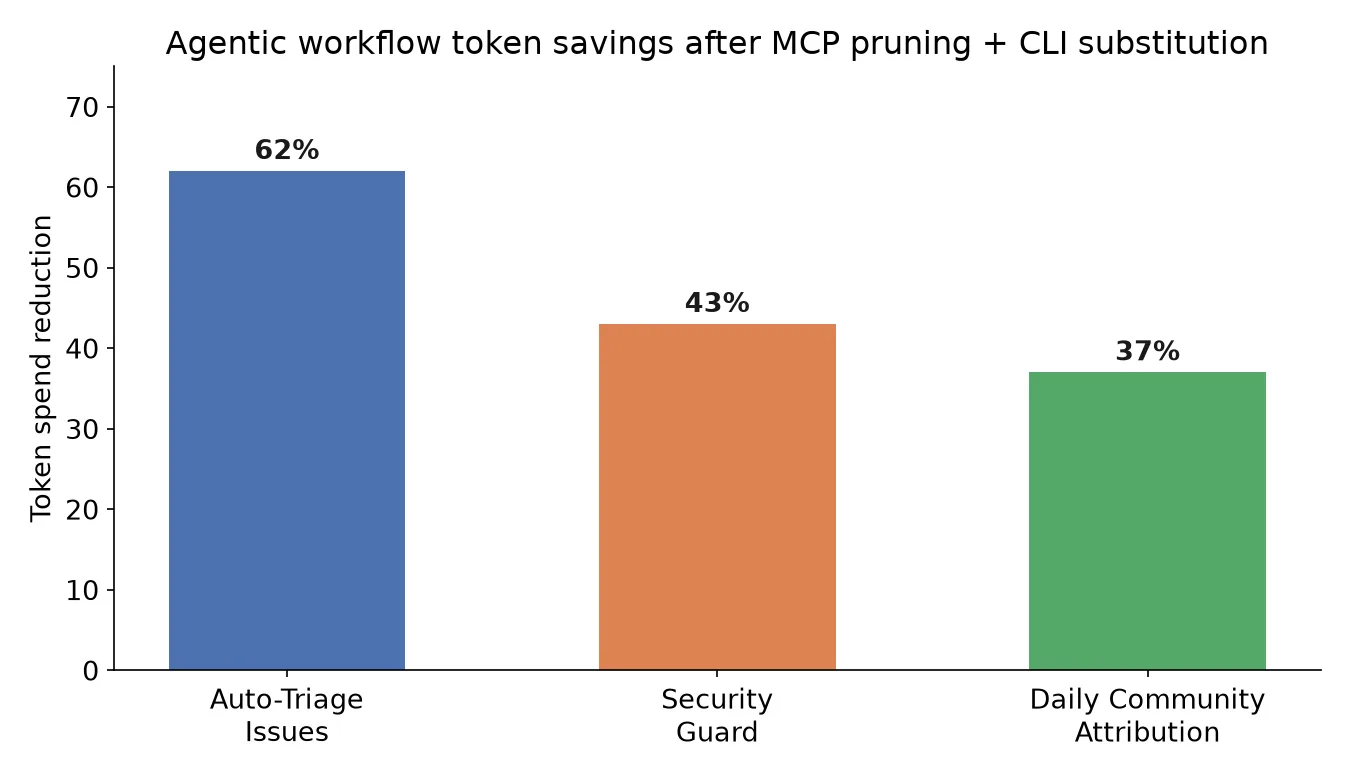
That turns cost control into a monitoring loop instead of a one-time audit that quietly goes stale. Across a dozen production workflows, GitHub reports sustained reductions like 62% on its Auto-Triage Issues workflow (measured over 109 post-fix runs) and 43% on its Security Guard workflow. The pattern ships in GitHub’s open-source gh-aw CLI if you’re already on GitHub Actions-based agent workflows (our GitHub Actions optimization guide covers the CI side); if not, the auditor/optimizer shape is straightforward to build against whatever logging your agent framework already produces.
What this doesn’t fix
None of this is a substitute for choosing the right model for the task or for broader LLM API cost optimization, and it won’t rescue a workflow that’s fundamentally doing too much reasoning for what it needs to accomplish. It also doesn’t help if your bottleneck is context window size rather than per-token cost, pruning tool schemas reduces token spend, but a workflow that’s hitting context limits from long transcripts needs a different fix (summarization, windowing, or breaking the task into smaller agent runs).
What it does fix, reliably, is the invisible tax every agentic workflow pays for tool access it doesn’t use in a given turn. If you’re running agents in production and haven’t audited which tools each workflow actually calls versus which tools it merely has access to, that gap is worth an afternoon. It’s one of the few genuinely free lunches in AI infrastructure cost right now: same model, same output quality, meaningfully lower bill.
If you’re weighing where AI agents fit into your own team’s engineering workflow more broadly, our guide to building AI agent teams in production covers the operational side of running agents at scale, of which cost control is one part of a larger picture.
Frequently asked questions
- Why does having more MCP tools connected cost more, even if the agent never calls most of them?
- Because LLM APIs are stateless. Every single turn of a conversation resends the full tool schema, name, description, and parameter definitions, for every tool the model has access to, regardless of whether that turn actually calls any of them. A GitHub MCP server exposing around 40 tools adds roughly 10 to 15KB of schema to every request. That's overhead paid on every turn of every conversation, whether or not the agent ever touches most of those tools.
- What exactly is MCP tool pruning?
- It's auditing which tools a given agentic workflow actually calls in practice, then removing the ones it doesn't need from that workflow's available tool set. A general-purpose MCP server might expose 40 tools because some workflow somewhere needs each one, but a specific workflow, say, a security-scanning agent, might only ever call five of them. Scoping that workflow to only its five needed tools removes the other 35 tools' schemas from every request it makes, which is where GitHub reports saving 8 to 12KB per call.
- What is CLI substitution and when should I use it?
- It means replacing an MCP tool call with a direct CLI command for operations that are high-volume and don't require the model's judgment about how to perform them, fetching a pull request diff or a file's contents, for example. GitHub either pre-downloads this data into workspace files before the agent starts, or proxies it at runtime through a transparent HTTP proxy that keeps authentication tokens away from the agent entirely. Use it for retrieval-style calls the agent makes constantly and predictably, not for actions where the model needs to decide what to do based on context.
- Do I need to build GitHub's Auditor and Optimizer agents myself?
- Not from scratch. GitHub shipped this pattern in its open-source gh-aw CLI, so teams building on GitHub Actions-based agentic workflows can adopt the auditor/optimizer pattern directly rather than reimplementing it. If you're running agents outside that ecosystem, the pattern itself, a scheduled job that aggregates token usage and flags anomalies, plus a second agent that investigates flagged workflows and proposes fixes, is straightforward to build against your own logging and works with any agent framework.
- Does this require switching to a cheaper or smaller model?
- No, and that's the point. These savings come from reducing the size of every request the existing model already makes, not from downgrading model quality. A workflow using GPT-5-class or Claude-class reasoning keeps that same reasoning; it just stops paying for 35 tool schemas it never uses and stops burning a full agentic turn on operations a CLI command could handle directly.
Sources
Sponsored
More from this category
More from AI Integration



Sponsored
Discussion
Join the conversation.
Comments are powered by GitHub Discussions. Sign in with your GitHub account to leave a comment.
Sponsored