Cloud & Infrastructure · Messaging
Dead Letter Queues Explained: What to Do When a Message Can't Be Processed
A message that fails every time it's retried shouldn't loop forever or vanish silently. Here's how dead letter queues catch it, how to configure retry limits properly, and the reprocessing workflow that actually closes the loop.

Prathviraj Singh
6 min read
Sponsored
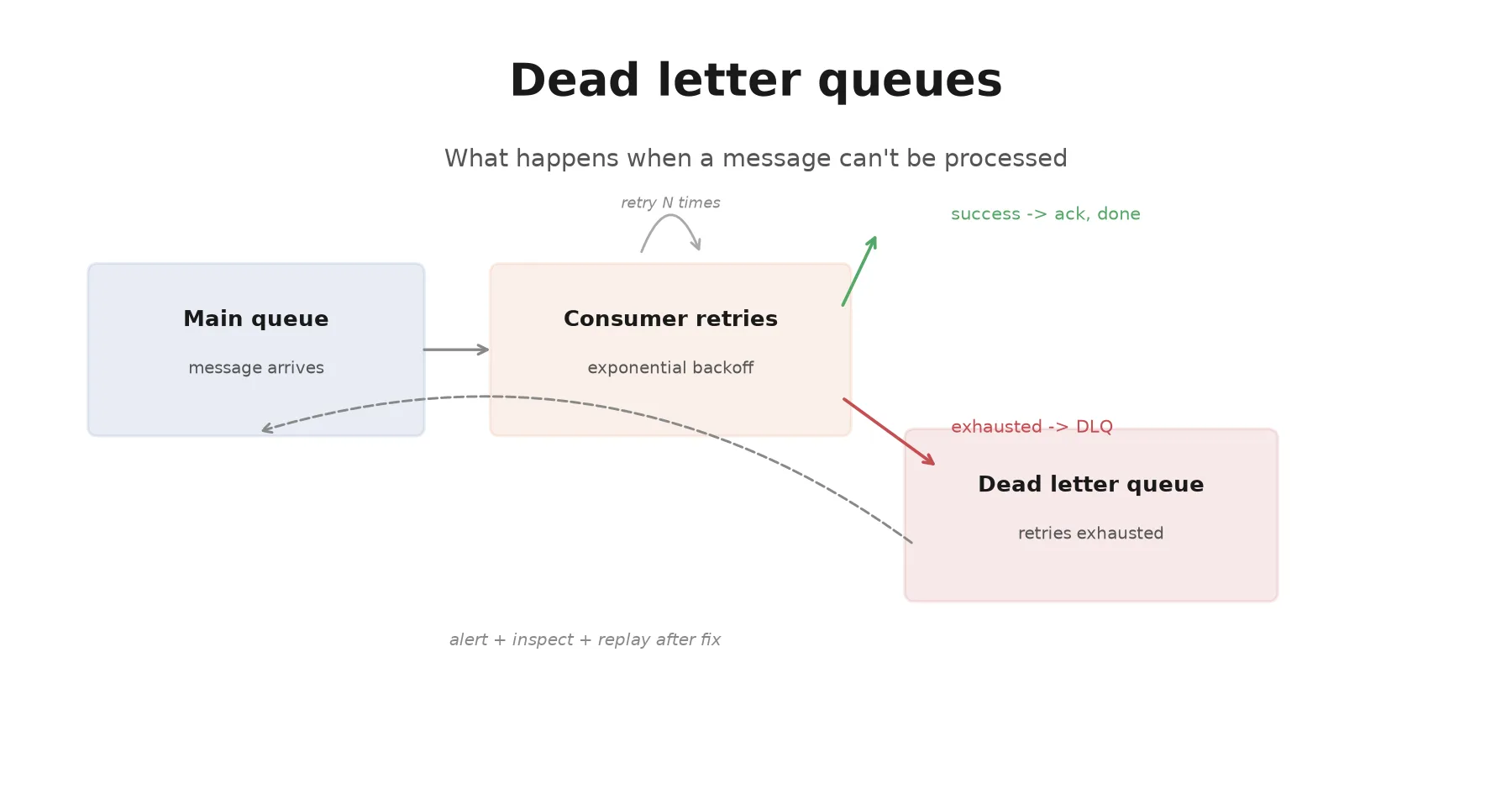
A message fails to process. Your consumer retries it, it fails again, retries again, fails again. Depending on how you built the retry logic, one of two bad things happens: the message blocks everything behind it in the queue, or your consumer eventually gives up and the message just disappears. A dead letter queue exists to make sure neither of those is the outcome.
What a DLQ actually is
A dead letter queue is a separate queue, usually configured as a companion to your main queue rather than a totally independent system, that receives messages which failed processing after exhausting their configured retry attempts. Most managed queue services support this natively: Amazon SQS lets you attach a redrive policy pointing at a DLQ, RabbitMQ has dead-letter exchanges, and Kafka doesn’t have a native DLQ concept but the pattern is commonly implemented at the consumer level by publishing failed messages to a dedicated topic.
The core mechanic is the same everywhere: track how many times a message has been attempted, and once it crosses your configured threshold, route it somewhere other than back into the main processing flow.
// A simplified consumer with retry tracking and DLQ routing (SQS-style)
async function processMessage(message) {
  const attempts = message.attributes.ApproximateReceiveCount;
  const MAX_RETRIES = 5;

  try {
    await handleMessage(message.body);
    await deleteMessage(message); // success, remove from queue
  } catch (err) {
    if (attempts >= MAX_RETRIES) {
      await sendToDeadLetterQueue(message, { lastError: err.message, attempts });
      await deleteMessage(message); // remove from main queue, it's in the DLQ now
    }
    // else: let visibility timeout expire, message becomes available for retry
  }
}
With a managed redrive policy configured (as in SQS), you often don’t need this logic in application code at all, the queue service handles the retry count and the move to the DLQ automatically once maxReceiveCount is exceeded. Either way, the effect is the same: a message that can’t succeed stops occupying a slot in the queue your healthy messages need to move through.
Why the retry policy matters more than the DLQ
It’s tempting to treat the DLQ as the interesting part of this pattern and the retry count as an afterthought. In practice, getting the retry policy wrong causes more operational pain than not having a DLQ at all.
Set retries too low, and transient failures, a database connection pool briefly exhausted, a downstream API timing out under load, a network blip, land in the DLQ even though they would have succeeded on the next attempt a few seconds later. Now your DLQ fills with noise, and every alert tied to it becomes something engineers learn to ignore, which is exactly the failure mode you don’t want for a signal that’s supposed to matter.
Set retries too high, or use fixed-interval retries instead of backoff, and a message that will never succeed, malformed payload, a permanently deleted downstream resource, a bug in your own handler, keeps consuming worker capacity and delaying the point where a human actually finds out something is broken. Five retries at a fixed one-second interval finds out in five seconds. Five retries with exponential backoff (1s, 2s, 4s, 8s, 16s) takes about 31 seconds to reach the same conclusion, but gives transient failures a real chance to clear first.
function backoffDelay(attempt, baseMs = 1000, maxMs = 60000) {
  const delay = Math.min(baseMs * 2 ** (attempt - 1), maxMs);
  const jitter = delay * 0.2 * Math.random(); // avoid thundering herd on retry
  return delay + jitter;
}
The jitter matters at scale: without it, a batch of messages that failed at the same moment (say, because a downstream dependency briefly went down) all retry at exactly the same intervals, hammering that dependency the moment it recovers instead of spreading the retry load out.
A DLQ you never look at is just a queue where failures go to disappear more politely
This is the part teams skip, and it’s the part that actually makes the pattern worth implementing. A message landing in the DLQ should trigger an alert, at minimum a threshold alarm (“more than N messages in the DLQ over the last hour”), because a spike usually means either a real bug shipped or a downstream dependency is having a bad day, and both are worth knowing about quickly.
Beyond alerting, you need an actual path back into the main flow once the underlying issue is fixed. That’s typically either:
- Manual replay, where an engineer inspects the failed messages (often via the cloud console, or a small internal tool), confirms the fix addresses the root cause, and re-publishes the messages to the main queue.
- Automated replay with limits, a scheduled job that periodically re-attempts DLQ messages a small number of times, useful when failures are often transient enough that “wait and retry once more” resolves most of them without a human.
Whichever you build, the DLQ message itself should carry enough context to make replay possible without guesswork: the original payload, the error that caused the final failure, the number of attempts, and a timestamp. Stripping that metadata down to just the payload turns debugging into archaeology.
Where this fits with the rest of your messaging architecture
Dead letter queues aren’t a replacement for correctness elsewhere in your system, they’re a backstop for the cases correctness doesn’t cover: the downstream service that’s down longer than your retry window, the malformed message that slipped past validation somewhere upstream, the bug in a deploy that broke one specific message shape. If you’re publishing events reliably in the first place, the outbox pattern is the piece that prevents messages from being lost before they even reach the queue; a DLQ handles what happens after a message arrives but can’t be processed.
The combination, reliable publishing on one end and a DLQ with real reprocessing on the other, is what actually gets you close to “no message quietly disappears,” which is usually the actual requirement teams are reaching for when they start asking about message durability. If you’re auditing your own queue-based architecture for silent failure points, a missing or unmonitored DLQ is one of the first things worth checking, and our team has walked several clients through exactly that kind of review.
Frequently asked questions
- What's the difference between a dead letter queue and just logging an error and dropping the message?
- Logging and dropping loses the message entirely, you have a record that something failed, but no way to act on the actual data that failed to process. A DLQ preserves the message itself, along with metadata like the number of retry attempts and often the last error, so you can inspect what happened and replay it once the underlying issue (a bug, a downstream outage, bad input data) is fixed.
- How many retries should I configure before a message goes to the DLQ?
- There's no universal number, it depends on what kind of failures you expect. A common starting point is 3-5 retries with exponential backoff for transient failures like network timeouts or a downstream service being briefly unavailable. If your failures are mostly permanent, like malformed message payloads that will never succeed no matter how many times you retry, a high retry count just delays detection and wastes consumer throughput. Start conservative and adjust based on what you actually see in your DLQ.
- Do I need a DLQ for every queue?
- Not necessarily for queues where a dropped message is genuinely low-stakes, like a best-effort analytics event where losing a few points doesn't matter. For anything where a lost message means lost data, a failed payment, an unprocessed order, an unsent notification a user is depending on, a DLQ is close to mandatory. Most managed queue services (SQS, RabbitMQ, Kafka via a consumer-side pattern) make it cheap enough to configure that the default answer should be yes.
- What happens if messages pile up in the DLQ and nobody looks at them?
- They sit there, consuming storage and signaling nothing, which defeats the purpose. A DLQ needs an alert tied to it, at minimum a threshold alarm when message count exceeds some baseline, so a spike gets a human's attention quickly. Some teams also build a small internal dashboard or CLI tool for inspecting DLQ contents and replaying selected messages after a fix ships, rather than doing it manually through the cloud provider's console every time.
Sponsored
More from this category
More from Cloud & Infrastructure
 R.01
R.01 Leader Election Explained: How a Cluster Picks Who's in Charge
 R.02
R.02 Structured Logging Done Right: JSON, Correlation IDs, and What to Skip
 R.03
R.03 How Database Indexes Actually Work (And When They Make Queries Slower)
Sponsored
Discussion
Join the conversation.
Comments are powered by GitHub Discussions. Sign in with your GitHub account to leave a comment.
Sponsored