AI Integration · Tutorial
LangChain's MCPAdapter: Connect Any MCP Server
LangChain 1.4's new langchain.mcp namespace turns any MCP server into an agent tool with one adapter. Here's how MCPAdapter, caching, and elicitation work.

Abhishek Gupta
6 min read

Sponsored
If you’ve built an agent that needs to talk to more than one MCP server, you know the annoying part isn’t the protocol, it’s the glue. A remote server needs a URL client. A local one needs a subprocess wrapper. Testing wants an in-process instance so you’re not shelling out on every test run. This tutorial covers LangChain’s answer to that glue problem: a new MCPAdapter class, shipped September 1 in langchain==1.4.0a3, that collapses all of it into one interface.
What actually shipped
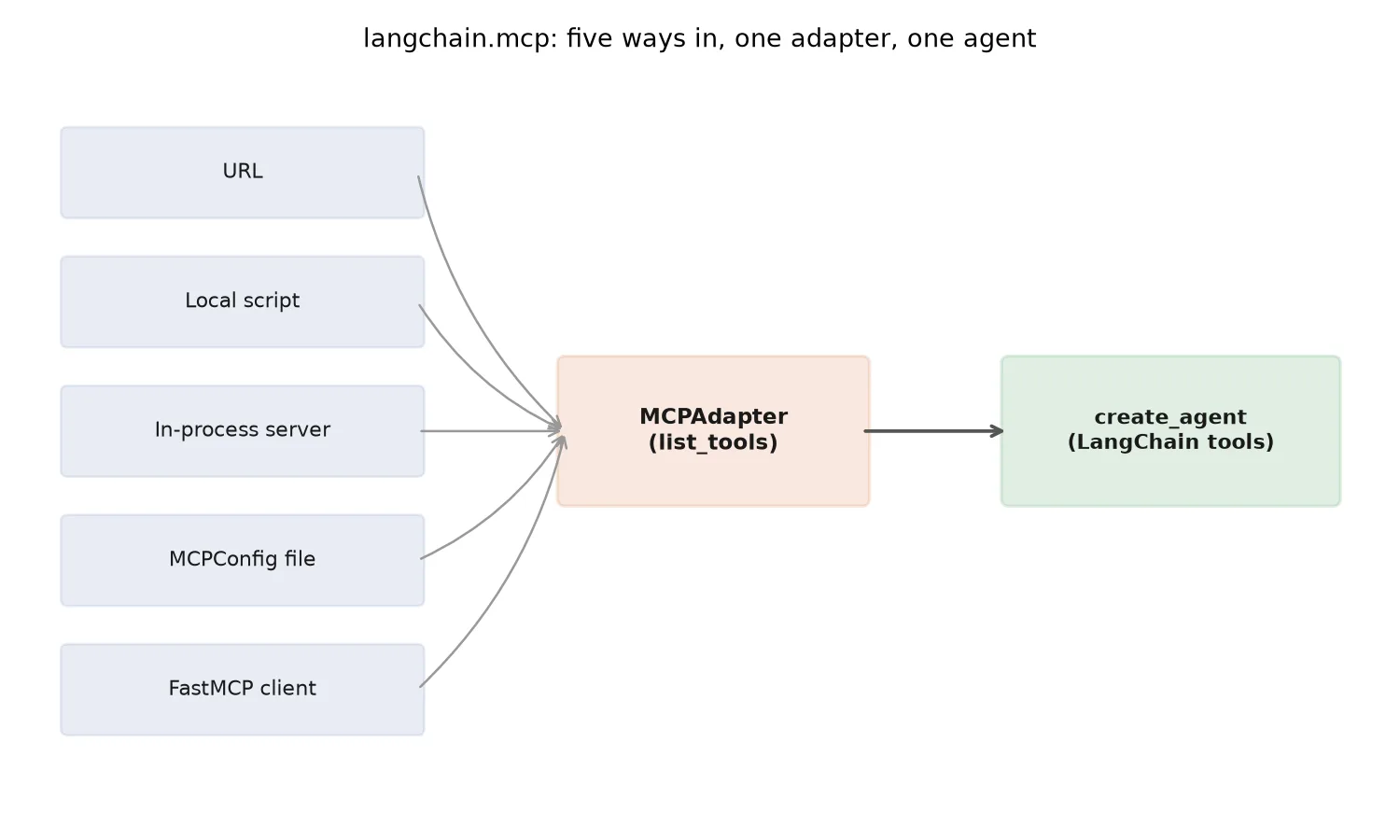
MCPAdapter takes any of five target types through the same interface: a URL, a local script path, an in-process server object, an MCPConfig file listing multiple servers, or a pre-built FastMCP client, per the release notes for this line of alphas.
That range matters more than it sounds. It means the exact same adapter code works whether you’re pointing at a production MCP server behind a URL or an in-process mock you spun up for a test, which is the kind of thing that usually forces a conditional branch or a second code path.
Install it with the mcp extra, and note the --pre flag, since this is still an alpha release:
pip install "langchain[mcp]==1.4.0a3" --preIt also pulls in fastmcp>=4.0.0, so if your environment pins an older FastMCP, bump it first or the install will fight you.
Wiring a server into an agent
The basic flow is short. Point an adapter at a target, discover its tools, hand them to create_agent:
from langchain.mcp import MCPAdapter
from langchain.agents import create_agent

# Any of these work as `target`:
#   "https://mcp.example.com/server"          -> remote URL
#   "./servers/inventory_server.py"           -> local script
#   my_inprocess_server_instance              -> in-process object
#   "mcp_config.json"                          -> multi-server config
#   fastmcp_client                             -> pre-built FastMCP client

adapter = MCPAdapter(target="https://mcp.example.com/server")
tools = adapter.list_tools(cache_mode="use")

agent = create_agent(
    model="gpt-4.1",
    tools=tools,
)
That list_tools() call is worth pausing on, because it’s not just a rename of the older get_tools() method from earlier alphas. It added a cache_mode argument with three values. "use" serves a cached tool list as long as it’s within the TTL the server advertised, which matters if your agent calls the same server on every turn of a conversation and you don’t want a discovery round trip each time. "refresh" forces a fresh call and repopulates the cache. "bypass" skips caching entirely, useful while you’re actively developing against a server whose tool list keeps changing underneath you.
Managing more than one server at once
Real agents rarely talk to exactly one MCP server. MCPAdapter handles that through FastMCP’s ClientGroup, which lets one adapter connection manage a fleet of servers instead of instantiating a separate adapter per backend:
from fastmcp import ClientGroup

group = ClientGroup(clients=[inventory_client, billing_client, support_client])
adapter = MCPAdapter(target=group)
tools = adapter.list_tools(cache_mode="use")
Each tool’s metadata comes back organized under an mcp namespace with server identity attached, so when something goes wrong at 2am you can tell which backend a failing tool call actually hit instead of guessing from a generic tool name. If you’re already deep into picking an orchestration layer, our comparison of LangGraph, CrewAI, and AutoGen covers where LangChain’s agent model fits against the alternatives; this adapter is specifically a LangChain/LangGraph feature, not a cross-framework one.
Handling a server that needs to ask a question mid-call
This is the feature that’s easy to skip past and expensive to need later. Some MCP servers don’t just execute a tool call, they pause and ask a clarifying question first, a pattern MCP calls elicitation. A billing tool might need to confirm “did you mean the March or April invoice?” before it commits to an action with real consequences.
Setting elicitation="interrupt" tells the adapter to surface that mid-call question as a LangGraph interrupt instead of either failing outright or having the model guess:
adapter = MCPAdapter(
    target="https://mcp.example.com/billing-server",
    elicitation="interrupt",
)
When the server elicits, the graph pauses, the interrupt carries the server’s question up to whatever is supervising the run, and execution resumes once that’s answered. That’s a meaningfully different failure mode than an agent silently picking the wrong invoice because it had no clean way to ask. If you’re already running an MCP-based agent in production, it’s worth cross-checking this against our MCP server security checklist, since a server that can pause your agent’s execution and wait on an answer is also a server whose elicitation prompts you should trust deliberately, not by default.
Where this actually breaks in practice
Two things trip people up the first time they wire this in. First, cache_mode="use" will happily hand you a stale tool list if the server’s TTL hint is generous and the server’s actual tool set changed underneath it, say a teammate deployed a new version of the MCP server mid-session. If an agent starts failing to find a tool that you know exists, cache_mode="refresh" is the first thing to try before you assume the integration itself is broken.
Second, the mcp extra pulling in fastmcp>=4.0.0 means if anything else in your environment pins an older FastMCP, pip will either fail the install outright or silently resolve to a version that doesn’t have ClientGroup. Check pip show fastmcp after installing, not before, since a clean-looking install log doesn’t guarantee you got the version the adapter actually needs.
Should you build on the alpha now
That depends on how much churn you can absorb. get_tools() becoming list_tools() between alpha revisions is exactly the kind of naming change that breaks code silently if you’re not pinned to an exact version. If you’re prototyping or evaluating whether this simplifies your MCP integration layer, it’s worth trying now, pinned to 1.4.0a3 specifically rather than a floating 1.4.*. If you’re shipping something a client depends on in production this quarter, wait for the stable 1.4.0 tag, or keep your existing per-server glue code as a fallback until the API stops moving.
Either way, the direction is the right one. Every MCP server you add today with hand-rolled connection code is one more thing to migrate later. Starting new integrations against MCPAdapter, even the alpha, means less to unwind when the ecosystem settles.
Frequently asked questions
- What is LangChain's MCPAdapter?
- MCPAdapter is a class in the new langchain.mcp namespace, shipped in langchain==1.4.0a3, that connects to a Model Context Protocol server and exposes its tools in the format LangChain's create_agent expects. It replaces writing custom glue code per MCP server with one consistent adapter interface, regardless of whether the server lives behind a URL, runs as a local script, or is an in-process object.
- Do I need a separate integration for every MCP server?
- No, and that's the point of MCPAdapter. It accepts five target types through the same constructor: a URL for a remote server, a path to a local script, an in-process server instance, an MCPConfig file listing multiple servers, or a pre-built FastMCP client object. You point it at whichever one you have and call list_tools() the same way regardless.
- What changed with list_tools() versus the older get_tools()?
- list_tools() is the current method in the 1.4.0a3 alpha and adds a cache_mode argument that get_tools() didn't have. Passing 'use' returns cached results as long as they're within the server's advertised TTL, 'refresh' forces a fresh discovery call and repopulates the cache, and 'bypass' skips caching altogether for that call. For an agent that calls the same MCP server repeatedly in a session, caching tool discovery avoids a redundant round trip on every turn.
- What is elicitation='interrupt' for?
- Some MCP servers pause mid-call to ask the caller a clarifying question, elicitation, rather than guessing and possibly getting it wrong. Setting elicitation='interrupt' on the adapter surfaces that mid-call question as a LangGraph interrupt, which pauses the graph and hands control back to whatever is running it. A human (or a supervising process) answers the question, and execution resumes from where it paused. Without this, an agent has no clean way to handle a server that needs more input mid-call.
- Is this LangChain feature stable yet?
- As of this writing it ships as an alpha release, langchain==1.4.0a3, and installing it requires the --pre flag plus the mcp extra: pip install "langchain[mcp]==1.4.0a3" --pre. It also needs fastmcp>=4.0.0. Alpha means the API surface, method names included, can still change before the stable 1.4.0 release, so pin your version if you build against it now.
Sources
Sponsored
More from this category
More from AI Integration



Sponsored
Discussion
Join the conversation.
Comments are powered by GitHub Discussions. Sign in with your GitHub account to leave a comment.
Sponsored