Web Development · Performance
Web Workers: Keep JavaScript Off the UI Thread
A heavy JavaScript task freezes your UI because it runs on the same thread as rendering. Here's how Web Workers fix that, with real benchmark numbers.

Abhishek Gupta
5 min read

Sponsored
Open your browser’s dev tools, throttle the CPU to 6x slowdown, and run a heavy synchronous loop in the console. The whole page stops responding, scrolling included, until the loop finishes. That’s not a bug. It’s JavaScript doing exactly what it’s designed to do: run on one thread, the same thread that paints your UI. A Web Worker is how you get a second thread without leaving JavaScript.
The quick answer
A Web Worker is a background JavaScript thread you create with new Worker('script.js'). It runs independently of the main thread, so a heavy computation inside it doesn’t block rendering or user input. It can’t touch the DOM, and it talks to the page that created it by sending messages, not by sharing variables directly, per MDN’s Web Workers API reference.
Why the main thread is the problem in the first place
Browsers give each tab one JavaScript execution thread by default. That same thread is also responsible for the parts of rendering that JavaScript can trigger: layout, paint, and running your event handlers when a user clicks or scrolls. When your code is busy running a synchronous loop, the browser physically cannot interleave a paint or an input handler in the middle of it. It has to wait its turn.
We measured this instead of just asserting it. Using a CPU-bound loop that counts primes up to two million (roughly 400ms of work), we ran a 16-millisecond heartbeat timer, standing in for a 60fps frame budget, alongside it in two configurations: once with the loop running directly on the main thread, and once with the identical loop offloaded to a worker.
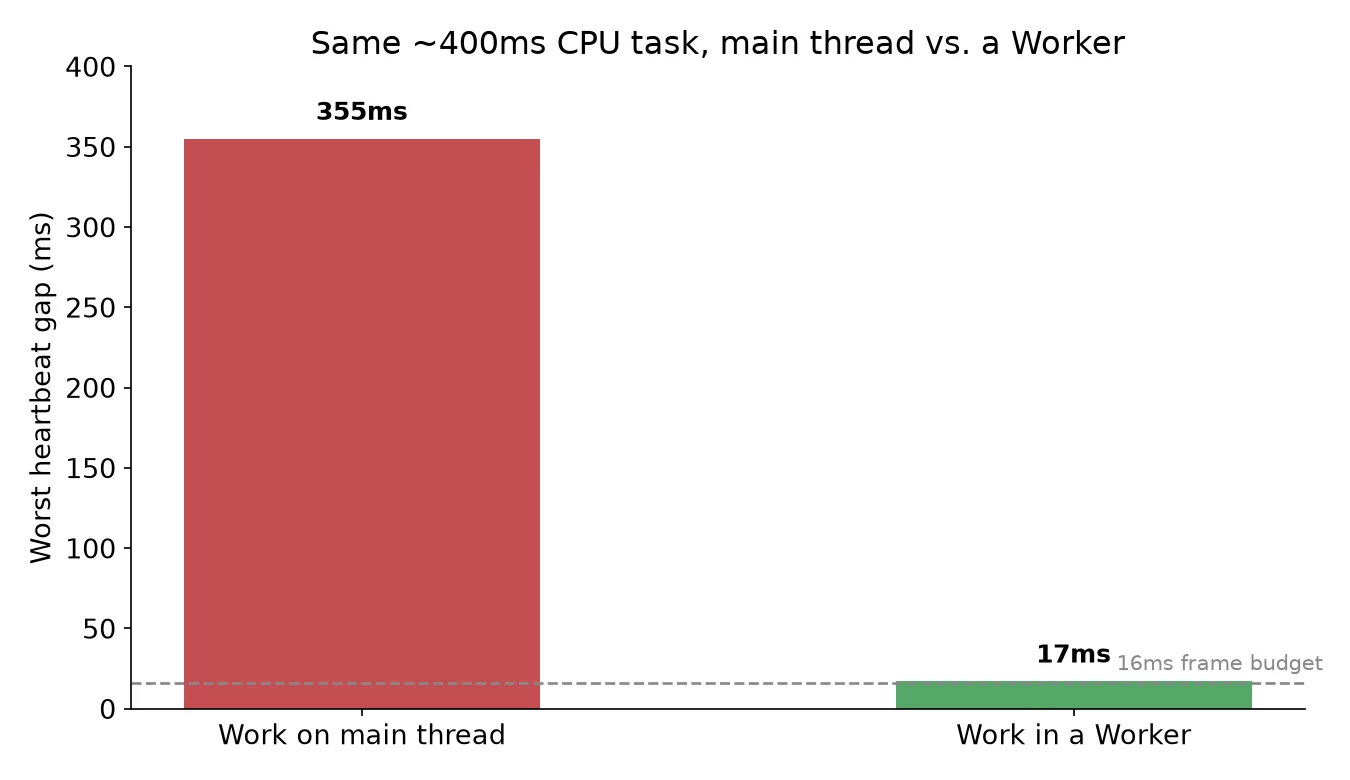
On the main thread, the heartbeat’s worst gap was 355 milliseconds, more than twenty frames’ worth of dropped time in a single stall. In the worker, the heartbeat never missed its 16ms budget by more than a rounding error. Same computation, same machine, same input size. The only variable was which thread it ran on. If your app has ever had a moment where the scroll position visibly catches up after a delay, that gap is what you’re looking at.
Setting one up
A worker is a separate file, loaded and started from your main script:
// main.js
const worker = new Worker('sort-worker.js');

worker.postMessage({ data: bigArray });

worker.onmessage = (event) => {
  console.log('Sorted:', event.data);
};
// sort-worker.js
self.onmessage = (event) => {
const sorted = event.data.data.slice().sort((a, b) => a - b);
self.postMessage(sorted);
};That’s the whole contract: postMessage out, onmessage in, on both sides. No shared variables, no direct function calls across the boundary. The worker’s self is its own global scope, not the page’s window, which is the first thing that trips people up when they try to reference something from the main script inside a worker and get a ReferenceError.
The part that costs you: message passing isn’t free
The default messaging mechanism is the structured clone algorithm. When you call postMessage(bigArray), the browser doesn’t hand the worker a reference to your array, it makes a full copy and hands the worker the copy. For a small object that’s invisible. For a 50MB typed array, that copy is real time and real memory, taken twice, once to serialize out and once to deserialize in.
Two ways around it, when the payload is genuinely large:
// Transfer ownership instead of copying (ArrayBuffer, MessagePort, etc.)
worker.postMessage(largeBuffer, [largeBuffer]); // second arg: transfer list
// After this call, `largeBuffer` is neutered on the main thread — it's gone, not copied.
Transferables move ownership rather than duplicating data, so the cost is closer to a pointer handoff than a copy. The tradeoff is that the sender loses access to the buffer entirely once transferred, which is fine for a one-way handoff and wrong for anything you still need afterward. For cases where multiple threads genuinely need to see the same live memory, SharedArrayBuffer exists, but it comes with the cross-origin isolation headers browsers require since Spectre, which is a bigger commitment than most one-off worker use cases need.
Where this fits with everything else that’s already async
If your instinct is “isn’t this what async/await and promises are for,” the distinction matters. async functions and promises manage asynchronous scheduling on the same single thread, they let I/O-bound work like a fetch call yield control back to the event loop while waiting. They don’t give you a second thread, and they don’t help at all with a synchronous CPU-bound loop, because that loop never yields control voluntarily; it just runs until it’s done. A worker is the only way to get actual parallelism in browser JavaScript short of WebAssembly’s own threading model. If you’re chasing INP regressions and you’ve already ruled out slow event handlers and layout thrashing, a long synchronous task hiding in a click handler is exactly the kind of culprit a worker fixes and a promise can’t.
When it’s not worth it
Don’t reach for a worker to wrap a fetch call or a setTimeout, those are already off the blocking path. Don’t reach for one for a computation that takes a couple of milliseconds either; spawning a worker and structured-cloning the input and output can cost more than the work you’re trying to save. The sweet spot is CPU-bound, synchronous, and long enough that a user would notice the freeze if it happened on the main thread instead, image processing, large-list sorting or filtering, parsing a big file client-side, or running a client-side ML model’s inference step. If you’re not sure whether a given task clears that bar, the dev tools performance profiler will tell you in about thirty seconds: throttle the CPU, run the task, and look at how long the main thread shows as blocked.
Frequently asked questions
- What is a Web Worker?
- A Web Worker is a JavaScript script that runs on a separate OS-level thread from your page's main thread, with its own global scope and event loop. It's created with new Worker('script.js') and communicates with the page that spawned it by sending messages, not by sharing variables or accessing the DOM directly. Its purpose is running work that would otherwise block the main thread, and therefore the UI, from responding.
- Can a Web Worker access the DOM?
- No. A worker has no access to document, window, or any DOM API, because those are only safe to touch from the main thread. A worker does have access to fetch, most Web APIs that don't touch the DOM, IndexedDB, and its own message-passing interface. If a worker needs to change what's on screen, it sends a message back to the main thread describing what changed, and the main thread does the actual DOM update.
- How is postMessage different from sharing memory directly?
- By default, postMessage uses the structured clone algorithm: it makes a deep copy of the data you send and delivers that copy to the other side. Neither side can see the other mutate the original. That's safe but costs time and memory proportional to the payload's size on every message. For large binary data, you can transfer ownership with a Transferable (like an ArrayBuffer) so the copy is avoided and ownership just moves, or use a SharedArrayBuffer for true shared memory when you actually need multiple threads to see the same bytes live.
- Is a Web Worker the same as a Service Worker?
- No, despite the similar name. A Web Worker runs alongside one page and dies when that page closes; it's for offloading CPU work from that page. A Service Worker runs independently of any single page, sits between your app and the network, and is built for intercepting requests, caching, and offline support. They're both background threads, but they solve different problems and have almost no API overlap beyond both being kinds of workers.
- When should I NOT use a Web Worker?
- Skip it for anything that's already asynchronous and I/O-bound, a fetch call, a timer, most DOM event handling, because those don't block the main thread in the first place; a worker adds overhead without fixing anything. Skip it for very short computations too, since spawning a worker and structured-cloning data across the boundary has a fixed cost that can exceed the time saved for a task that only takes a few milliseconds. Workers earn their cost on genuinely CPU-bound work that runs long enough for a frozen UI to be noticeable, generally tens of milliseconds or more.
Sources
Sponsored
More from this category
More from Web Development



Sponsored
Discussion
Join the conversation.
Comments are powered by GitHub Discussions. Sign in with your GitHub account to leave a comment.
Sponsored