AI Integration · Engineering
Multi-Agent Orchestration with MCP: Patterns and SDK Code
Use multiple agents when one agent has too many tools or too much context. The core patterns, MCP as the tool layer, and real code for three agent SDKs.

Anurag Verma
11 min read · Updated Oct 19, 2026
Sponsored
A single agent with a dozen tools works fine until it doesn’t. It picks the code search tool when it should have opened a ticket, or it forgets the first half of a long task because its context filled with logs. Multi-agent orchestration is the fix for those specific problems, and it’s also an easy way to build a distributed system you can’t debug. This guide covers when the split is worth it, the patterns that hold up, MCP as the tool layer, and the actual primitives in three SDKs, since they’re not the same.
When multiple agents are worth it
Split work across agents when one agent has too many tools to choose from reliably, when unrelated material crowds its context, or when independent subtasks can run in parallel. Each specialist gets a narrow job, a small tool set and its own context. If none of those problems exists yet, one agent is simpler.
The LangChain multi-agent docs open with the same caution: not every complex task needs this, and a single agent with the right tools and prompt often gets similar results. They list three real reasons teams reach for multiple agents: context management, distributed development (separate teams owning separate capabilities), and parallelization.
There’s a third benefit people underrate: blast radius. A documentation agent that only has read tools can’t delete a namespace, however confused it gets.
Four orchestration patterns
| Pattern | How it works | Good for |
|---|---|---|
| Router | A classification step sends each request to one or more specialists | Clear domains, such as billing vs. technical support |
| Orchestrator with subagents as tools | A main agent calls specialists like functions and keeps control | Multi-step tasks that need the results combined |
| Handoffs | Control transfers to a specialist, which then talks to the user | Conversations that move fully into one domain |
| Parallel fan-out | Independent subtasks run at the same time, then merge | Research across several sources, per-file review |
                    ┌──────────────────────┐
                    │     User request     │
                    └──────────┬───────────┘
                               ▼
                    ┌──────────────────────┐
                    │     Orchestrator     │
                    │ classify, delegate,  │
                    │ combine results      │
                    └──┬────────┬────────┬─┘
                       ▼        ▼        ▼
                 ┌────────┐ ┌────────┐ ┌────────┐
                 │ Review │ │ Infra  │ │  Docs  │
                 │ agent  │ │ agent  │ │ agent  │
                 └───┬────┘ └───┬────┘ └───┬────┘
                     ▼          ▼          ▼
                 GitHub MCP   K8s MCP   Docs MCP
My default is the orchestrator with subagents as tools. The orchestrator keeps the thread of the task, which matters for anything like “review this PR, then deploy it if it passes,” where step two depends on step one. Pure handoffs are simpler but leave the user stuck in one specialist. Fan-out is right when subtasks are independent, and wrong when they aren’t, because merging conflicting outputs is harder than it looks.
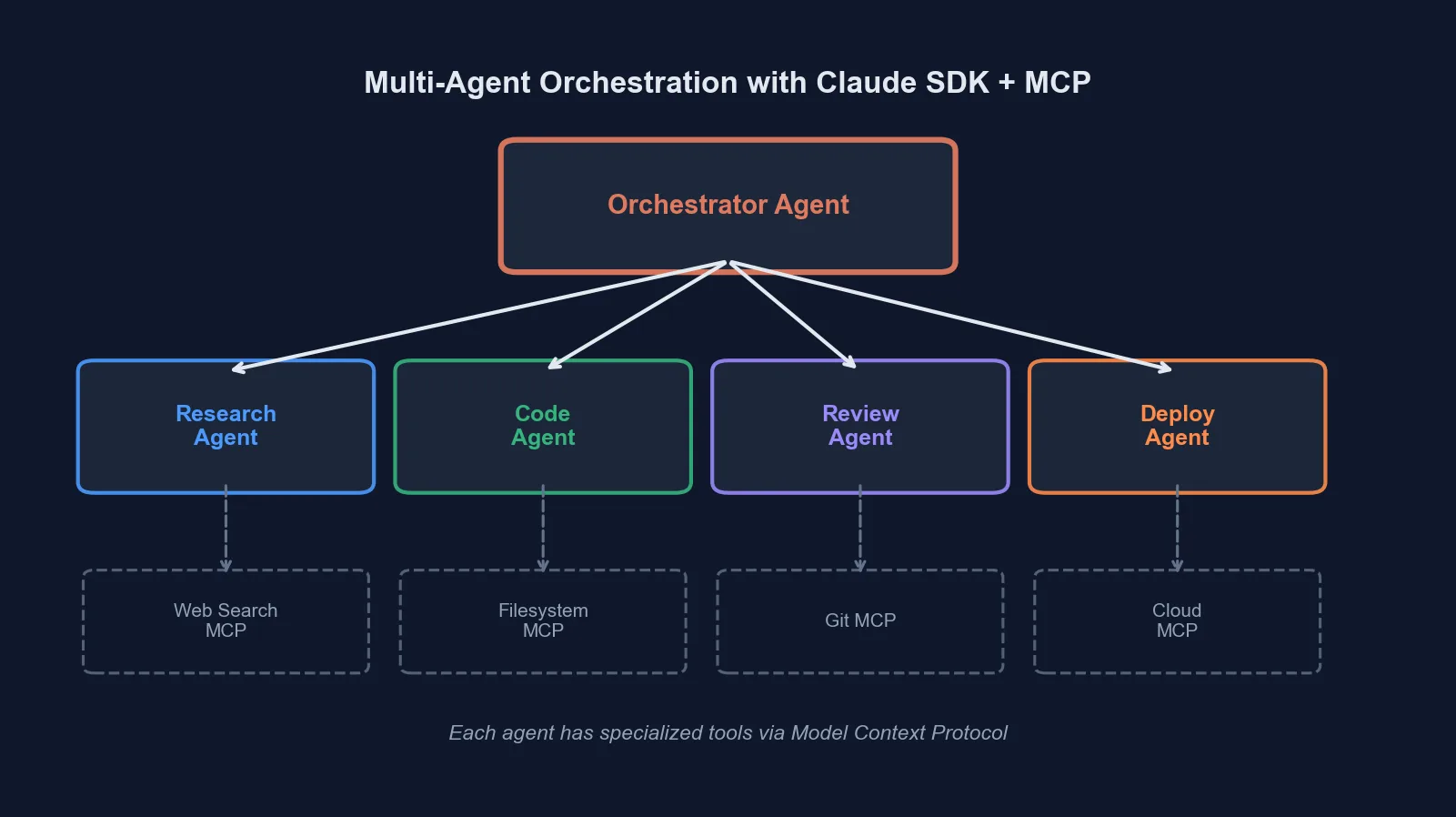 Orchestrator-worker topology: the orchestrator routes tasks to specialized agents, each with their own tool set and context
MCP is the tool layer
The Model Context Protocol standardizes how an agent discovers and calls tools on a server. The current spec (revision 2026-07-28) defines two transports: stdio for a local process speaking newline-delimited JSON-RPC, and Streamable HTTP for remote servers. The older HTTP+SSE transport is deprecated; the OpenAI Agents SDK docs say its SSE client is only suitable for legacy servers.
The practical win is that tool code stops being framework code. A GitHub MCP server you write once attaches to an OpenAI agent, a Claude agent or a LangChain agent unchanged. That also means you can run each MCP server as its own service with its own credentials, scale it separately, and give each specialist only the servers it needs. Our MCP server guide covers building one, and the MCP security checklist covers locking it down. If tool definitions start eating your context, MCP tool pruning is the next fix.
The same ideas in three SDKs
The concepts transfer. The names and mechanics don’t, and blog posts that describe one SDK in another’s vocabulary cause real bugs. Here’s how each one does the job, from its own docs:
| Concept | OpenAI Agents SDK | Claude Agent SDK | LangChain |
|---|---|---|---|
| Delegate and keep control | Agent.as_tool() | Subagents via agents and AgentDefinition, invoked through the Agent tool | Wrap a subagent in a @tool function |
| Transfer control | handoffs=[...] and handoff() | No handoff primitive | Handoffs pattern via state changes |
| Validate or block | Input, output and tool guardrails | Hooks (PreToolUse and others) and permissions | Middleware (guardrails, call limits, PII detection) |
| Attach MCP | mcp_servers=[...], or HostedMCPTool | mcp_servers option (mcpServers in TypeScript) | MCPAdapter |
| Hard limits | max_turns, MaxTurnsExceeded | max_turns, max_budget_usd, spawn depth and concurrency env vars | LangGraph recursion_limit, GraphRecursionError |
OpenAI Agents SDK
The SDK docs name three core primitives: agents, agents as tools or handoffs, and guardrails. Handoffs transfer control, and the receiving agent sees the conversation history by default:
from agents import Agent, handoff

billing_agent = Agent(name="Billing agent")
refund_agent = Agent(name="Refund agent")

triage_agent = Agent(name="Triage agent", handoffs=[billing_agent, handoff(refund_agent)])
For the orchestrator pattern, use as_tool so the caller stays in charge:
orchestrator_agent = Agent(
    name="orchestrator_agent",
    instructions=(
        "You are a translation agent. You use the tools given to you to translate. "
        "If asked for multiple translations, you call the relevant tools."
    ),
    tools=[
        spanish_agent.as_tool(
            tool_name="translate_to_spanish",
            tool_description="Translate the user's message to Spanish",
        ),
        french_agent.as_tool(
            tool_name="translate_to_french",
            tool_description="Translate the user's message to French",
        ),
    ],
)
Attach a Streamable HTTP MCP server per the MCP docs:
from agents import Agent, Runner
from agents.mcp import MCPServerStreamableHttp

async with MCPServerStreamableHttp(
    name="Streamable HTTP Python Server",
    params={
        "url": "http://localhost:8000/mcp",
        "headers": {"Authorization": f"Bearer {token}"},
        "timeout": 10,
    },
    cache_tools_list=True,
    max_retry_attempts=3,
) as server:
    agent = Agent(
        name="Assistant",
        instructions="Use the MCP tools to answer the questions.",
        mcp_servers=[server],
    )
    result = await Runner.run(agent, "Add 7 and 22.")
Local MCP servers also accept require_approval, for example {"always": {"tool_names": ["delete_file"]}}, which pauses the run for a human. Guardrails are functions returning a GuardrailFunctionOutput; input guardrails run on the first agent in a chain, output guardrails on the agent that produces the final output, and tool guardrails wrap individual function-tool calls. A tripped input guardrail raises InputGuardrailTripwireTriggered. Tracing is on by default and records generations, tool calls, handoffs and guardrails, though the docs note it’s unavailable to organizations under Zero Data Retention.
Claude Agent SDK
The Claude Agent SDK is Claude Code packaged as a library, with built-in tools like Read, Grep, Bash and Edit. It has no handoffs or guardrails primitives. Delegation goes through subagents, which the subagents docs define programmatically:
import asyncio
from claude_agent_sdk import query, ClaudeAgentOptions, AgentDefinition


async def main():
    async for message in query(
        prompt="Review the authentication module for security issues",
        options=ClaudeAgentOptions(
            allowed_tools=["Read", "Grep", "Glob", "Agent"],
            agents={
                "code-reviewer": AgentDefinition(
                    description="Expert code review specialist. Use for quality, security, and maintainability reviews.",
                    prompt="You are a code review specialist. Identify security vulnerabilities and suggest specific fixes.",
                    tools=["Read", "Grep", "Glob"],  # read-only
                    model="sonnet",
                ),
                "test-runner": AgentDefinition(
                    description="Runs and analyzes test suites. Use for test execution and coverage analysis.",
                    prompt="You are a test execution specialist. Run tests and explain failures.",
                    tools=["Bash", "Read", "Grep"],
                ),
            },
        ),
    ):
        if hasattr(message, "result"):
            print(message.result)


asyncio.run(main())
The description is what the main agent reads when deciding whom to call, so write it like a routing rule. Each subagent starts with a fresh context, and only its final message returns to the parent, which is the context-isolation benefit in one sentence. Subagents can spawn their own subagents, up to three layers by default.
MCP servers go in the mcp_servers option, and their tools are named mcp__<server>__<tool>, per the MCP docs:
options = ClaudeAgentOptions(
    mcp_servers={
        "claude-code-docs": {
            "type": "http",
            "url": "https://code.claude.com/docs/mcp",
        }
    },
    allowed_tools=["mcp__claude-code-docs__*"],
)
Per-subagent MCP access goes on AgentDefinition.mcpServers (camelCase even in Python). For the guardrail job, use hooks. A PreToolUse hook sees each tool call before it runs and can deny it:
from claude_agent_sdk import ClaudeAgentOptions, HookMatcher

async def protect_env_files(input_data, tool_use_id, context):
    file_path = input_data["tool_input"].get("file_path", "")
    if file_path.split("/")[-1].lower() == ".env":
        return {
            "hookSpecificOutput": {
                "hookEventName": input_data["hook_event_name"],
                "permissionDecision": "deny",
                "permissionDecisionReason": "Cannot modify .env files",
            }
        }
    return {}

options = ClaudeAgentOptions(
    hooks={"PreToolUse": [HookMatcher(matcher="Write|Edit", hooks=[protect_env_files])]}
)
LangChain
LangChain’s subagents pattern is the orchestrator pattern with no special API, just a subagent wrapped in a tool:
from langchain.tools import tool
from langchain.agents import create_agent

subagent = create_agent(model="google_genai:gemini-3.6-flash", tools=[...])

@tool("research", description="Research a topic and return findings")
def call_research_agent(query: str):
    result = subagent.invoke({"messages": [{"role": "user", "content": query}]})
    return result["messages"][-1].content

main_agent = create_agent(model="google_genai:gemini-3.6-flash", tools=[call_research_agent])
Handoffs in LangChain are a pattern rather than a primitive: tool calls update a state variable that switches the active agent or its tools and prompt. For deterministic steps mixed with agent steps, the docs point to custom LangGraph workflows. MCP tools load through MCPAdapter:
from langchain.agents import create_agent
from langchain.mcp import MCPAdapter

async def main():
    async with MCPAdapter("https://example.com/mcp") as adapter:
        tools = await adapter.list_tools()
        agent = create_agent("claude-sonnet-5", tools)
        return await agent.ainvoke({"messages": [{"role": "user", "content": "..."}]})
Our LangChain MCPAdapter tutorial goes further. Hosted harnesses are a fourth option. OpenAI’s Agents API, for instance, has a multi_agent setting with a cap on concurrent subagents, covered in our Agents API guide.
Error handling that survives production
Agents fail in ways that look like success. They run the wrong plan confidently, or call a tool with plausible but wrong arguments. Three layers help, whatever SDK you use.
Tools return structured errors
Validate inputs inside the tool and return an error the model can act on, instead of throwing. This is plain Python and works as the body of an MCP tool or a function tool:
import json
import re

PROTECTED_NAMESPACES = {"kube-system", "production"}

def provision_namespace(name: str, cpu_limit: str, memory_limit: str) -> str:
    """Provision a Kubernetes namespace with resource limits. Idempotent."""
    if not re.match(r"^[a-z][a-z0-9-]{2,62}$", name):
        return json.dumps({
            "status": "error",
            "message": f"Invalid namespace '{name}'. Use 3-63 lowercase letters, digits or hyphens.",
        })
    if name in PROTECTED_NAMESPACES:
        return json.dumps({"status": "error", "message": f"'{name}' is protected."})
    if k8s.namespace_exists(name):  # safe to retry
        return json.dumps({"status": "ok", "namespace": name, "created": False})
    k8s.create_namespace(name, cpu_limit, memory_limit)
    return json.dumps({"status": "ok", "namespace": name, "created": True})
Make every mutating tool idempotent. Agents retry, and a retry that creates a second resource is worse than a failure.
A policy layer blocks dangerous actions
Instructions alone don’t stop an agent from running DROP TABLE. Put the rule in code: an OpenAI tool guardrail or MCP require_approval, a Claude PreToolUse hook, or LangChain middleware or a check in your LangGraph node. Route anything that touches production through a human approval step.
The runner enforces hard limits
Cap turns, spend and depth. The OpenAI Agents SDK raises MaxTurnsExceeded when a run passes max_turns, and error_handlers can turn that into a controlled final output. The Claude Agent SDK’s Python options include max_turns and max_budget_usd, and the subagents docs add CLAUDE_CODE_MAX_SUBAGENT_SPAWN_DEPTH (default 3) and CLAUDE_CODE_MAX_CONCURRENT_SUBAGENTS (default 20). In LangGraph, recursion_limit caps super-steps per run (the default is 1000 since version 1.0.6) and raises GraphRecursionError. Durable work that outlives a request belongs in a job system; our BullMQ, Inngest and Temporal comparison covers that layer.
Observability
You can’t run this without traces. At minimum, record which agent handled each step, every tool call with arguments and result status, turn counts, and tokens per task type. The OpenAI Agents SDK traces runs by default and lets you group them with trace(workflow_name=..., group_id=...). With the Claude Agent SDK, PreToolUse and PostToolUse hooks are the natural place to log and audit tool calls. Whichever you use, watch for agents bouncing a task back and forth. It usually means two descriptions overlap.
 Trace every agent turn, tool call and delegation so failures can be traced back to a cause
Design rules worth keeping
- Start with two agents, an orchestrator and one specialist. Add the next only when the first pair is reliable.
- Write tool and subagent descriptions as routing rules. The model chooses based on them, so say when not to use each one.
- Keep instructions short. Long prompts create ambiguity faster than they remove it.
- Give each specialist the smallest tool set that does the job, and read-only access wherever possible.
- Use a cheaper model or lower effort for routing and simple workers. Anthropic’s effort docs, for example, suggest
loweffort for subagents. Measure before you assume quality holds. - Test with bad inputs: ambiguous requests, requests that span domains, and requests that should be refused.
For a broader comparison of agent frameworks, see LangGraph vs CrewAI vs AutoGen. If you’re scoping a multi-agent system and want a second opinion on the architecture, reach out to us.
Frequently asked questions
- Why use multiple agents instead of one agent with many tools?
- A single agent with a large tool set has more chances to pick the wrong tool, fills its context with material unrelated to the current step, and gives one bad decision access to every system. Specialized agents with small tool sets limit all three. If none of those problems shows up, stay with one agent.
- What does MCP do in a multi-agent system?
- The Model Context Protocol standardizes how an agent discovers and calls tools on an external server. You build an MCP server once and attach it to whichever agent framework you use. The current specification defines stdio for local processes and Streamable HTTP for remote servers.
- Does the Claude Agent SDK have handoffs and guardrails?
- Not under those names. Handoffs and guardrails are primitives of the OpenAI Agents SDK. The Claude Agent SDK delegates to subagents through its Agent tool, where only the subagent's final message returns to the parent, and it blocks or modifies actions with hooks such as PreToolUse plus permission settings.
- What is the difference between a handoff and calling an agent as a tool?
- In the OpenAI Agents SDK, a handoff transfers the conversation to another agent, which then owns the reply. Agent.as_tool keeps the calling agent in control: the specialist runs, returns a result, and the caller decides what to do next. Use as_tool when an orchestrator needs to combine results from several specialists.
- How do I stop a multi-agent system from looping?
- Set hard limits in the runner. The OpenAI Agents SDK raises MaxTurnsExceeded when a run passes max_turns. The Claude Agent SDK has max_turns and max_budget_usd options plus environment variables that cap subagent nesting depth and concurrency. Keep handoff graphs acyclic where you can.
Sources
- Model Context Protocol specification: Transports
- OpenAI Agents SDK docs
- OpenAI Agents SDK: Handoffs
- OpenAI Agents SDK: MCP
- OpenAI Agents SDK docs source (tools, guardrails, running agents, tracing)
- Claude Agent SDK: Subagents
- Claude Agent SDK: MCP
- Claude Agent SDK: Hooks
- Claude Agent SDK: Python reference
- LangChain docs: Multi-agent
- LangChain docs: Subagents
- LangChain docs: MCP
- LangChain docs: Middleware
- LangGraph docs: Graph API (recursion limit)
- Claude API docs: Effort
Sponsored
More from this category
More from AI Integration



Sponsored
Discussion
Join the conversation.
Comments are powered by GitHub Discussions. Sign in with your GitHub account to leave a comment.
Sponsored