AI Integration · Voice AI
gpt-realtime-2.1: What Voice AI Teams Should Know
OpenAI's gpt-realtime-2.1-mini brings reasoning and tool use down-market at 25% lower latency. What changed, what it costs, and when to skip the flagship.

Abhishek Gupta
5 min read
Sponsored
OpenAI shipped two new Realtime API models on July 6, 2026, and the more interesting one isn’t the flagship. gpt-realtime-2.1 gets the expected round of quality improvements, but gpt-realtime-2.1-mini is the one that changes what’s economically viable to build: reasoning and tool use, previously a flagship-only capability, are now available at a fraction of the cost. If you’ve been holding off on a voice agent because the per-minute math didn’t work, it’s worth running the numbers again.
What changed
Both models are built for speech-to-speech voice interaction, the same category as their predecessor, but with three concrete improvements:
- Lower latency. p95 latency dropped at least 25% across OpenAI’s Realtime voice models. OpenAI attributes this to better caching in the serving infrastructure, not a smaller or lighter model, which matters because latency and quality usually trade off against each other in voice AI. Getting both moving in the same direction is the actual news here.
- Better recognition and noise handling. Improved alphanumeric recognition (reading out order numbers, confirmation codes, addresses) and steadier handling of silence and background noise, both of which are the kind of unglamorous fixes that determine whether a voice agent feels usable or frustrating in a real environment rather than a quiet demo room.
- More natural interruption behavior. Voice agents that can’t handle a user talking over them read as robotic almost immediately; this is a direct fix to that failure mode.
The bigger structural change is on the mini side: gpt-realtime-2.1-mini now supports configurable reasoning effort and tool use, the two capabilities that let a voice agent do more than script-follow. Before this release, if you wanted a voice agent to reason through an ambiguous request or call an external API mid-conversation, the flagship model was the only realistic option.
Pricing: why the mini model changes the calculus
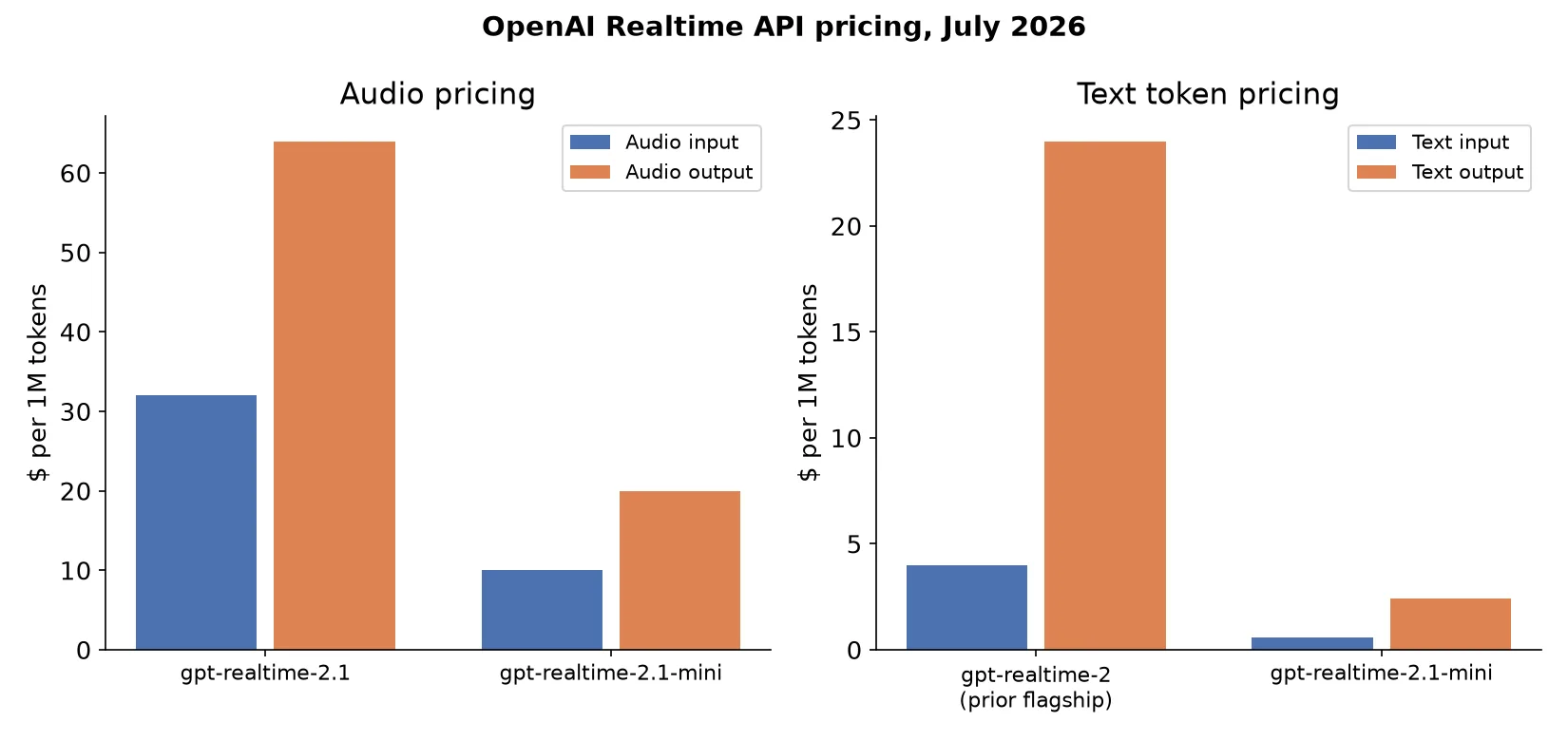
Voice AI has an unusual cost profile compared to text-based agents: audio tokens are expensive relative to text tokens, and a live conversation burns through them continuously rather than in short bursts. That makes the per-model pricing tier a bigger lever on total cost than it typically is for a chatbot.
| Model | Audio input ($/1M) | Audio output ($/1M) | Text input ($/1M) | Text output ($/1M) |
|---|---|---|---|---|
| gpt-realtime-2.1 (flagship) | $32.00 | $64.00 | — | — |
| gpt-realtime-2.1-mini | $10.00 | $20.00 | $0.60 | $2.40 |
| gpt-realtime-2 (prior flagship, for reference) | — | — | $4.00 | $24.00 |
The mini model’s text pricing runs a small fraction of what the previous flagship charged for the same tiers. For a use case that’s running continuously, a customer support line, an IVR replacement, an in-app voice assistant that stays connected during a session, that difference compounds fast. A voice agent that would have needed flagship-tier spend to get tool use now gets it at the mini tier’s cost.
A minimal integration pattern
The Realtime API session setup follows the same general shape whether you’re targeting the flagship or mini model; the model name and reasoning-effort configuration are what change:
import asyncio
from openai import AsyncOpenAI

client = AsyncOpenAI()

async def start_voice_session():
    async with client.realtime.connect(model="gpt-realtime-2.1-mini") as session:
        await session.session.update(session={
            "modalities": ["audio", "text"],
            "instructions": "You are a support agent. Confirm order numbers digit by digit.",
            "reasoning": {"effort": "medium"},
            "tools": [
                {
                    "type": "function",
                    "name": "lookup_order",
                    "description": "Look up an order by ID and return its status.",
                    "parameters": {
                        "type": "object",
                        "properties": {"order_id": {"type": "string"}},
                        "required": ["order_id"],
                    },
                }
            ],
        })

        async for event in session:
            if event.type == "response.function_call":
                # handle tool call, then send the result back into the session
                pass

asyncio.run(start_voice_session())
The pattern to notice: reasoning.effort and tools are now first-class options on the mini model’s session config, not flagship-exclusive parameters. That’s the actual product change wrapped in a code sample, everything downstream of session setup (event handling, tool call routing, audio streaming) works the same way it did before.
When to pick which model
Use the flagship, gpt-realtime-2.1, when the application genuinely needs peak reasoning and instruction-following: a voice agent navigating ambiguous multi-step requests, handling edge cases in a regulated domain, or where getting a wrong answer has real cost. Use the mini model for the much larger set of use cases where speed and cost matter more than squeezing out the last bit of reasoning quality: most customer-facing IVR replacements, in-app assistants, and any high-volume deployment where the flagship’s per-minute economics simply don’t scale.
If you’re scoping a voice feature and unsure which tier your use case actually needs, prototype against the mini model first. Its new tool-use support covers a wider range of real voice-agent requirements than it did a week ago, and you can upgrade the model name in your session config without restructuring the integration if you find you need the flagship’s extra headroom.
Voice is one of the areas where AI product decisions still come down to a genuine build-versus-buy tradeoff around latency and infrastructure, not just model choice. If you’re weighing that tradeoff for a client project, our breakdown of AI chatbot build vs. buy costs covers the adjacent decision for text-based assistants, and much of the same cost logic carries over to voice.
Frequently asked questions
- What's actually new in gpt-realtime-2.1 versus gpt-realtime-2?
- Improved alphanumeric recognition, better silence and background-noise handling, and more natural interruption behavior, on top of at least a 25% reduction in p95 latency. OpenAI attributes the latency improvement to better caching in the serving stack rather than a change in model size, which is notable because it means the capability gain didn't come at the cost of speed.
- What does gpt-realtime-2.1-mini add that wasn't available at the low-cost tier before?
- Configurable reasoning effort and tool use. Previously, if you wanted a voice agent that could reason through a multi-step request or call external tools mid-conversation, you needed the flagship model. The mini variant brings that capability down to a much cheaper tier, while still supporting speech-to-speech interaction over WebRTC, WebSocket, or SIP.
- How much does gpt-realtime-2.1 cost compared to the mini version?
- gpt-realtime-2.1 runs $32 per 1M audio input tokens and $64 per 1M audio output tokens. The mini variant runs $10 per 1M audio input and $20 per 1M audio output, plus text tokens at $0.60 per 1M input and $2.40 per 1M output, versus $4.00 and $24.00 for the same text tiers on the prior flagship gpt-realtime-2. The mini model is the clear choice unless your use case specifically needs the flagship's peak reasoning quality.
- Should I build a voice agent on the flagship or the mini model?
- Use the flagship (gpt-realtime-2.1) when the application needs the strongest available reasoning, instruction-following, and tool-use reliability, complex multi-step voice workflows like a support agent that needs to look up account details and reason about edge cases. Use the mini model when speed and cost matter more than peak capability, which covers a large share of voice UI: simple assistants, IVR replacements, and any high-volume, always-on use case where the per-minute cost compounds quickly.
- What connection protocols does the Realtime API support?
- WebRTC, WebSocket, or SIP, for both the flagship and mini models. WebRTC is the typical choice for browser and mobile clients where you want OpenAI's infrastructure handling media transport; WebSocket suits server-to-server integrations; SIP is aimed at teams integrating with existing telephony infrastructure.
Sources
Sponsored
More from this category
More from AI Integration
Sponsored
Discussion
Join the conversation.
Comments are powered by GitHub Discussions. Sign in with your GitHub account to leave a comment.
Sponsored