AI Integration · Developer Tooling
AI Code Review Tools Compared: Copilot, CodeRabbit, Greptile, and Qodo
Four AI code review tools, four different tradeoffs. Here's what actually differs between GitHub Copilot's built-in review, CodeRabbit, Greptile, and Qodo once you look past the marketing pages, plus what each one costs per seat.

Prathviraj Singh
5 min read
Sponsored
Every pull request now gets an AI review before a human looks at it, at enough teams that the interesting question stopped being “should we use one” and became “which one, for which kind of team.” Four tools keep coming up in that conversation: GitHub Copilot’s built-in review, CodeRabbit, Greptile, and Qodo. They solve overlapping problems with genuinely different tradeoffs, and the marketing pages for all four make roughly the same claims, so here’s what actually differs once you’ve used them on a real codebase, plus what each one costs.
This is a tool-selection question, which is a different problem from what to do once you’ve picked one. If you’ve already got AI review running and want the workflow for dividing work between it and human reviewers, we covered that separately. Here, the question is which tool to run in the first place.
The core tradeoff: diff-only vs whole-codebase context
The single biggest split between these tools isn’t features, it’s how much of your repository each one actually sees when it reviews a pull request.
GitHub Copilot’s PR review looks at the diff. That’s fast and requires no indexing step, but it means a bug that only shows up when you consider how the changed function is called from three other files, files not touched in this PR, is invisible to it by design. For a team shipping small, contained PRs, that’s rarely a problem. For a team where changes ripple across a large, interconnected codebase, it’s the tool’s main blind spot.
Greptile and Qodo both index the whole repository, not just the diff, so they can flag when a change breaks an assumption made somewhere else in the codebase that the PR itself doesn’t touch. That’s genuinely more capable review, and it’s also more expensive to run and slower to set up initially, since the tool has to build and maintain an index of your entire repo rather than just parsing a diff.
What each tool is actually good at
| Tool | Context scope | Strength | Tradeoff |
|---|---|---|---|
| GitHub Copilot review | PR diff only | Zero setup, already paid for on GitHub Enterprise | Misses cross-file bugs |
| CodeRabbit | PR diff, configurable depth | Low false-positive rate, works across four major Git hosts | Finds fewer issues than whole-codebase tools |
| Greptile | Whole-codebase index | Catches the most issues in a single pass | Highest false-positive rate of the four |
| Qodo | Whole-codebase, multi-repo | Highest F1 score in a February 2026 eight-tool benchmark | Credit-based pricing takes some getting used to |
That F1 score is worth unpacking because it’s the metric that actually matters here, more than raw issue count. F1 balances how many real issues a tool catches against how many of its flags are false positives. A tool that flags everything catches every real bug too, but buries it in noise a reviewer has to wade through. Qodo’s February 2026 release, built around a multi-agent review architecture rather than a single pass, posted the highest F1 score among eight tools benchmarked, which is a specific claim about precision and recall, not just “finds more stuff.”
What it costs per seat
CodeRabbit Pro   ~$24 / developer / month  (annual billing)
Greptile         ~$30 / seat / month       (50 reviews included)
Qodo Teams       ~$30 / user / month       (credit-based, ~$0.012/credit)
GitHub Copilot   bundled into existing Copilot seat pricing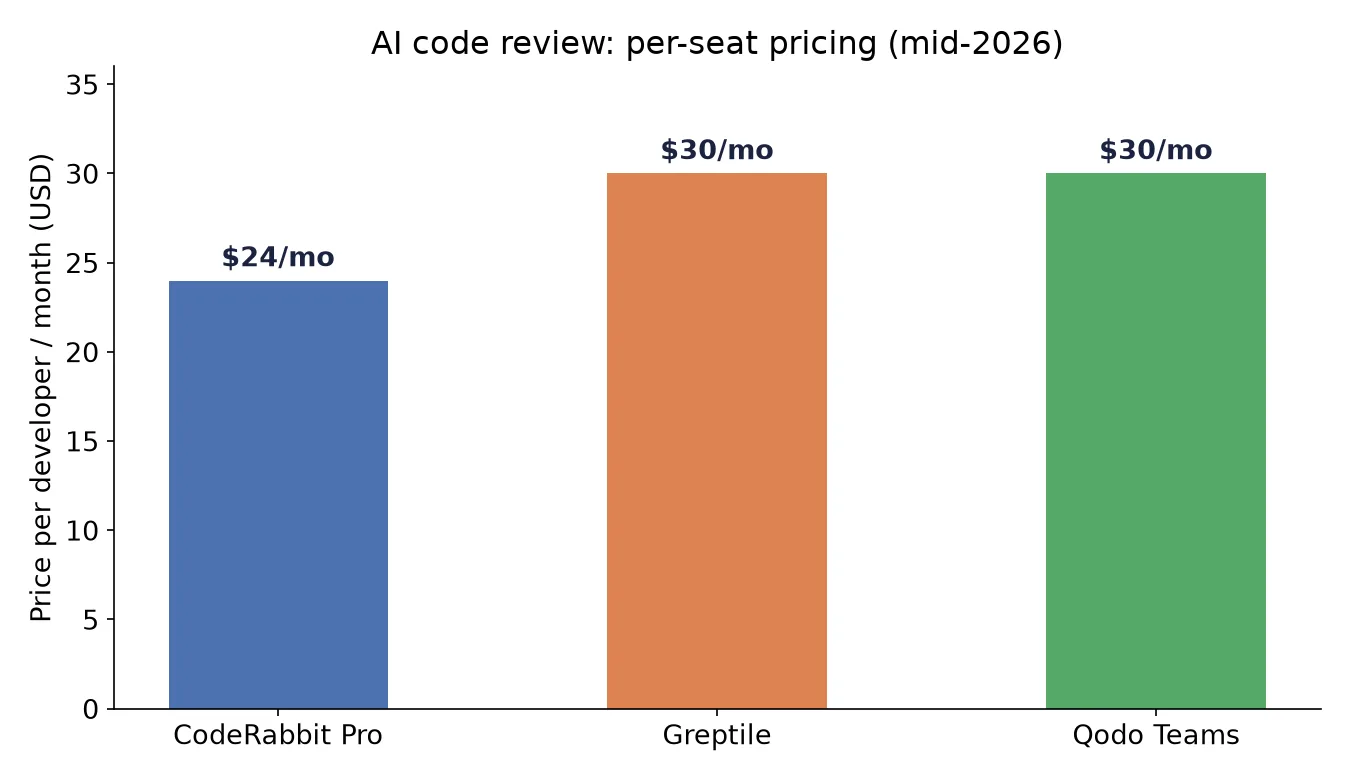
The Copilot line matters more than it looks like at first glance. If your organization already pays for GitHub Copilot seats, its PR review feature is effectively free marginal cost, which is a hard number for a standalone tool to beat even if that standalone tool catches more bugs. The calculation changes for a team not already on Copilot, where you’re comparing a genuinely new line item against the actual cost of the bugs each tool would have caught.
Where the platform choice narrows the field
If your team isn’t on GitHub, the field shrinks fast. CodeRabbit is the strongest option for cross-platform teams, with native support across GitHub, GitLab, Bitbucket, and Azure DevOps, which matters more than it might seem for any agency running a multi-client contractor network where different client engagements land on different Git hosts. Qodo also covers GitLab, GitLab Self-managed, Bitbucket, and Azure DevOps in addition to GitHub. Copilot’s review is GitHub-only, which is a non-starter if that’s not where your code lives, regardless of how good the review quality is.
The decision that actually matters
Skip the feature-by-feature comparison chart and ask two questions instead. First: is your codebase small and contained enough that diff-only review catches most of what matters, or does your bug history show cross-file issues that a diff-scoped tool would have missed? Second: are you already paying for GitHub Copilot seats, making its review feature effectively free, or are you evaluating a genuinely new cost regardless of which tool you pick?
Teams with contained, well-modularized codebases and existing Copilot seats have a straightforward answer: use what’s already there, and revisit only if review quality becomes a visible problem. Teams with larger, more interconnected codebases, or teams not on GitHub at all, are choosing between Greptile’s thoroughness and CodeRabbit’s lower noise, and that’s genuinely a judgment call that depends on whether your reviewers would rather triage more false positives or risk missing more real ones. Whichever you pick, the tool is a first pass, not the review. A human still has to decide whether the change is the right one to ship, and no F1 score measures that.
Frequently asked questions
- Which AI code review tool should I use if my team is already on GitHub?
- Start with GitHub Copilot's built-in PR review if you're already paying for GitHub Enterprise. It's already included, setup is essentially zero, and its review quality is competitive with CodeRabbit for straightforward diffs. The limitation shows up on bugs that span multiple files, since Copilot's review only sees the PR diff, not the rest of your repository.
- What's the difference between Greptile and CodeRabbit?
- Greptile indexes your entire codebase, not just the diff, which lets it catch cross-file issues the diff-only tools miss, and in practice it surfaces the most findings of the tools compared here. That thoroughness comes with a tradeoff: it also produces the most false positives, so reviewers spend more time triaging what it flags. CodeRabbit finds fewer issues but has a lower false-positive rate, so less of what it flags turns out to be noise.
- How much do these tools actually cost per developer?
- As of mid-2026, CodeRabbit Pro runs about $24 per developer per month on annual billing. Greptile is around $30 per seat with 50 reviews included. Qodo's Teams plan is also roughly $30 per user on a credit-based model. GitHub Copilot's review feature is bundled into Copilot's existing per-seat pricing rather than billed separately.
- Does an AI code review tool replace a human reviewer?
- No. These tools are strong at catching what a fast, tired human skims past: an unhandled error case, a missed null check, an inconsistency between a function's implementation and its docstring. They're not a substitute for a human evaluating whether a change is the right approach, fits the system's architecture, or matches what the product actually needs. Teams that treat AI review as the only review tend to ship technically correct code that's still the wrong change.
- Which tool works if my team isn't on GitHub?
- CodeRabbit is the strongest option here among the four compared, with native support across GitHub, GitLab, Bitbucket, and Azure DevOps. Qodo also supports GitLab, GitLab Self-managed, Bitbucket, and Azure DevOps in addition to GitHub. GitHub Copilot's review feature, unsurprisingly, is GitHub-only.
Sources
Sponsored
More from this category
More from AI Integration
 R.01
R.01 OpenAI's Zero Data Retention Update: What Private Safety Processing Changes
 R.02
R.02 Cloudflare Built a Browser With No Tabs. It's Not for You, It's for Your Agents
 R.03
R.03 GLM-5.3 Is Out: Z.ai's $18/Month Coding Plan and What Same-Base Training Gets You
Sponsored
Discussion
Join the conversation.
Comments are powered by GitHub Discussions. Sign in with your GitHub account to leave a comment.
Sponsored