Web Development · Frameworks
Next.js 16.3: Turbopack Cache and 90% Less Memory
Next.js 16.3 cuts Turbopack dev memory roughly 90% on large apps, extends the disk cache to next build, and ships a native Rust React Compiler.

Abhishek Gupta
5 min read
Sponsored
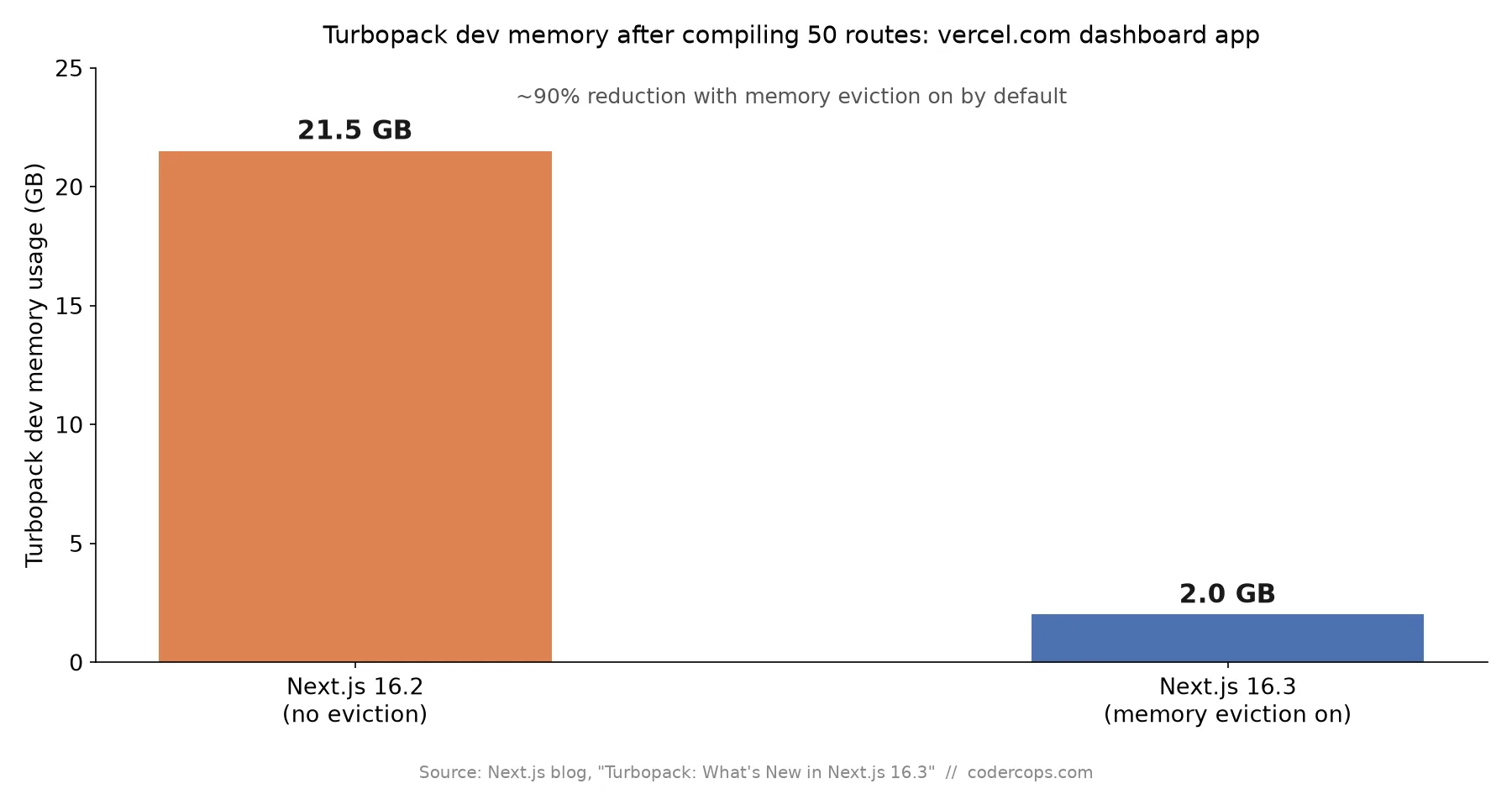
If you’ve watched next dev eat memory on a large app until your machine starts swapping, Next.js 16.3 is aimed directly at you. This is the build-tooling half of the release; if you’re also curious about the client-side routing changes in the same version, that’s a separate but complementary set of wins. The headline change is Turbopack memory eviction, and the number behind it is worth sitting with: on Vercel’s own dashboard app, compiling 50 routes went from 21.5 GB of dev memory down to 2 GB, roughly a 90% reduction, with the feature on by default.
What memory eviction actually does
The mechanic is simple once you see it: routes you’re not actively working on get moved out of in-memory cache to disk, then reclaimed when the process is idle. Previously, Turbopack’s dev server kept everything it had compiled resident in memory for the life of the process, which scales fine on a small app and badly on a large one with dozens or hundreds of routes. Most of a working session touches a handful of routes at a time; keeping the other 45 fully compiled in RAM was pure waste.
Both memory eviction and the dev filesystem cache are on by default in 16.3, so this isn’t a flag you need to hunt for. If you’re on a large monorepo-style Next.js app and you’ve been provisioning bigger dev machines just to keep next dev from crashing, this release is the reason to re-test before your next hardware upgrade.
The persistent build cache now covers next build, not just next dev
Turbopack has persisted its dev cache to disk since Next.js 16.1, which is why a second next dev session on the same project starts faster than the first. What’s new in 16.3 is that the same persisted cache mechanism now works for next build too, after months of production hardening on Vercel’s own sites.
It’s not on by default for builds; you enable it with the turbopackFileSystemCacheForBuild flag in the experimental section of next.config.ts:
// next.config.ts
const nextConfig = {
  experimental: {
    turbopackFileSystemCacheForBuild: true,
  },
};

export default nextConfig;
The practical payoff is in CI. A build that reuses previously computed compilation work instead of starting cold can meaningfully cut build time, but only if your CI pipeline actually restores the .next cache directory at the start of a run and saves it back at the end. That’s the same pattern most teams already use for node_modules or package manager caches, and it’s worth adding to your CI config alongside this flag, since a stateless runner gets zero benefit from a disk cache that never survives between jobs.
A native Rust React Compiler
React Compiler has been stable in Next.js since version 16.0, but it ran as a Babel transform bolted onto Turbopack’s otherwise Rust-native pipeline. On large apps that becomes a real bottleneck: Babel waits on JavaScript execution resources while the rest of Turbopack’s Rust pipeline sits idle waiting for it. The React team shipped a native Rust port of the compiler, and Vercel integrated it directly into Turbopack in 16.3. Early testing on large apps, including Vercel’s own v0 product, showed 20-50% faster compilation.
This is the same compiler, not new optimization behavior, so adopting it is closer to a build-tooling upgrade than a change in what your code does. If your team has been holding off on React Compiler because of build-time overhead on a large codebase, that’s the constraint this specifically addresses.
import.meta.glob support
Turbopack now supports the Vite-compatible import.meta.glob API, letting you import every module matching a pattern without hardcoding each filename:
const posts = import.meta.glob("./posts/*.mdx");It’s wired into Turbopack’s file watcher, so adding or removing a matching file triggers a dev recompile automatically. For content-driven routing, blog posts, product entries, documentation pages, this replaces the manual index file or fs.readdir call a lot of teams have been maintaining by hand.
What to actually do
If you’re running a large Next.js app, upgrade and re-benchmark your dev memory usage before assuming you still need a bigger machine. Separately, add turbopackFileSystemCacheForBuild to your config and wire up cache persistence in CI; that one is opt-in and easy to skip by accident. We wrote about a similarly disruptive Astro 7 and Vite 8 upgrade recently, and the same advice applies here: read the release notes past the headline number, because the config flag that actually saves you build minutes is usually not the default.
If your team’s CI pipeline hasn’t been re-evaluated since your Next.js version was last major-bumped, that’s worth a look on its own, separate from this release. A proper build and deploy pipeline review tends to surface these opt-in wins long before a blog post does.
Primary source: Turbopack: What’s New in Next.js 16.3
Frequently asked questions
- Do I need to change anything to get the memory improvements?
- No. Memory eviction and the dev filesystem cache are both on by default in Next.js 16.3. If you upgrade and run `next dev` on a large app, you should see lower memory usage without touching any configuration. The persistent build cache for `next build` is the one piece that requires an explicit opt-in.
- How do I enable the persistent build cache for next build?
- Set `turbopackFileSystemCacheForBuild` in the `experimental` section of `next.config.ts`. Once enabled, `next build` writes its compilation cache to disk the same way `next dev` has since Next.js 16.1, so a second build with mostly unchanged files can skip recompiling work it already did.
- Does the persistent build cache help in CI, where the filesystem doesn't survive between runs?
- It helps if your CI setup explicitly carries the cache forward. The `.next` directory holding the persistent cache needs to be restored at the start of a run and saved at the end, the same pattern most CI systems already use for `node_modules` or package manager caches. Without that step, a stateless CI runner starts cold every time regardless of this feature, since there's no disk state to reuse.
- What's actually different about the new React Compiler and is it risky to adopt?
- React Compiler has been stable in Next.js since 16.0, but it ran as a Babel transform, which becomes a bottleneck on large codebases because Babel waits on JS execution resources while Turbopack's Rust pipeline sits idle. The 16.3 release integrates a native Rust port of the same compiler directly into Turbopack, with early testing on large apps showing 20-50% faster compilation. It's the same compiler with a faster execution path, not new compiler behavior, so the main risk is upgrade friction, not a behavior change in what gets optimized.
- What does import.meta.glob actually let me do?
- It's Turbopack's implementation of the same Vite-compatible API: import every module matching a glob pattern without hardcoding each filename, which is exactly the pattern content-driven routes need, like a blog that imports every MDX file in a directory. It's wired into Turbopack's file watcher, so adding or removing a matching file triggers a dev recompile automatically instead of requiring a manual index file to stay in sync.
Sources
Sponsored
More from this category
More from Web Development



Sponsored
Discussion
Join the conversation.
Comments are powered by GitHub Discussions. Sign in with your GitHub account to leave a comment.
Sponsored