Web Development · Package Management
npm v12 Blocks Install Scripts by Default
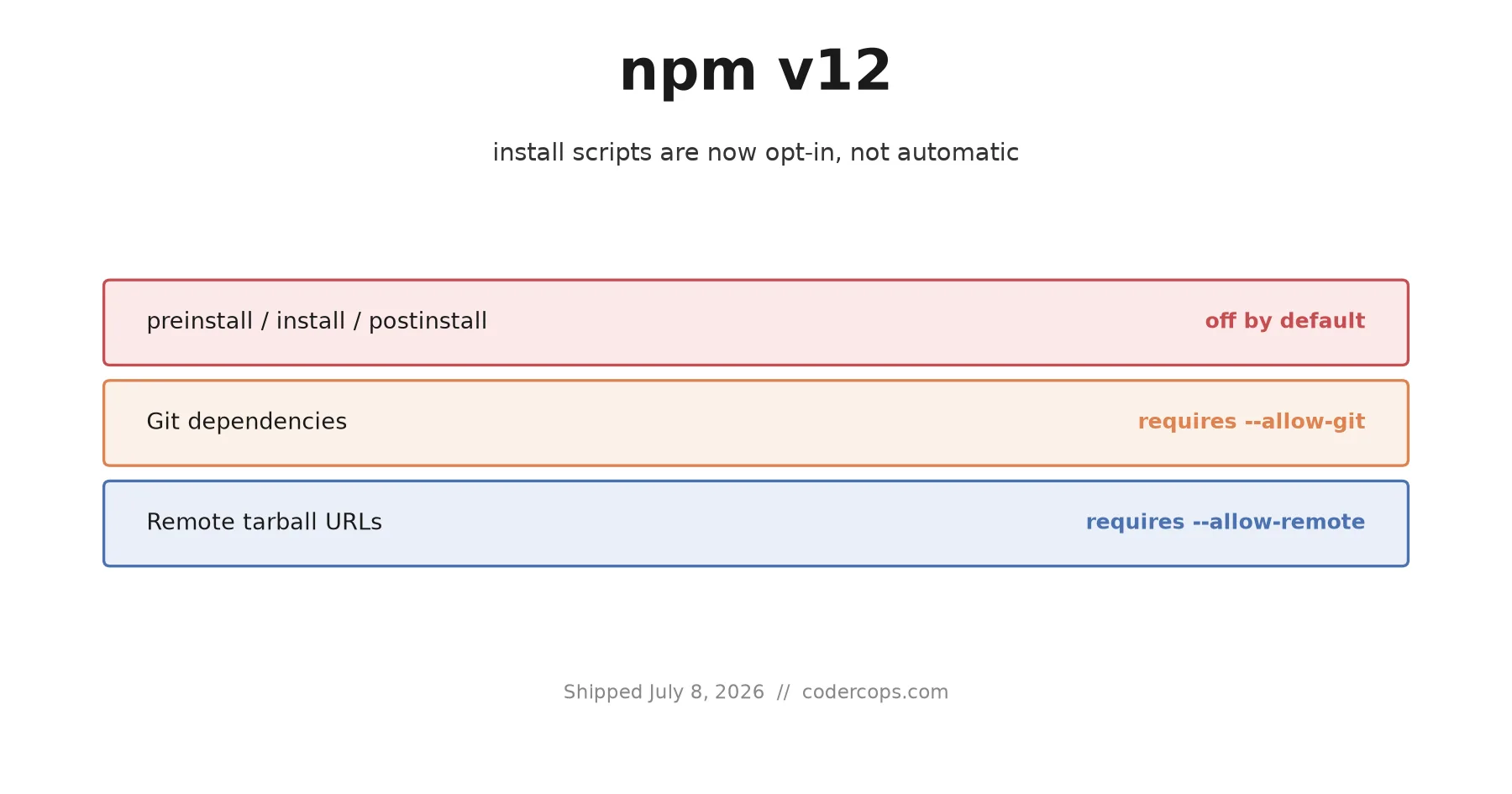
npm v12 blocks preinstall, install, and postinstall scripts, Git dependencies, and remote tarballs unless allowed. What breaks, and how to migrate.

Prathviraj Singh
6 min read
Sponsored
npm v12 shipped on July 8, 2026, and it is the biggest default-behavior change to the registry client in years. Install-time lifecycle scripts, the thing that let a single npm install silently run arbitrary code from every package in your tree, are now off by default. So is resolving Git dependencies and remote tarball URLs without explicit permission. If you manage a project with any native dependencies, you have work to do before this reaches your team, and it’s worth doing this week rather than after something breaks in production.
What actually changed
Three defaults flipped at once:
| Behavior | Before v12 | After v12 |
|---|---|---|
preinstall / install / postinstall scripts | Run automatically | Skipped unless approved |
Implicit node-gyp native builds | Run automatically | Skipped unless approved |
| Git dependencies (direct or transitive) | Resolved automatically | Requires --allow-git |
| Remote URL / tarball dependencies | Resolved automatically | Requires --allow-remote |
The install-scripts change is the one that will hit the most projects. For sixteen years, any package you installed could run code on your machine the moment npm install finished resolving it, before you’d imported a single line, read a changelog, or had any real chance to notice something was wrong. That was a reasonable tradeoff when most install scripts existed to compile a native addon. It stopped being reasonable once it became the standard delivery mechanism for supply-chain malware.
Why this shipped now, not two years ago
npm has been talking about this change for a while, but the timeline compressed once a string of incidents made the cost of the status quo impossible to ignore. The TanStack compromise in May used a node-gyp install hook to harvest CI secrets and cloud credentials the moment developers ran npm install, no user action required beyond that. The jscrambler compromise this month did the same thing with a preinstall script that unpacked a 7.8MB Rust infostealer. Different attackers, different targets, identical delivery mechanism.
npm’s own postmortem framing points at a full year of this pattern: maintainer-account compromises and worm activity going back to September 2025, the March 2026 Axios incident, and the June 2026 Miasma worm. Every one of them used a lifecycle script as the payload trigger, because it was the one part of the install process that ran without asking.
What breaks, practically
A blocked install script does not fail your build. That’s the detail most write-ups skip and the one that will actually bite people. npm skips the script, prints a warning, and reports the install as successful. If that script was doing something cosmetic, nothing happens. If it was compiling a native binary your package needs at runtime, you won’t find out until that code path executes, possibly in production, possibly days after the install that should have caught it.
Packages most likely to be affected:
- Anything with native bindings compiled via
node-gyp(common in database drivers, image processing, and crypto libraries) - Packages that download a platform-specific binary post-install (common in bundlers, linters, and CLI tools written in Rust or Go)
- Internal tooling that patches or scaffolds files as part of setup
Migrating a real project
Start by auditing what npm would currently block. This works on 11.16.0 and later, so you can prepare before actually upgrading:
npm approve-scripts --allow-scripts-pendingThis scans your dependency tree, lists every package that has a lifecycle script, and lets you review each one. Approve the ones you recognize and trust:
# review each flagged package interactively
npm approve-scripts

# after review, the approvals are written into package.json under an
# allowedScripts (or equivalent) block. Commit that file.
git add package.json
git commit -m "npm v12: approve trusted install scripts"
Once that’s committed, a clean npm install from your lockfile respects the same allowlist, which means CI does too, as long as CI runs from the committed lockfile and doesn’t regenerate it from scratch.
For CI specifically, don’t stop at “it installs.” Add strict enforcement so a new, unapproved script fails the build instead of silently skipping:
npm install --strict-allow-scriptsThat flag turns a skipped script into a hard failure, which is the behavior you want in a pipeline: you’d rather a build fail loudly on an unreviewed dependency than ship quietly with a half-installed package.
Monorepos need a pass per workspace
If you’re on a monorepo with Turborepo, Nx, or plain npm/pnpm workspaces, the approval list is per-package, not global. Approving a script at the root doesn’t propagate to a workspace package that has its own native dependency. Run the approval flow from inside each workspace directory that has packages with lifecycle scripts, and check that CI runs the audit against every workspace, not just the root.
# from inside each workspace with native deps
cd packages/image-processing
npm approve-scripts --allow-scripts-pending
Git and remote URL dependencies
The other two changes are less disruptive for most teams but worth checking. If any package.json references a dependency by Git URL (git+https://...) or a direct tarball URL instead of a registry version, that resolution now requires an explicit flag:
npm install --allow-git
npm install --allow-remote
This mostly affects projects that pull an unpublished fork or a private patch directly from a Git branch. If that’s part of your workflow, decide deliberately whether to keep doing it with the flag set, or move to a published, versioned package instead, which is the safer long-term option regardless of this change.
The honest tradeoff
This will generate friction for a few weeks across the ecosystem. Some legitimate packages with genuinely necessary native builds will need explicit approval that used to be silent and automatic, and some CI pipelines will need a one-time audit pass. That friction is the point. A postinstall script that ran without review was never actually safe, it was just convenient, and convenience without review is exactly what the last year of supply-chain attacks exploited. If your team hasn’t run npm approve-scripts --allow-scripts-pending yet, do it today rather than the day a build breaks in front of a client. If you’re setting up dependency automation as part of a broader engineering process, this is a good moment to also revisit how updates get reviewed before they land.
Frequently asked questions
- What exactly changed in npm v12?
- Three install-time behaviors flipped from on-by-default to off-by-default: dependency lifecycle scripts (preinstall, install, postinstall, and implicit node-gyp builds) no longer execute; npm install no longer resolves Git dependencies (direct or transitive) without --allow-git; and npm install no longer resolves remote URL dependencies like https tarballs without --allow-remote.
- Will npm v12 break my build?
- If any dependency in your tree relies on a native build step via node-gyp, or a postinstall script that does real work (compiling a binary, downloading a platform-specific asset, patching another package), that step will silently skip and the install will still report success. The failure shows up later, usually as a runtime error when the package tries to use the thing its install script was supposed to produce.
- How do I know which of my dependencies need approval?
- Run npm approve-scripts --allow-scripts-pending. It scans your dependency tree, lists every package with a lifecycle script npm would otherwise skip, and lets you approve them individually. The approvals get written to your package.json so the decision is committed and reviewable, not a local setting someone forgets to replicate.
- Does this fix apply automatically in CI?
- Only if you commit the approval list. CI runs a clean install from your lockfile and package.json, so once you've run npm approve-scripts locally and committed the result, CI respects the same allowlist. For stricter enforcement, add --strict-allow-scripts to your CI install step so any new, unapproved script fails the build loudly instead of skipping silently.
- Is this the same fix that would have stopped the recent supply chain attacks?
- Partially. It would have blocked the payload delivery mechanism used by the TanStack, React Native Aria, and jscrambler incidents, since all three relied on a lifecycle script running automatically at install time. It does not stop the underlying problem of a stolen publishing credential getting a malicious version onto the registry in the first place, it just removes the easiest way for that malicious version to execute code on your machine without you noticing.
Sources
Sponsored
More from this category
More from Web Development
Sponsored
Discussion
Join the conversation.
Comments are powered by GitHub Discussions. Sign in with your GitHub account to leave a comment.
Sponsored