Cybersecurity · Supply Chain Security
Jscrambler's Own npm Package Was Backdoored
Attackers used a stolen credential to push five malicious jscrambler versions, each carrying a 7.8MB cross-platform infostealer. What it stole, and how to check.

Abhishek Gupta
5 min read
Sponsored
If your CI pipeline or a developer machine ran npm install jscrambler on July 11, 2026, stop what you’re doing and check the version. A company that sells JavaScript obfuscation and web-app protection as a product just had its own npm package turned into a credential-stealing delivery mechanism, and the payload was built to specifically go after the tools developers use every day, including the AI coding assistants sitting in half the terminals in the industry.
What happened
Jscrambler publishes the CLI client for its Code Integrity API, a commercial obfuscation service used to harden JavaScript and web apps against tampering. It pulls around 15,800 weekly downloads, small next to a framework but plenty for a targeted attack.
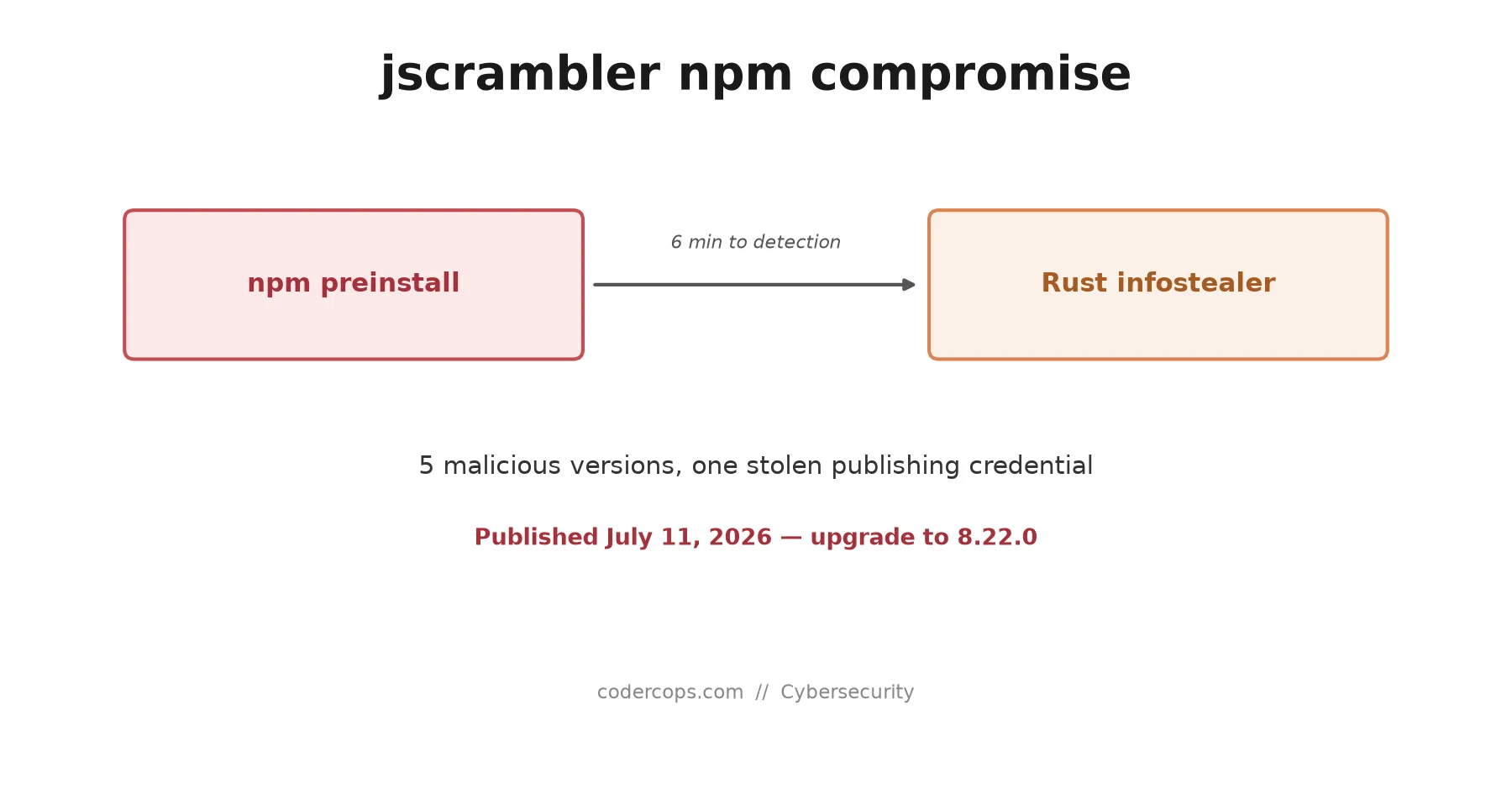
On July 11, an attacker with a valid npm publishing credential for the jscrambler account pushed five malicious versions over roughly three hours: 8.14.0, 8.16.0, 8.17.0, 8.18.0, and 8.20.0. Every one of them carried the same payload. Version 8.15.0, published in the middle of that window, was clean, which suggests the attacker was testing or working around something rather than being sloppy.
Socket’s automated scanning caught the compromise six minutes after the first malicious publish. Six minutes is fast as these things go, and it likely kept the blast radius smaller than it could have been. It is also not fast enough to matter if your CI runs on a schedule that happened to land inside that window, which is the uncomfortable part of relying on detection speed as a primary defense.
How the payload works
Each of the five versions added an undocumented preinstall script, meaning it runs automatically the moment npm install touches the package, before you’ve imported a single line of it. That script invokes a bundled dist/setup.js, which unpacks dist/intro.js, a 7.8MB obfuscated container. Inside is a Rust-compiled infostealer, built separately for Linux, macOS, and Windows, with the right binary selected and executed based on the host platform.
Once running, the infostealer sweeps the machine for anything valuable and exfiltrates it to a remote server over TLS. Based on what Socket and Jscrambler’s own advisory describe, the target list includes:
- Cloud provider credentials (AWS, GCP, Azure config and credential files)
- CI/CD tokens and secrets exposed to the build environment
- Browser session data
- Cryptocurrency wallets
- Password manager vaults, Bitwarden specifically named
- Configuration files for AI coding tools, including Claude Desktop and Cursor
That last category is worth sitting with. AI coding assistant configs routinely hold API keys for model providers, sometimes with billing attached, plus cached project context that can leak proprietary code structure. A few years ago, a supply-chain infostealer’s target list was browsers and cloud creds. Now it’s also the tools developers use to write code, because those tools have quietly become credential stores in their own right.
Why this keeps happening the same way
Jscrambler confirmed the root cause: a compromised npm publishing credential, not a bug in their code or build pipeline. That puts this incident in the same category as the React Native Aria compromise from June, where a stolen maintainer token was enough to push malicious versions of a trusted package straight to production installs. The mechanism is boring by attacker standards: get one credential, publish, wait for someone to run npm install.
What makes it work is that npm has historically trusted the install-time script by default. A preinstall or postinstall hook runs with the same permissions as the user invoking the install, no separate consent required, no sandbox. That design choice is now the single most reliable delivery mechanism for supply-chain malware in the JavaScript ecosystem, which is exactly why npm v12 turns install scripts off by default as of this month. If that change had already been the default in July, this attack would have needed an extra step to reach a victim’s machine instead of zero.
What to check right now
Look at every package-lock.json, pnpm-lock.yaml, or yarn.lock you have, in every repository and every CI cache, for a jscrambler entry pinned to 8.14.0, 8.16.0, 8.17.0, 8.18.0, or 8.20.0.
grep -r '"jscrambler"' package-lock.json pnpm-lock.yaml yarn.lock 2>/dev/null
npm ls jscrambler --all 2>/dev/null
If any of those five versions shows up, or if you can’t rule out that a CI job installed jscrambler during the roughly three-hour window on July 11, treat the affected machine as compromised, not just outdated:
- Upgrade to 8.22.0, the current clean release, immediately.
- Rotate every cloud and CI credential that was reachable from that machine or that build environment.
- Revoke and reissue any API key stored in an AI coding tool’s config, then check the provider’s usage logs for anomalous activity in the affected window.
- Force a re-authentication on browser sessions and check password manager access logs for unfamiliar vault reads.
- Do this even without direct evidence of exfiltration succeeding. The whole point of a preinstall hook is that it runs silently before you’d normally notice anything wrong.
A security vendor’s own package becoming the attack vector is not a new story shape, but it is a useful reminder that the tools you trust because of what they’re for are not automatically trustworthy in how they’re delivered. Vet your dependency’s publishing hygiene the same way you’d vet anything else that runs code on your machine before you’ve had a chance to read it, and if you’re setting up a new project’s CI/CD pipeline, pin your lockfile and treat install scripts as a permission you grant, not a default you accept.
Frequently asked questions
- Which jscrambler versions are compromised?
- Five versions carry the malicious preinstall hook and infostealer payload: 8.14.0, 8.16.0, 8.17.0, 8.18.0, and 8.20.0, all published within about three hours on July 11, 2026. Version 8.15.0 was a clean interim release, and 8.22.0, the current latest, is confirmed clean.
- What does the malicious code actually do?
- Every affected version adds an undocumented preinstall script that invokes a bundled dist/setup.js, which unpacks a 7.8MB obfuscated container (dist/intro.js) holding a Rust-compiled infostealer binary for whichever platform it's running on. The binary sweeps the machine for secrets and sends them to a remote server over TLS.
- What kind of data does the infostealer target?
- Cloud provider credentials, CI/CD tokens, browser session data, cryptocurrency wallets, password manager vaults including Bitwarden, and the configuration files of AI coding assistants like Claude Desktop and Cursor, which frequently hold API keys and project context.
- How do I know if I was affected?
- Check whether package-lock.json, pnpm-lock.yaml, or yarn.lock in any project references jscrambler at 8.14.0, 8.16.0, 8.17.0, 8.18.0, or 8.20.0, and check whether any machine ran npm install (or an equivalent) against one of those versions between roughly 9pm and midnight UTC on July 11, 2026. If either is true, treat that machine as compromised.
- What should I do if I installed an affected version?
- Upgrade to jscrambler 8.22.0 immediately, then treat the machine as compromised rather than just patched: rotate cloud and CI credentials, revoke and reissue API keys stored in AI coding tool configs, sign out of browser sessions, and check password manager vault access logs for anything unusual.
Sources
Sponsored
More from this category
More from Cybersecurity
Sponsored
Discussion
Join the conversation.
Comments are powered by GitHub Discussions. Sign in with your GitHub account to leave a comment.
Sponsored