Cloud & Infrastructure · Databases
Partitioning an Existing Postgres Table, No Downtime
Postgres won't convert a live table into a partitioned one in place. Here's the CHECK-constraint trick that avoids a full-table rewrite and a long lock.

Abhishek Gupta
5 min read
Sponsored
We covered what database partitioning actually is a few months back: splitting one big table into smaller physical pieces on the same server, mostly for fast bulk deletes and smaller working sets per query. What that post didn’t cover, because it’s a different problem entirely, is how you actually partition an existing Postgres table that already has 40 million rows in it, in production, without downtime. Postgres has no command that converts a live, populated table into a partitioned one in place, and that gap is what actually stops people.
Why you can’t just partition in place
The instinct is to reach for something like ALTER TABLE orders PARTITION BY RANGE (created_at). That command doesn’t exist for a table that already has data in it. Postgres partitioning is a property you declare when a table is created empty; there’s no supported path to bolt it onto a table after the fact without building a new table structure. So the real task isn’t “add partitioning,” it’s “migrate a live table into a new, correctly-partitioned one,” which is a data-movement problem wearing a schema-change costume.
The naive version of that migration is expensive. Create a new partitioned parent, create partitions for your date ranges, then run ALTER TABLE orders_new ATTACH PARTITION orders_2026_08 FOR VALUES FROM (...) TO (...) against your existing 40-million-row table. Postgres has to scan every row to confirm each one actually falls inside that partition’s range before it’ll let the attach finish, and that scan holds a lock for as long as it takes to run. On a big table, that’s not a maintenance window, that’s an incident.
The trick: let a CHECK constraint do the proving
Here’s the part most teams miss the first time: Postgres will skip that validation scan entirely if it can prove the constraint some other way, and a CHECK constraint is exactly that other way.
-- 1. Add the constraint to the existing table, matching the partition
--    bound you're about to attach it under. NOT VALID skips an immediate
--    full scan; the table keeps serving traffic normally.
ALTER TABLE orders_2026_08
  ADD CONSTRAINT orders_2026_08_check
  CHECK (created_at >= '2026-08-01' AND created_at < '2026-09-01')
  NOT VALID;

-- 2. Validate it separately. This still scans the table, but VALIDATE
--    CONSTRAINT takes a SHARE UPDATE EXCLUSIVE lock, not an access-
--    exclusive one, so reads and writes keep flowing while it runs.
ALTER TABLE orders_2026_08 VALIDATE CONSTRAINT orders_2026_08_check;

-- 3. Now attach it. Postgres sees the already-validated CHECK constraint
--    proves every row satisfies the partition bound, and skips its own
--    scan. This step is fast.
ALTER TABLE orders_new ATTACH PARTITION orders_2026_08
  FOR VALUES FROM ('2026-08-01') TO ('2026-09-01');
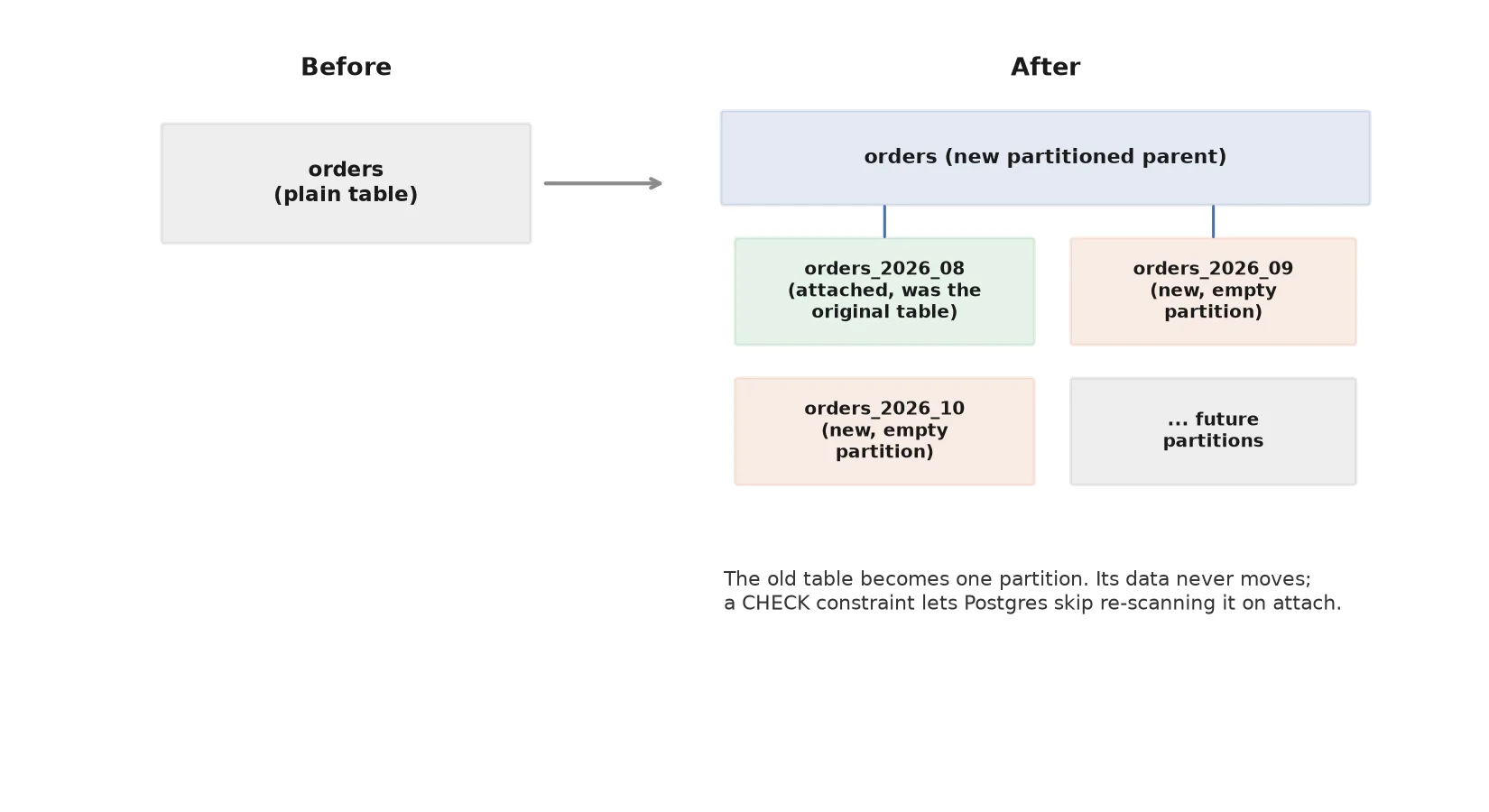
The expensive scan still happens, in step 2, but it happens under a lock mode that doesn’t block your application. Step 3, the actual attach, becomes a catalog-only change instead of a table-scanning one. That reordering, doing the expensive part under a cheap lock and the cheap part under a strict one, is the entire trick.
Putting the whole migration together
In practice, the sequence for a table you can’t take offline looks like this:
- Create the new partitioned parent (
orders_new) with the same columns, indexes, and constraints as the original table. - Create partitions for every future date range you’ll need going forward, plus one partition to hold the entire existing history.
- Add and validate a
CHECKconstraint on the existing table matching the historical partition’s bound, using the two-step pattern above. - Attach the existing table as that historical partition. This is fast because of step 3.
- In a single short transaction, rename the old table out of the way and rename
orders_newinto the original table’s name. This is the one moment that briefly locks the table, and it’s a metadata rename, not a data copy, so it resolves in milliseconds.
Application code that was querying orders before the migration keeps working after, unaware anything changed underneath it, because the table name it queries didn’t move.
The part that bites people three months later
Partitioning by date only works as long as there’s a partition to receive new rows. Once every existing partition’s range is exhausted and no new one exists, inserts start failing outright, not silently, which is at least a mercy, but it’s still an outage that shows up long after whoever did the migration has moved on to other work. Don’t rely on someone remembering to run a monthly CREATE TABLE ... PARTITION OF command. Either script it into a scheduled job or use pg_partman, which exists specifically to keep creating and retiring time-based partitions automatically. The migration is the interesting part of this problem. The maintenance is the part that actually determines whether it stays fixed.
Indexes need the same attention as the migration itself
One detail that trips people up after a successful migration: indexes on the old, standalone table don’t automatically become indexes on the new partitioned parent. Each partition needs its own matching indexes, and if you created them by hand on the historical partition but forgot to define them on the partitioned parent (so every future partition inherits them automatically), you’ll find query plans on recent data doing sequential scans while historical data stays fast. Define indexes on the parent table before you attach or create partitions, not after, so every partition, past and future, gets them without you tracking which ones you remembered. If you’re also working through general Postgres query performance issues on the same table, do that pass after the partitioning migration settles, since query plans genuinely change once the planner is choosing among partitions instead of scanning one large table.
Frequently asked questions
- Can I convert an existing Postgres table into a partitioned table without recreating it?
- No. Postgres doesn't support an ALTER TABLE ... PARTITION BY command on a table that already has rows. You have to create a new, empty partitioned table with the same schema, migrate the existing table in as one of its partitions, and then swap names. There's no in-place shortcut, but the migration itself doesn't have to rewrite your data or lock the table for long.
- Why does attaching a partition normally take so long on a large table?
- When you run ALTER TABLE new_parent ATTACH PARTITION old_table, Postgres has to verify every row in old_table actually satisfies the partition's bound (its date range, for example). By default that means a full sequential scan while holding a lock, which on a table with tens of millions of rows can run long enough to matter in production.
- How do you avoid the full-table scan when attaching an existing table as a partition?
- Add a CHECK constraint to the existing table that states the same condition as the partition bound before you attach it, and validate that constraint separately (ideally with ALTER TABLE ... VALIDATE CONSTRAINT, which takes a lighter lock than the attach operation would). Once that CHECK constraint exists and is validated, Postgres's planner can prove the partition constraint is already satisfied without scanning the table again, and the attach becomes a fast, metadata-only operation.
- Does the final cutover cause downtime?
- The rename step itself, swapping the new partitioned table into the original table's name, is a catalog operation and takes milliseconds. It does briefly need an ACCESS EXCLUSIVE lock, so any query running at that exact instant waits a beat, but it's not a rewrite and it's not the multi-minute lock you'd get from a naive ATTACH PARTITION on an unprepared table.
- What breaks if I forget to create future partitions after migrating?
- Inserts start failing once a row's partition key value falls outside every existing partition's range, because Postgres has nowhere to route the row. This is the most common way partitioned tables break in production: the migration goes fine, then three months later nobody remembers to keep creating monthly partitions and writes start erroring. Automate it with a cron job or pg_partman rather than relying on someone remembering.
Sources
Sponsored
More from this category
More from Cloud & Infrastructure



Sponsored
Discussion
Join the conversation.
Comments are powered by GitHub Discussions. Sign in with your GitHub account to leave a comment.
Sponsored