Cybersecurity · Vulnerability Management
wp2shell: WordPress Core's Zero-Login RCE Chain
A default WordPress install can be taken over by one anonymous HTTP request. wp2shell chains two core flaws into pre-auth RCE. What's affected, and the fix.

Prathviraj Singh
5 min read
Sponsored
If you run WordPress and haven’t checked your version number since Friday, do it before you finish reading this. A vulnerability chain researchers are calling wp2shell lets an attacker with zero credentials take full control of a default WordPress install, no plugin required, no login required, just one HTTP request. WordPress shipped the fix on July 17, and exploitation started the same evening.
What wp2shell actually is
wp2shell isn’t one bug, it’s two chained together. CVE-2026-63030 is a route-confusion flaw in how WordPress core’s REST API resolves batch requests, requests that bundle multiple API calls into a single HTTP call. CVE-2026-60137 is a SQL injection in core. On their own, each is a serious problem. Chained, they let an unauthenticated attacker route a crafted batch request through the confused endpoint into the injectable query, and from there into arbitrary code execution on the server.
The part worth sitting with: this lives in WordPress core itself. It doesn’t need a vulnerable plugin, a misconfigured theme, or an admin who clicked the wrong link. A brand-new, completely default WordPress install on an affected version is exploitable by a single anonymous request. That’s a different threat model than the plugin-chain vulnerabilities that make up most WordPress CVEs, where the attack surface is at least gated by what you happened to install.
The timeline is the real story
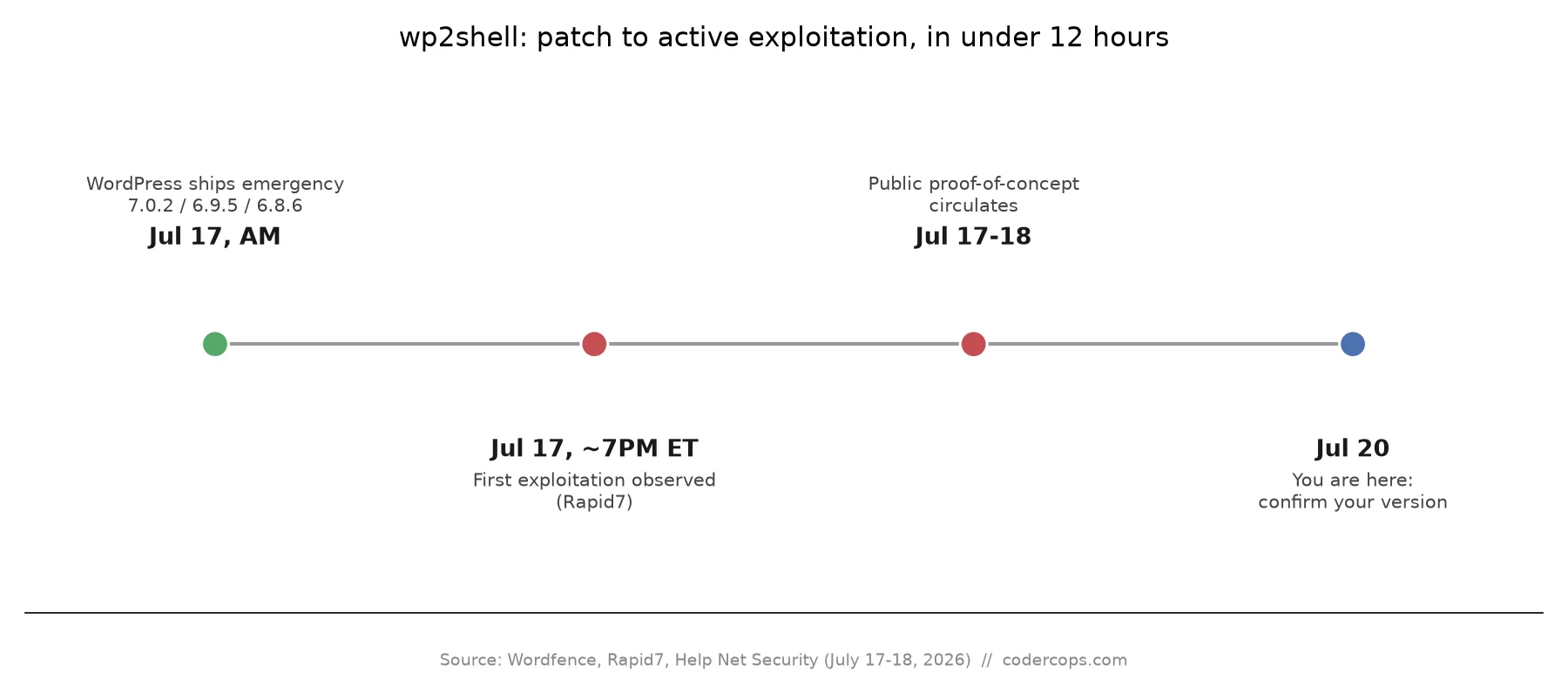
WordPress shipped 7.0.2, 6.9.5, and 6.8.6 on July 17, 2026, and pushed the fix through forced auto-updates rather than the usual opt-in release cycle, a strong signal of how seriously the core team treated this one. Rapid7 reported the first confirmed exploitation starting shortly before 7 PM ET that same day, roughly six hours after the patch went out. A public proof-of-concept followed within the next day.
Six hours is not enough time for most site owners to have manually patched anything, which is exactly why the forced auto-update mattered here. If you’re relying on a manual patch cadence, weekly maintenance windows, monthly reviews, this vulnerability moved faster than that cadence by design, and the only thing standing between a default install and compromise for most sites was whether WordPress’s own update mechanism actually reached them in time.
| Detail | Value |
|---|---|
| Vulnerability chain | CVE-2026-63030 (REST API batch-route confusion) + CVE-2026-60137 (SQL injection) |
| Nickname | wp2shell |
| Affected versions | WordPress 6.9.x and 7.0 through 7.0.1 |
| Authentication required | None |
| Plugins required | None, affects core |
| Patched versions | 7.0.2, 6.9.5, 6.8.6 |
| Patch released | July 17, 2026 |
| First observed exploitation | July 17, 2026, ~7 PM ET |
| Public PoC | Yes, circulating since July 17-18 |
Why this is worse than a typical core CVE
Most severe WordPress vulnerabilities need a second condition to be exploitable at scale: a specific plugin installed, a non-default configuration, an authenticated low-privilege account to escalate from. Those conditions filter the actual attack surface down from “every WordPress site” to “every WordPress site running this specific combination.” wp2shell doesn’t have that filter. WordPress powers a meaningful share of the web’s total site count, and every one of those running an affected core version, regardless of what’s built on top of it, was exposed the moment the vulnerability chain became public.
That also means the usual advice, “just review your plugins,” doesn’t apply here. This is a core patch-level problem, full stop. If you manage WordPress sites for clients, this is the kind of CVE where checking version numbers across your whole portfolio in one sitting is worth doing today rather than waiting for the next scheduled maintenance pass.
What to actually do this week
- Confirm your real version number, not just that auto-updates are enabled. Log into wp-admin and check Dashboard > Updates, or check the version footer directly. You want 7.0.2, 6.9.5, or 6.8.6 or later.
- If you manage multiple WordPress sites, check all of them, not just the ones you remember updating recently. Managed hosting, staging environments, and old client sites that don’t get regular attention are the likeliest places to still be running an unpatched version.
- Review access logs for the July 17-19 window for anonymous POST requests hitting REST API batch routes, especially with malformed or unusually nested request bodies. Given the public PoC, treat scanning activity from that window as a signal worth investigating, not necessarily a confirmed breach on its own.
- If a site turns out to have been unpatched during that window, don’t just patch and move on. Check for new admin accounts, unfamiliar files in the upload directory or site root, and scheduled tasks (cron jobs) you didn’t create. A code-execution chain this clean is rarely used for just one thing.
- If auto-updates are disabled for change-control reasons, this is a good moment to reconsider that policy specifically for core security releases, even if you keep manual review for feature updates.
We work with a lot of teams whose WordPress sites are past due for exactly this kind of patch discipline, whether because auto-updates got turned off for a legacy customization or because nobody’s owned the maintenance calendar since the site launched. If that describes your situation, our WordPress development and maintenance work usually starts with exactly this kind of version-and-patch audit before touching anything else. We’ve also covered how to hire a WordPress developer who treats this kind of patch cadence as a baseline responsibility rather than an afterthought, which is worth reading if this CVE is the reason you’re rethinking who maintains your site.
Unauthenticated, core-level, zero-plugin-required RCE chains are rare, but the gap between patch and exploitation keeps shrinking across the board, not just for WordPress. Treat the next one the same way: check your actual version, don’t assume the update landed, and verify rather than trust the automation.
Frequently asked questions
- What is wp2shell?
- wp2shell is the name researchers gave to a vulnerability chain in WordPress core that combines a REST API batch-request routing bug (CVE-2026-63030) with a SQL injection flaw (CVE-2026-60137). Chained together, they let an attacker with no account and no authentication execute arbitrary code on the server. It affects core WordPress itself, not a theme or plugin, so every default install running an affected version is exposed regardless of what's installed on top of it.
- Which WordPress versions are affected?
- WordPress 6.9 and 7.0 are affected, up through 7.0.1. WordPress released patched versions 7.0.2, 6.9.5, and 6.8.6 on July 17, 2026. If you're running anything earlier than those patched releases in the 6.9 or 7.0 line, you're exposed. Older branches that received a 6.8.6-equivalent backport are covered; check your specific version number rather than assuming a general release line is safe.
- Do I need a vulnerable plugin installed to be at risk?
- No. That's what makes wp2shell unusual. The chain lives entirely in WordPress core, specifically in how the REST API resolves batch requests and how a query gets built afterward. A completely default WordPress install, no plugins, no custom theme, is exploitable. Most core RCE chains this severe require a specific plugin or misconfiguration as one link. This one doesn't.
- How do I know if my site has already been hit?
- Check your web server access logs for anonymous POST requests to REST API batch endpoints (paths containing /wp-json/batch/v1 or similar batch routing) around and after July 17, 2026, particularly ones with unusual or malformed nested request bodies. Also look for new admin users you didn't create, unexpected files in wp-content/uploads or the site root, and outbound connections from the server to unfamiliar IPs. Because a public proof-of-concept exists, automated scanning traffic against unpatched sites has been widespread since the weekend of July 17-19, so a hit in the logs doesn't necessarily mean a successful compromise, but it does mean you should check for one.
- Is auto-update enough to protect me?
- It's enough if it actually ran. WordPress force-pushed this fix through its core auto-update system, which covers the majority of sites by default. But auto-updates silently fail more often than site owners expect: managed hosts with custom deployment pipelines, sites with auto-updates disabled for compliance or change-control reasons, and heavily modified core installs are the common failure points. Don't treat 'I have auto-updates on' as confirmation. Log into wp-admin, check Dashboard > Updates, and confirm your actual version number is 7.0.2, 6.9.5, or 6.8.6 or later.
Sources
- Wordfence: PSA — WordPress Core Patched Unauthenticated Remote Code Execution Vulnerability Chain
- Rapid7: CVE-2026-63030 — wp2shell, a Critical Remote Code Execution Vulnerability in WordPress Core
- The Hacker News: New wp2shell WordPress Core Flaw Lets Unauthenticated Attackers Run Code
- Help Net Security: Two new high severity WordPress vulnerabilities, patch immediately!
Sponsored
More from this category
More from Cybersecurity
Sponsored
Discussion
Join the conversation.
Comments are powered by GitHub Discussions. Sign in with your GitHub account to leave a comment.
Sponsored